43
LEO 55 - LEO 55 essential
EN
6 PROGRAMMING
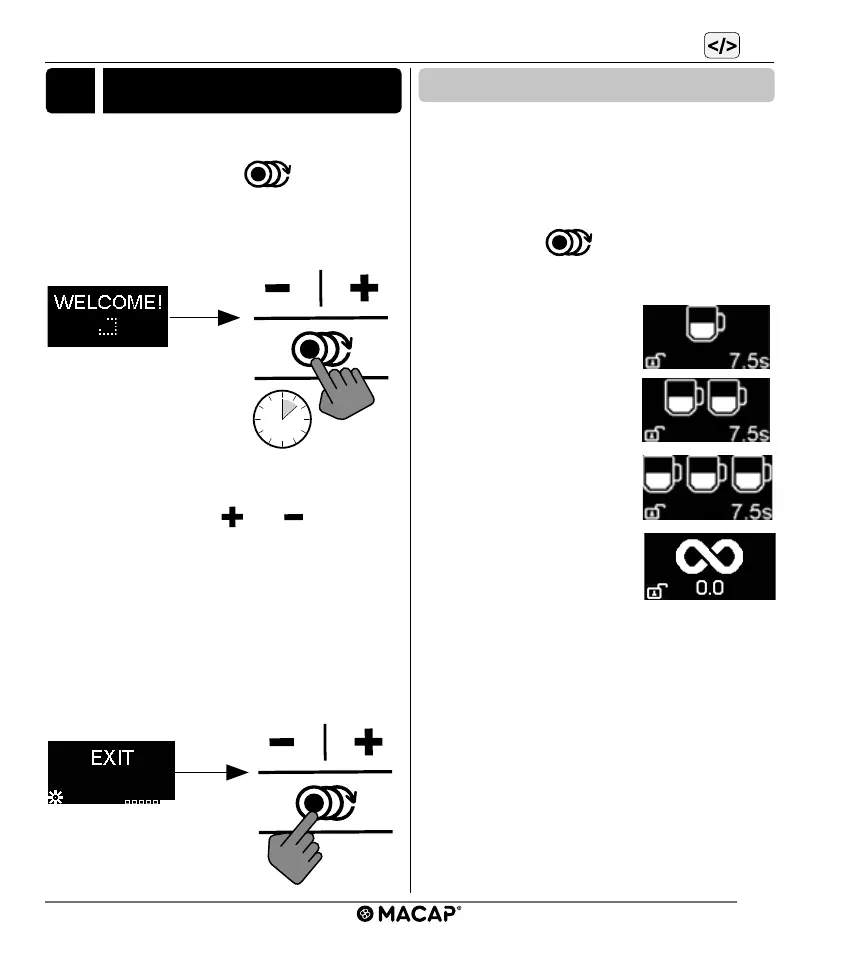
To enter the programming menu, switch on the
machine, after the welcome message, press
the dose selection button
for 8 seconds
until the display changes.
Pressing the buttons “ ” or “ ” allows you
to scroll through the menu; in programming
you can view the number of doses for timed
functions, activate triple dose as well as
continuous dose. To exit the programming
menu, scroll to the “EXIT” screen and press
the dose selection button to return to the op-
eration menu.
6.1 Operation menu
The display can show several screens for
controlling the coee grinder.
Only some of these can be displayed depend-
ing on the settings in the programming menu.
To scroll through the menu, press the dose
selection button
after the "WELCOME"
Message.
■ Single dose
■ Double dose
■ Triple dose (if active)
■ Continuous dose (if ac-
tive)


 To Next Page