44
LEO 55 - LEO 55 essential
EN
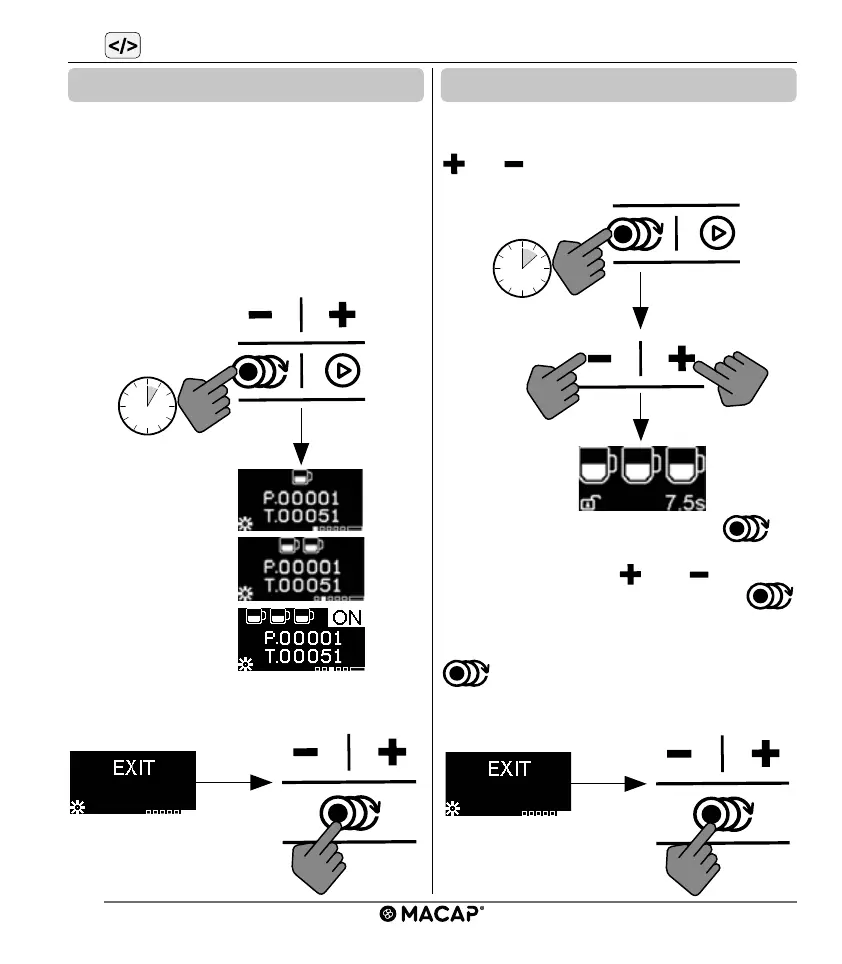
The device is equipped with a function for
controlling the number of doses for timed
functions. The letter “P” indicates the number
of partial doses, “T” indicates the number of
total doses. The dose counter can be reset by
entering the programming menu and pressing
the dose selection button for 5 seconds.
Select EXIT and press the DOSE to exit pro-
gramming.
To enable the triple dose, proceed as follows:
enter the programming menu, scroll with the “
” or “ ” buttons until the “TRIPLE DOSE”
symbol is displayed.
Press the dose selection button to
activate the function ON/OFF and make the
selection via button “
” or “ ”. Conrm
by pressing the dose selection button
again.
Select EXIT and press dose selection button
to exit programming. The operation
menu will now allow you to choose triple dose,
if enabled.
6.2 Dose counter
Single dose counter
Double dose counter
Triple dose counter
6.3 Triple dose


 To Next Page