SB 1356 Page 3 of 5
ENGINE BELTS - Replacing Fan Belt (2013 and newer or with Fan Drive Upgrade Kit)
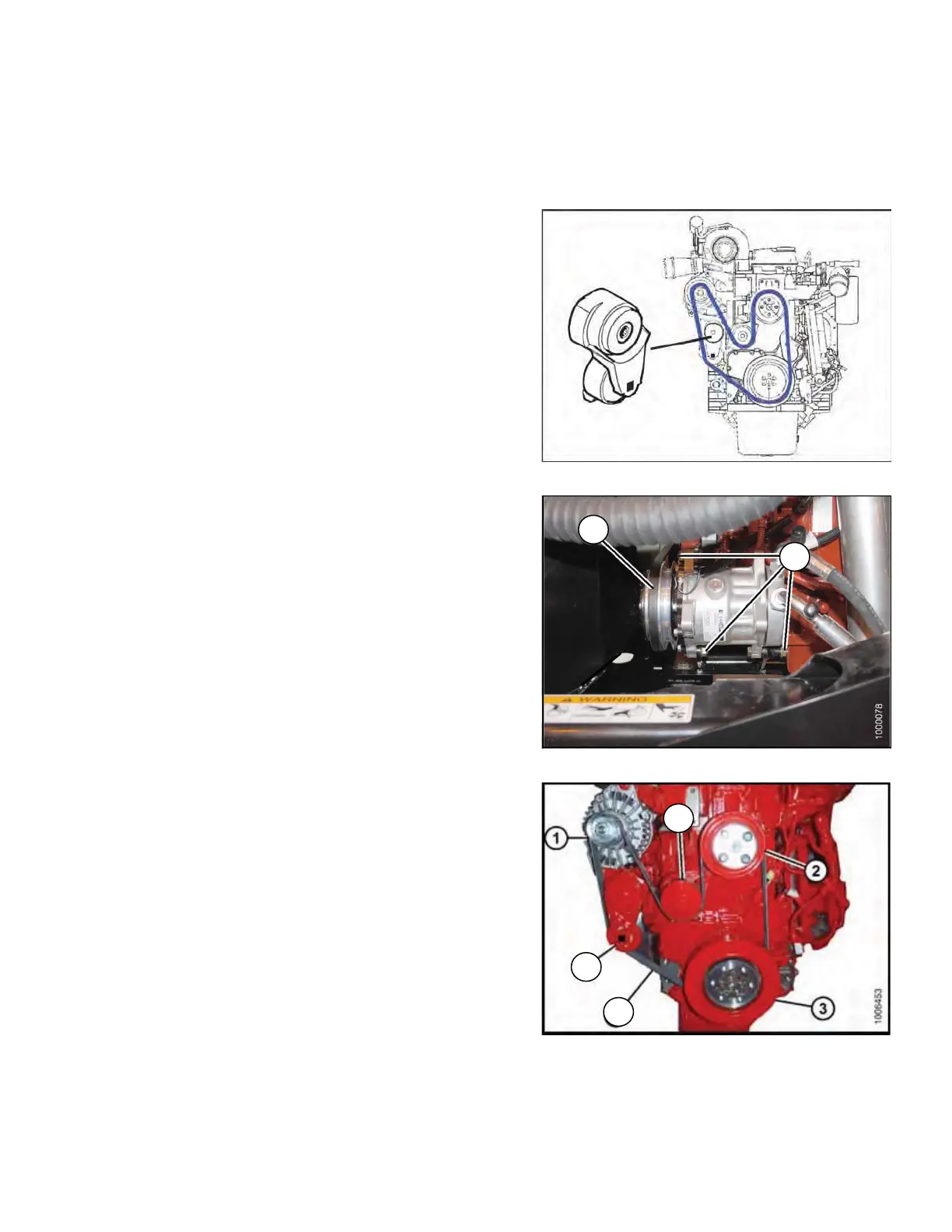
NOTE: 2013 and newer windrowers, or units that have had Fan Drive Upgrade Kit MD #139956 installed, will
have a belt tensioner as shown in Figure 1.
If your belt tensioner does not resemble the one in Figure 1
1. Shut down the engine and remove the key.
2. Open the LH platform.
3. Open the hood.
4. Loosen compressor mounting hardware (A) and push
compressor towards engine to release tension.
5. Remove belt (B) from compressor.
6. Insert the drive end of a 1/2 in. drive ratchet wrench into
the belt tensioner (C).
7. Rotate tensioner counter-clockwise until fan belt (D) can
be slipped off pulley (E). Release tensioner and remove
wrench.
8. Remove belt in order 1–2–3 as shown. Route fan belt
around fan and remove belt.
9. Install new belt MD #139952 (D) around fan and onto
pulleys in order 3–2–1.
10. Insert the drive end of a 1/2 in. drive ratchet wrench into
the belt tensioner (C).
11. Rotate tensioner counter-clockwise until belt (D) can be
slipped onto pulley (E). Release tensioner and remove
wrench.
12. Check that belt is properly seated in all pulley grooves.
13. Install compressor belt (B).
14. Pry compressor away from engine so that a force of 8–
12 ft·lbf (35–55 N·m) deflects the belt (B)
3/16 in. (5 mm)
at mid-span.
15. Tighten compressor mounting hardware (A).
16. Recheck tension and readjust as required.
17. Close the hood.
18. Close the platform.
Figure 1
Figure 2
Figure 3
PARTS NOTE: M205 Parts Catalog 169472 Rev.F lists the fan belt part number as MD #139152. This is
INCORRECT. The correct fan belt part number is MD #139952 for 2013 and newer models or for models that
have Fan Drive Upgrade Kit MD #139956 installed.
B
A
D
E
C
Replaces Page 162 in M205 Op Manual
162





 To Next Page