8
ONYX 1620
ONYX 1620
Stereo Compressor
Mono Compressor
Multi Effect
Processor
Keyboard or other
line level input
Stereo Guitar Effects
Drum
Machine
Bass Guitar Electric Guitar
Electric Guitar
Vocal Mics
Digital Delay
Powered
Studio Monitors
for Control Room
Headphones
Sound Card
Powered
Studio Monitors
for Studio
LINE
IN
LINE
OUTS
MIC
IN
1
2
3
4
L
R
7
8
6
16
15
14
13
12
11
8
8
7
6
7
5
6
5
3
4
2
1
5
4
4
3
2
3
1
2
1
1
2
L
R
L
R
3
4
L
R
L
R
L
R
CHANNEL INSERTS
AUX RETURNS
ALT 3/4
OUT
PHONES
OUT
INPUTS
L
MONO
R
R
R
R
L
MONO
L
MONO
L
MONO
AUX
SEND
L
9
1
2
3
4
10
CHANNEL
R
L
R
IN-TAPE-OUT
MAIN
OUT
CNTRL ROOM
OUTPUTS
MAIN
OUT
RECORDING OUT
9-16
RECORDING OUT
1-8
L
R
Out
In
Out
In
Out
In
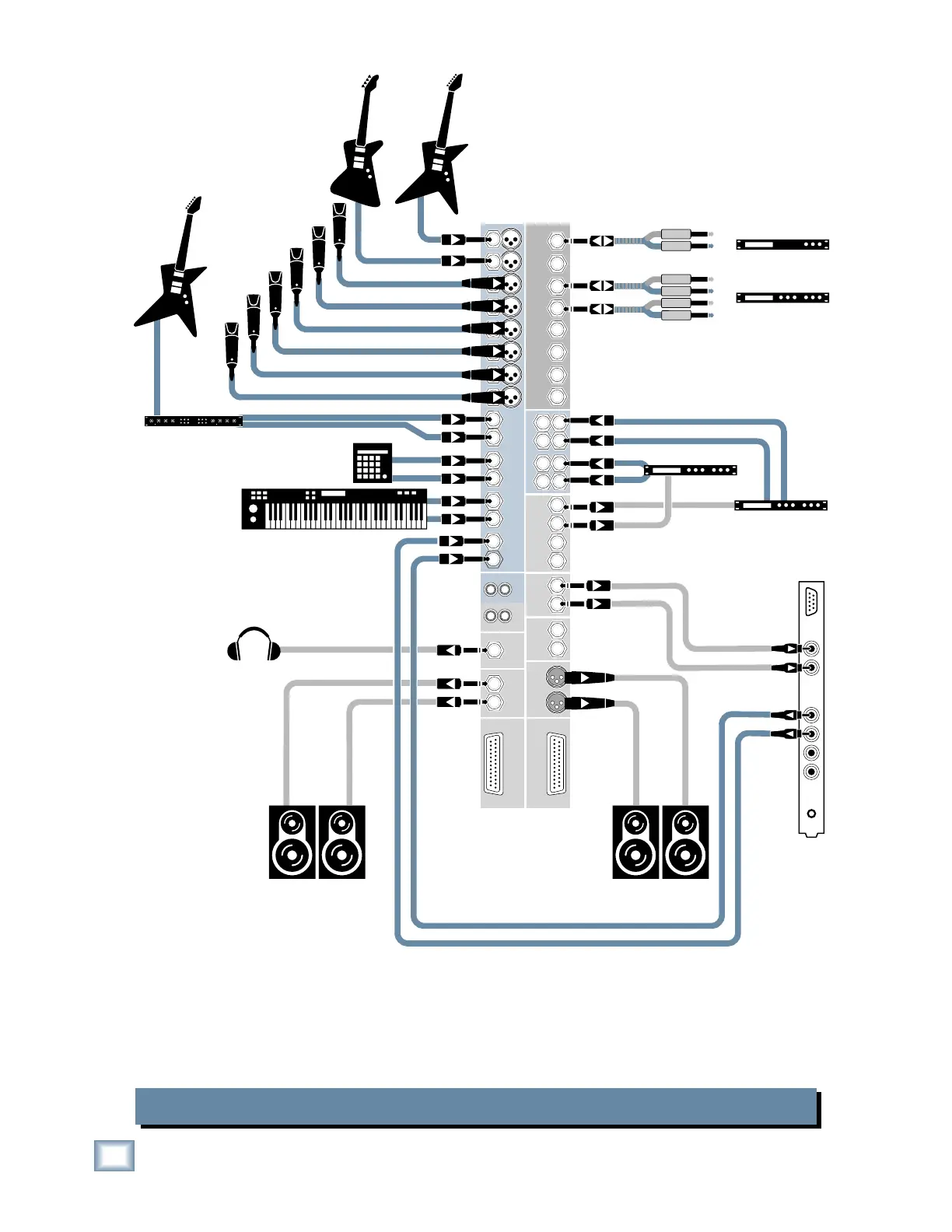
Onyx 1620 Computer Recording
In this hookup diagram, the tracking channels have
the MUTE/ALT 3-4 button pushed in. This routes their
signals to the ALT 3-4 OUT and on to the Sound Card
or other analog audio interface to your DAW.
IMPORTANT: The playback channels (channels 15-16
in this case) should have their MUTE/ALT 3-4 buttons
out or you will get feedback. Ouch!



 To Next Page