9
Owner’s Manual
Owner’s Manual
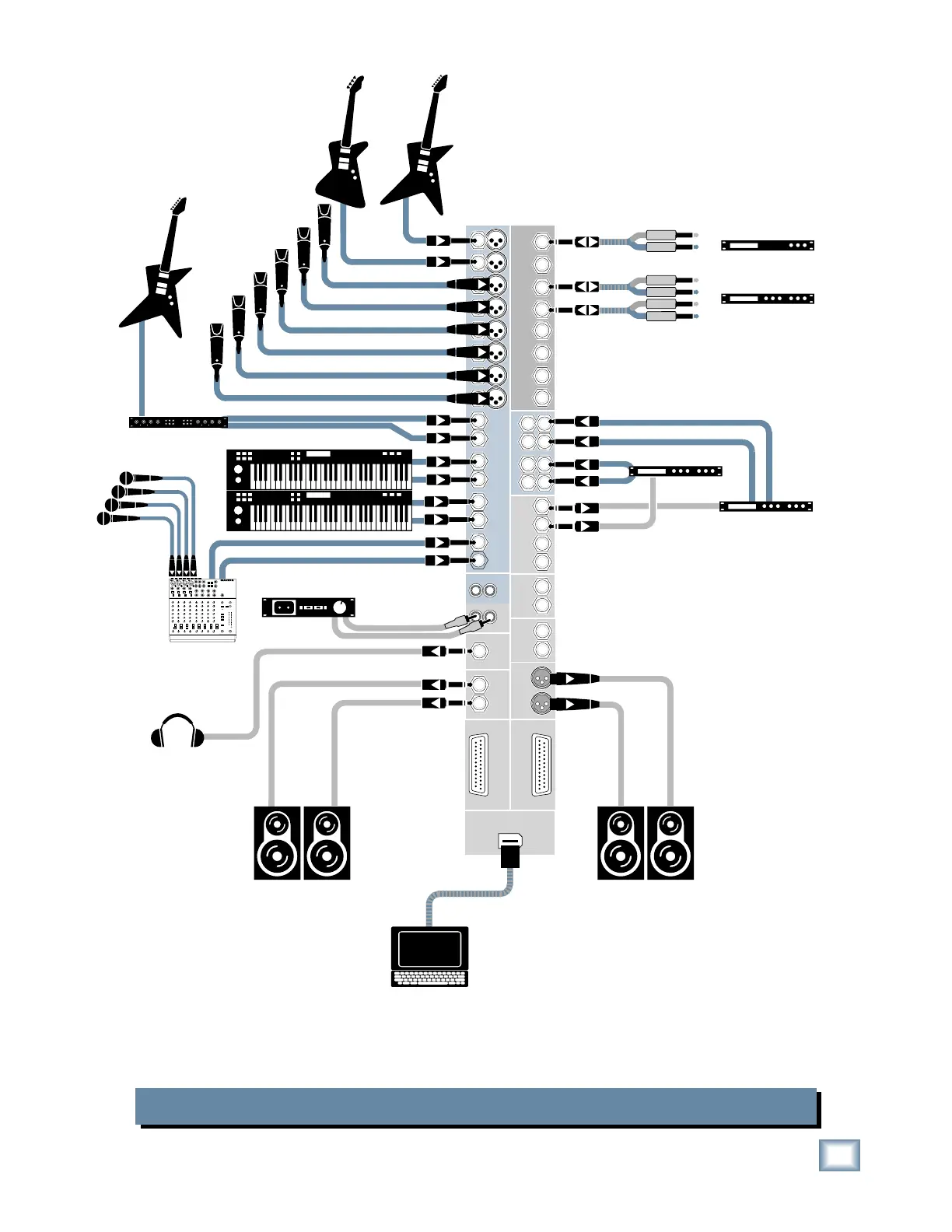
Onyx 1620 Recording with FireWire to a Laptop
Stereo Compressor
Mono Compressor
Multi Effect
Processor
Keyboard or other
line level input
Stereo Guitar Effects
Bass Guitar Electric Guitar
Electric Guitar
Vocal Mics
Digital Delay
Powered
Studio Monitors
for Control Room
Powered
Studio Monitors
for Studio
Drum
Mics
Submixer
for Drums
1202-VLZPRO
Headphones
Laptop Computer
In
(record)
7
8
6
16
15
14
13
12
11
8
8
7
6
7
5
6
5
3
4
2
1
5
4
4
3
2
3
1
2
1
1
2
L
R
L
R
3
4
L
R
L
R
L
R
CHANNEL INSERTS
AUX RETURNS
ALT 3/4
OUT
PHONES
OUT
INPUTS
L
MONO
R
R
R
R
L
MONO
L
MONO
L
MONO
AUX
SEND
L
9
1
2
3
4
10
CHANNEL
R
L
R
IN-TAPE-OUT
MAIN
OUT
CNTRL ROOM
OUTPUTS
MAIN
OUT
RECORDING OUT
9-16
RECORDING OUT
1-8
L
R
Out
In
Out
In
Out
In
FIREWIRE
(OPTION)
The optional FireWire card provides a digital direct output for each channel,
tapped after the GAIN control but before the EQ controls, as well as the L-R Mix.
Two tracks can be returned to the Onyx from the computer for playback monitor-
ing in the Control Room Outputs, or mixdown to two tracks at the TAPE OUT.



 To Next Page