10
d.4 Pro DJ Production Console
d.4 Pro 4-channel DJ Production Console
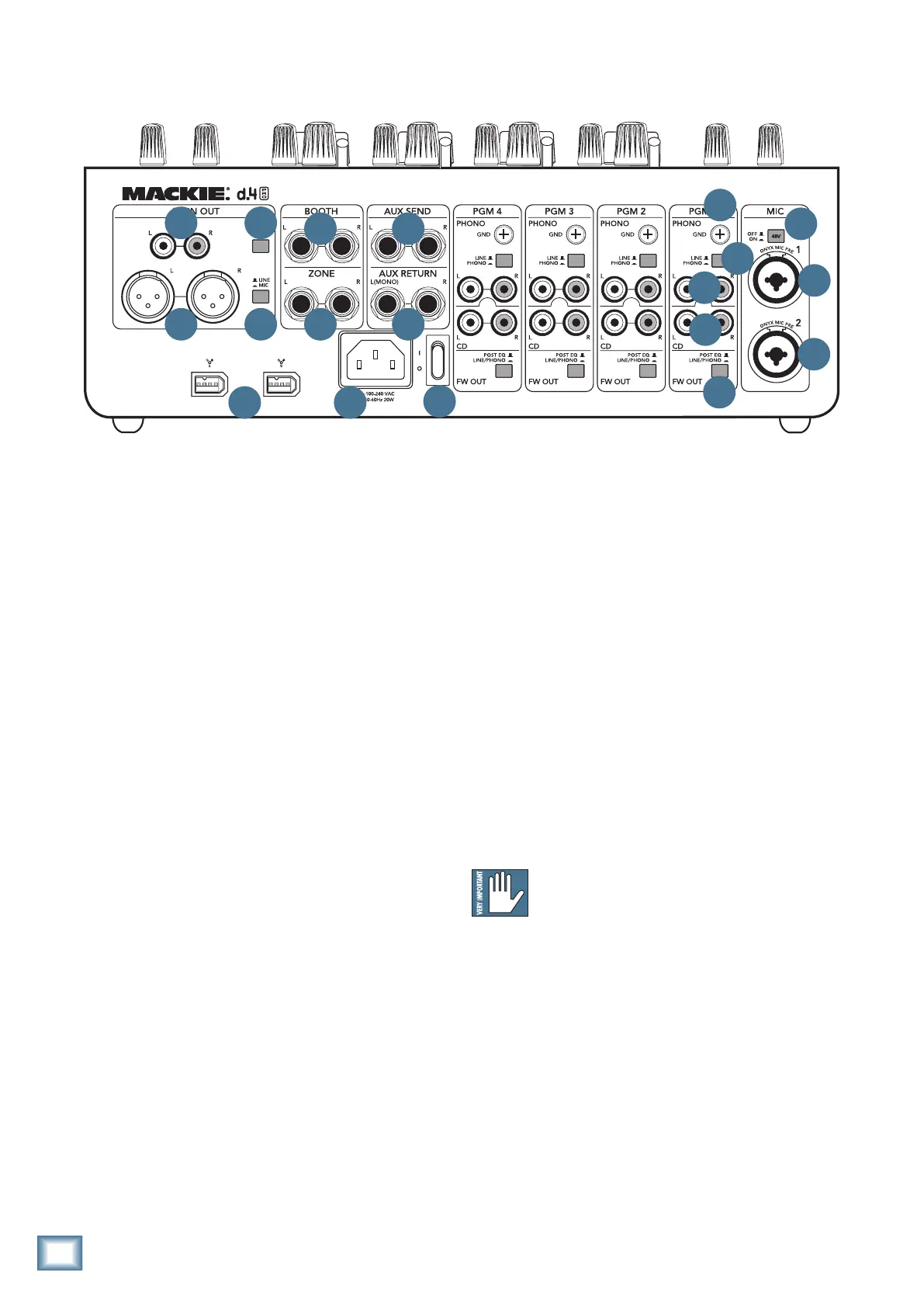
Rear Panel Features
1. MIC Inputs
TheseNeutrik“combo”inputconnectorsaccepteither
balancedmaleXLRconnectors,or1/4"TRSbalanced
orTSunbalancedconnectors.UseXLRconnectorsfor
low-impedancemicrophones,and1/4"connectorsfor
high-impedance microphones.
The microphone signals entering the d.4 Pro are in
for a special treat: the microphone preamplifiers are the
Mackie Onyx design, as used in our Onyx line of mixers.
The microphone signals are routed through the mic
preamp, EQ section, level control, on/off/talk assign, and
then to the main mix bus. Mic signals can also be sent to
the aux bus for external processing, before returning to
the main mix bus.
2. 48V PHANTOM POWER
If your microphone is a condenser design, it probably
requires phantom power to operate. Push in this switch
tosupply48VDCtopins2and3oftheXLRmicrophone
connectors(the1/4"connectorsarenotaffected).
Dynamicmicrophones,likeShure’sSM57andSM58,
donotrequirephantompower.However,phantom
power will not harm most dynamic microphones should
you accidentally plug one in while the phantom power
is turned on. Check your microphone’s user’s manual if
you are not sure whether your microphone needs phan-
tom power or not.
3. CD Inputs
The bottom pair of RCA jacks accept a stereo line-lev-
el signal from a CD player or other line-level playback
device (such as an MP3 player).
4. LINE/PHONO Inputs
These RCA jacks accept a stereo phono-level signal
from a turntable (line/phono [5] switch pushed in), or
from a line-level playback device such as a CD player or
MP3 player (line/phono switch out). Check that your
turntable has a phono-level output and a moving magnet
cartridge.
5. LINE/PHONO
If you connect a turntable with phono-level outputs
to the line/phono inputs [4], push this switch in to
select the phono-level input stage. It includes a nice
RIAApreampforproperre-equalizationoftheincoming
phono signal.
If you connect a line-level playback device like a CD
or MP3 player, leave this switch out to select the line-
level preamp.
Do not press this switch in if you have a line-
level signal connected.
6. PHONO GROUND TERMINAL
These terminals are provided to connect a ground
wire from your turntable(s) to the d.4 Pro.
Most turntables provide a ground wire to connect to
thepreampforthepurposeofeliminating“hum”inthe
audio signal. Simply turn the ground terminal on the
d.4 Pro counter-clockwise to loosen it, wrap the end of
the ground wire clockwise around the terminal, and
hand-tighten the ground terminal for a secure ground
connection.
1
1
2
3
4
6
5
7
8
9
10
11
16
1718
12
14 15
13


 To Next Page