18
d.4 Pro DJ Production Console
d.4 Pro 4-channel DJ Production Console
Output Control Section
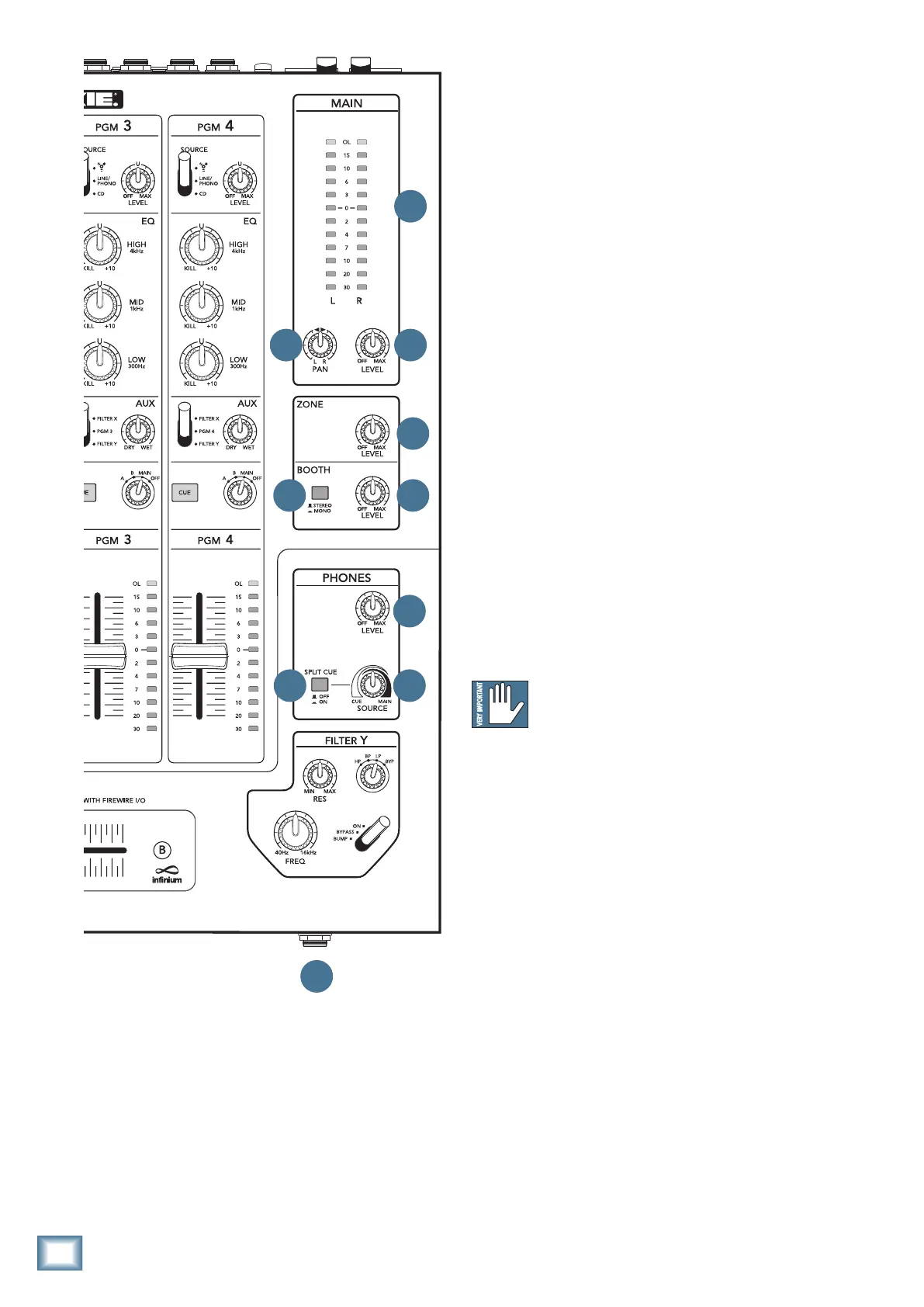
48. PHONES SOURCE
Thiscontrolonlyworksifthesplitcue[49]switchis
in the up (off) position.
It provides the cued source in stereo when panned
hard left, and the main mix in stereo when panned to
the right. It provides a smooth crossfade throughout the
rotation of the control.
49. PHONES SPLIT CUE
When this is pressed in, you will hear the cue bus (in
mono) in the left headphone, and the main mix bus (in
mono)intherightheadphone.(Thesource[48]knob
will then have no effect.)
This useful feature lets you quickly and simultane-
ously monitor in different ears what is happening in
your main mix and in your cued-up programs.
Without the split cue, you will hear a stereo mix of the
cued programs and the main mix, in both ears.
50. PHONES LEVEL
This controls the output level of the headphone am-
plier.Therangeoftheknobisoffto+12dB.
WARNING: The headphone amp has enough
gain to drive any standard headphones to
a very loud level. We’re not kidding! It can
cause permanent hearing damage. Even intermediate
levels may be painfully loud with some headphones. BE
CAREFUL! Turn this all the way down before connect-
ingheadphones,andbeforeyoupresscue[36]onany
program, or make any connections. Keep it down until
you’ve put on the headphones.
51. PHONES JACK
Thisfront-panel1/4"TRSstereojackiswhereyou
plug in your stereo headphones.
The main headphone volume is controlled by the
phones level [50] control. The level is not affected by
themainlevel[55]orpan[56]controls.Asmentioned
above,pressingsplitcue[49]givesthecuemixinone
ear, and the main mix in the other. The phones source
control[48]adjuststhecuedsource,ormainmixto
play in your headphones.
The quality of sound reaching your ears is really up to
you. We hope that you enjoy the sounds coming out, and
that your audiences will appreciate your fine sense of
musical style, beat and rhythm.
E CU E
55
54
57
56
5253
48
50
49
51


 To Next Page