15
Owner’s Manual
Owner’s Manual
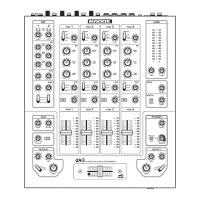
34. FILTER SELECT
This three-position switch allows you to pass the
program material through either of two filters before
reaching the main mix bus (not the aux bus.)
• Inthetopposition,theprogrampassesthrough
lterX,whoseparametersareadjustableusing
the controls in the bottom left of the mixer.
• Inthemiddleposition,theprogramisnotsent
through a filter, just straight through the pro-
gram channel.
• Inthebottomposition,theprogrampasses
through filter Y, whose parameters are adjust-
able using the controls in the bottom right of
the mixer.
AsthelterXcontrolsarelocatedinthebottomleft,
you could use it on programs assigned to the left (A)
side of the crossfader [43]. Similarly, you could use
filter Y on those assigned to the right (B) side. This is
just an idea, so try whatever works for you.
FiltersXandYwishtoremainanonymous,andtheir
real names have been changed as part of the filter pro-
tection program.
35. AUX
These knobs allow you to adjust how much of the
stereo program signal goes onto the aux bus (wet), and
how much goes to the main mix (dry).
In the wet position, the stereo program signals only go
onto the aux bus.
In the dry position, the program signals only go onto
the main mix bus.
In the middle position, the program signals are split
evenly between the aux and main mix.
“Wet”isatermusedforsignalsthathavepassed
throughanexternalaudioprocessor.“Dry”isaterm
used for signals not passed through such a processor. So
this control lets you adjust the amount of program avail-
able for external processing, and how much is available
unprocessed for the main mix.
The aux bus contains a mix of the aux signals of all
program and mic channels that have their aux controls
set to more than dry.
The aux bus is then adjusted using the aux send [40]
control,andsentouttoFireWireandtheauxsend[8]
TRS outputs, typically to an external effects processor.
The aux signals are affected by the settings of the
programsource[30]switch,level[29],EQ[31,32,33],
programfader[38],andcrossfader[43].Theyarenot
affectedbylterXorY.
If you want the aux signals to be affected by
ltersXandY,aswellastheexternalproces-
sor, then you could do the following:
If a program is playing in program channel 1, you
couldsetitsauxleveltowet.Theauxsend[8]output
would feed your external processor. The output from
your processor could then return to the input jacks of
another program channel, such as program 2’s CD input
[3],setitsauxtodryandassignlterXorYtoit.In
this way, your program 1 is then externally processed
and reappears into program 2 for the filtering and then
onto the main mix.
36. CUE
Press this button in to route a copy of the program
channel (pre fader) to the cue bus, also known as the
PFL (pre-fader-listen) bus. You can then listen to the
program in your headphones, getting it ready before
increasing the program fader and assigning it to the
main mix.
Thecuesignalsarepost-EQ,butpre-fader[38],and
theprogrammeter[39]showsthelevelsdancingalong
happily.
Turn down the phones level [50] control
every time before cueing, or you may be in for
a loud and painful surprise. Check the pro-
gram meters, as these show the program level coming
your way.
37. ASSIGN
This four-position stereo rotary switch affects the
program in four popular ways:
•A
Moving the crossfader [43] towards the left
will increase the level of any programs set to A.
(At the same time, decreasing the level of any
programs set to B.)
•B
Moving the crossfader towards the right will
increase the level of any programs set to B.
(At the same time, decreasing the level of any
programs set to A.)
•Main
The program level is not affected by the cross-
fader.
•Off
The program channel is effectively muted, and
does not appear on the main mix.


 To Next Page