16
d.4 Pro DJ Production Console
d.4 Pro 4-channel DJ Production Console
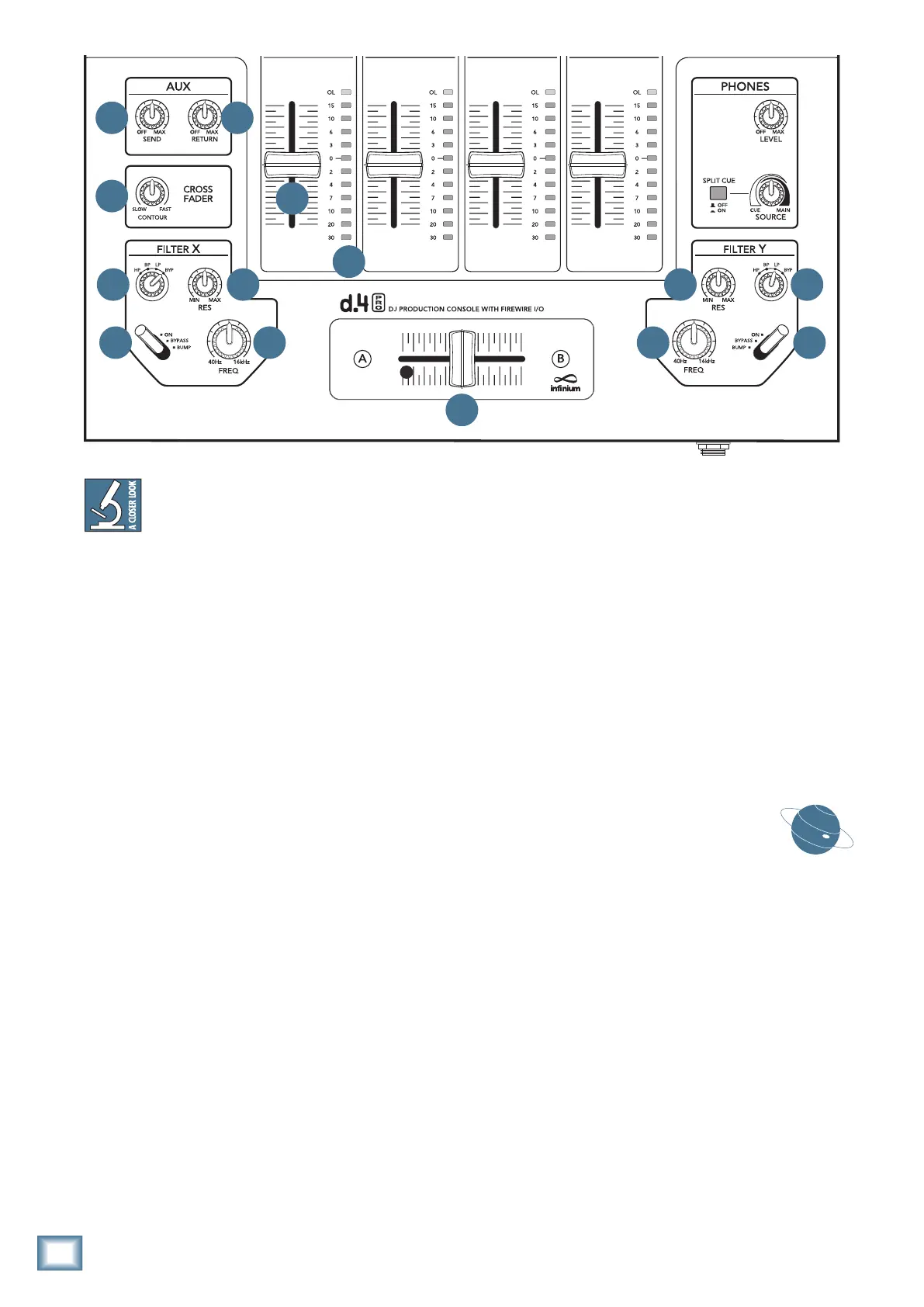
Theprogramfaders[38]andthecrossfader
[43] control the signal levels as follows:
After the audio signals pass through the EQ
sectiontheyenterapairofVCAs(voltagecontrolled
amplifiers). These control how much of the audio signal
is sent out into the filters (if selected) and then to the
mainmixbus.TheaudiooutputlevelfromtheVCAsis
adjustable by a control voltage, and the assign switch
selects what will affect the control voltage:
• IfitissettoAorB,thentheVCAcontrol
voltage is set by the position of the crossfader
and the program fader.
• Ifitissettomain,thenonlytheprogram fader
has an effect.
• Ifitissettooff,thentheVCAoutputismuted.
• Inaddition,allprogramlevelsareattenuated
by14dBwhenamicassign[28]switchissetto
“talk”tomakeabriefannouncement.
38. PROGRAM FADER
This controls the volume of the program signal being
sent to the main mix bus.
These faders are designed to last the lifetime of the
d.4 Pro. No audio passes through these faders, rather,
theysendacontrolvoltagetoapairofVCAsthatdeter-
mine the gain of the signal. This is a very good thing, by
the way, as the audio will not be affected by any scratchy
electrical contacts.
39. PROGRAM LEVEL METERS
These meters have 12 LEDs, calibrated in dBu, rang-
ingfromtoptobottom:OL,15,10,6,3,0,-2,-4,-7,-10,
-20, and -30
They indicate the summed-mono signal strength of
theprogramsignals,aftertheprograminputlevel[29]
control, and EQ, but not affected by the program fader
[38]orthecrossfader[43].
Typically, you want to see these meters bouncing
betweenthe“0”andthe“+6”LEDs.ItisokayiftheOL
LED lights occasionally, but if it lights frequently or con-
tinuously, turn down the program level controls (or the
EQ) until the OL LED blinks occasionally or not at all.
Occasionally, the meters will start decoding
vinyl timecode messages from a small blue
methane DJ planet in Ursa Minor. This is
perfectly normal, do not be alarmed.
Aux, Crossfader, and Filter
Controls
40. AUX SEND
This knob controls the amount of signal being sent
totheauxsend[8]outputsfromtheauxbus.Adjust
this knob to provide an appropriate input signal level to
your external effects processor (or whatever you have
connected to the aux sends). It ranges from off, to unity
gain at maximum.
40 41
42
43
44 45
4647 46
45 44
47
38
39


 To Next Page