7
Owner’s Manual
Owner’s Manual
Radio Show Recording/Podcasting
Laptop Computer
Headphones
Plug into
front panel
headphone jack
Turntables with phono-level outputs
ground wires
Studio
Mic
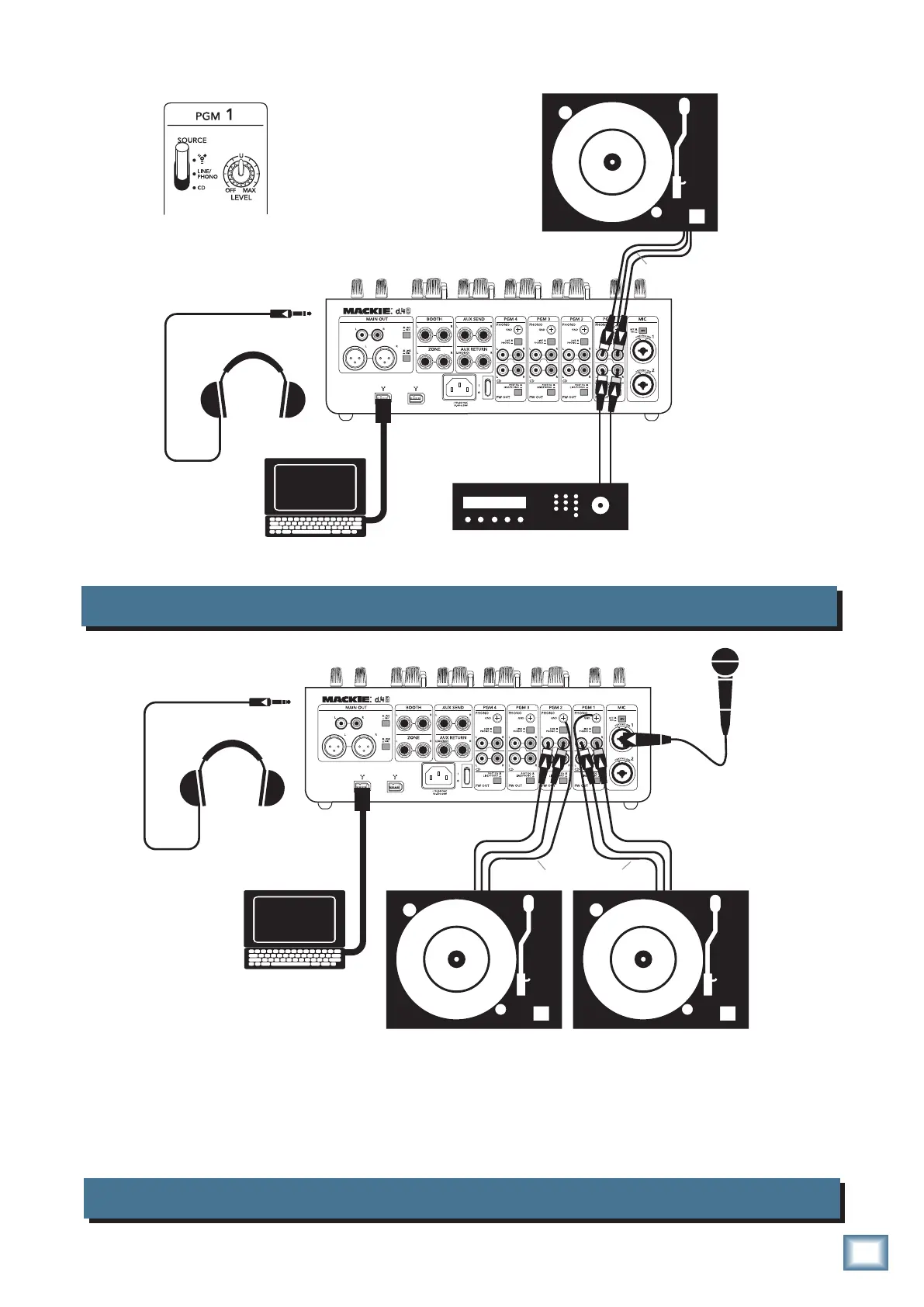
Example of connecting more than one source to each program channel
Laptop Computer
Headphones
Plug into
front panel
headphone jack
Turntable with phono-level output
ground wire
CD/DVD Player
Using the program source switch, each
program can quickly select from three
different inputs without repatching:
• FireWire
• Line or Phono (set Line/Phono switch)
• CD Player (or other line-level)
The output from various software, such as Reason™, Live™, Tracktion™, and Logic™ can be sent to
the program channels for mixing, and the final mix recorded for broadcast/podcasting. This is also a
nice setup for recording your record collection for posterity. You could also play timecode vinyl and set
up a virtual turntable on the laptop. In this way, you can use the physical turntable to control any musical
tracks added to the virtual turntable.


 To Next Page