22
PPM1012
PPM1012
With this constant-Q graphic EQ, the band-
width (and Q) of a frequency band doesn't
vary with the amount of boost or cut, and the
adjustment of one slider has minimal effect
on adjacent bands for all settings of the slider levels.
(There's always some effect on adjacent bands to avoid
too much variation or ripple between bands, but the
constant-Q design keeps this fairly constant for all set-
tings.) The position of the sliders gives a good indica-
tion of the frequency response across the audio band.
With non-constant types of EQ (on other mixers), for
example, if you're boosting 500 Hz and 2 kHz slightly,
the 1 kHz band will also be boosted, even though the
1 kHz slider is in the fl at position.
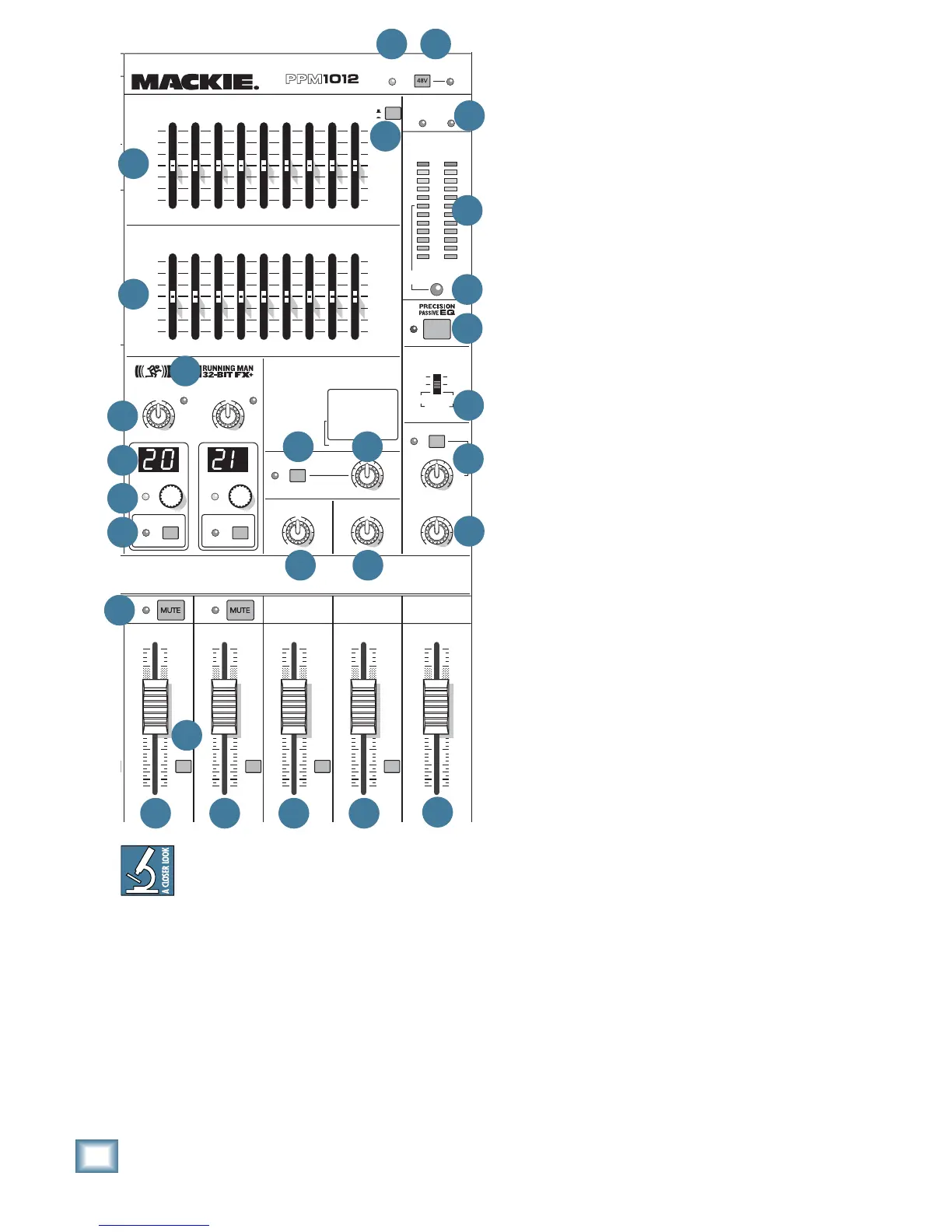
45. MON 1 EQUALIZER
This 9-band, constant-Q, mono graphic equalizer
allows you to adjust the monitor 1 mix line-level
outputs [10] and the speaker-level output [3] if the
internal amplifi er is playing the monitor 1 mix.
Each control allows up to 15 dB of boost and cut,
with 0 dB (no change in level) at the center. The
frequency bands are: 63, 125, 250, 500, 1 k, 2 k, 4 k,
8 k, and 16 kHz
The EQ comes before the monitor 1 fader [58].
Adjust the EQ carefully, in case you over-do it and
take the stage monitor 1 levels into overload. As with
the channel EQ, just take it easy. There are no prizes
for who can EQ the most (or is there?). If lots of EQ
seems to be needed, then chances are your system
can be improved by careful re-positioning of the mi-
crophones and other equipment.
You will fi nd this EQ useful for reducing feedback in
the stage monitors. Stage monitors point towards the
performers and their microphones, so feedback can
often occur. You can reduce the level of the problem
frequency band, by adjusting the graphic EQ sliders.
46. MAIN EQ ASSIGN
This delightful little switch allows you to assign
the main equalizer [44] to either the main mix when
pressed out, or to monitor 2 when pressed in.
This is useful in cases where your monitor 2 mix is
having feedback troubles or needs your special touch.
If you are not using the monitor 2 system, keep this
switch out. The EQ will then operate on your main
left and right mix.
47. POWER AMP LIMITER LEDs
These independent LEDs turn on when power am-
plifi er channel A or B is being overloaded internally
and its internal automatic limiter is actively working.
The LED will pulse in time with how much the limiter
is being used.
If the limiter LEDs come on and stay on for more
than a second or two, it means the power supply has
overheated and the limiter is holding the amp signal
down to 1/4 power until the power supply cools down
enough to release the limiter. If this happens, check
there is good ventilation around the mixer, and that
you are not cranking it too much. Also make sure that
your speakers are OK, and are not less than 4 ohms
impedance.


 To Next Page