4-4 Serial Number Programming
4.0 Serial Number Programming
A Serial Number can be reprogrammed into units with replacement boards with the Dealer Serial
Number Programming tool. See Figure 4-1 CPS Programming Setup.
4.1 To read the Radio Serial Number to a PC
1. Turn off the radio.
2. Connect the programming cable to the radio.
3. Press and hold Programmable Button 1 (top side button on the radio) then turn on the radio.
4. The radio beeps once. Immediately release Programmable Button 1. The radio’s LED
illuminates in orange.
5. Click the Read button on the Dealer Serial Number Programming Tool. The tool shows a
reading progress bar.
6. The tool displays the serial number field. This field is displayed in one of two forms:
• an empty serial number field or populated with the factory preprogrammed serial number.
This means this board can be reprogrammed.
• a grayed/un-editable serial number field, if it is already programmed with a 10-digit serial
number. This means this board cannot be reprogrammed.
4.2 To Reprogram a Serial Number to a Radio
NOTE
Only radios whose boards have been replaced with service boards as listed in Table 4-1
below can have the serial number reprogrammed. See Disassembling and Reassembling
the Radio – General on page 2-5 for instructions on how to replace the board.
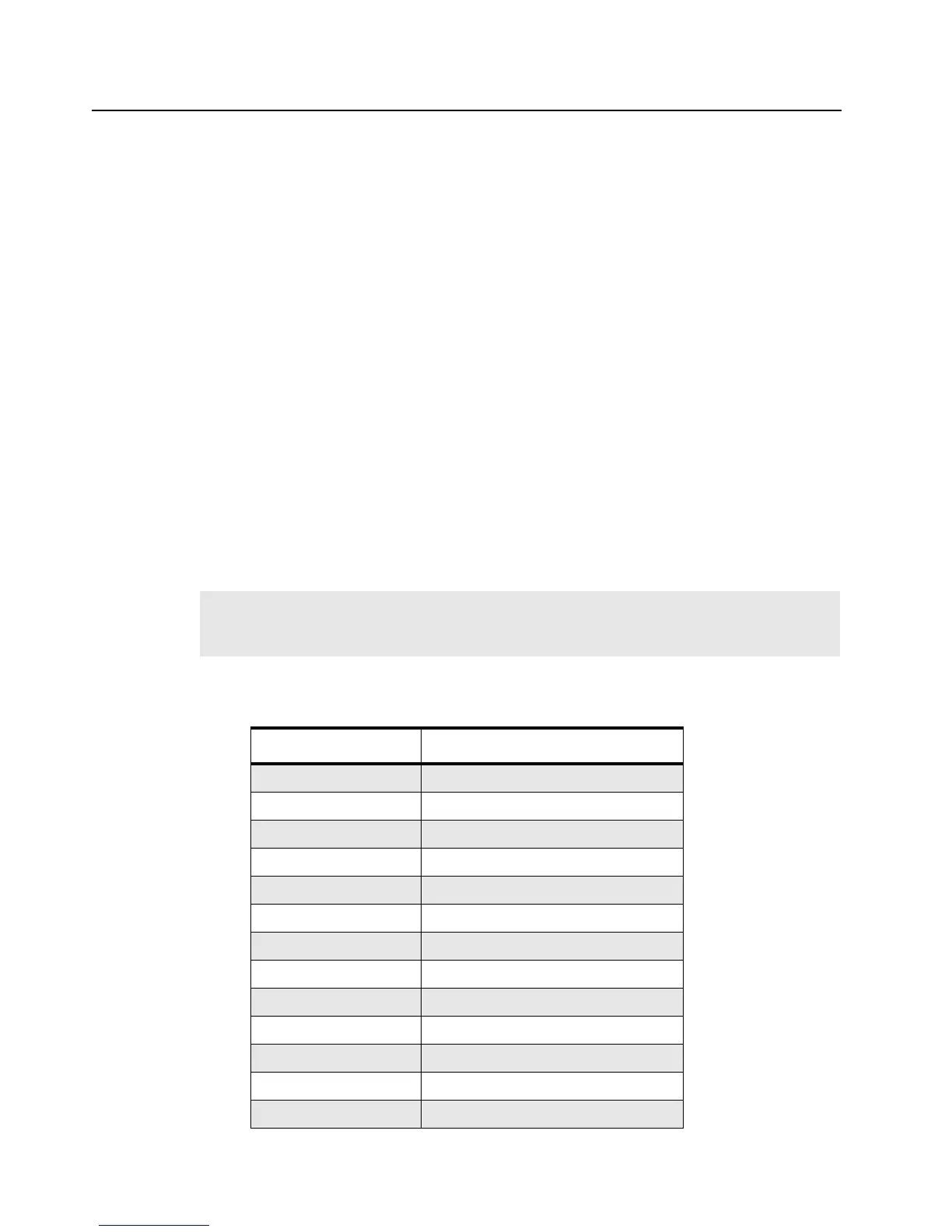
Table 4-1 Reprogrammable Service Boards
Service Board Band
PMDD4000AR 136–150 MHz 5W PCB
PMDD4001AR 150–174 MHz 5W PCB (Non-EPP)
PMDD4005AR 150–174 MHz 5W PCB (EPP)
PMDD4006AR 148–174 MHz 5W PCB (Non-EPP)
PMDD4007AR 148–174 MHz 5W PCB (EPP)
PMDE4000AR 403–425 MHz 4W PCB
PMDE4001AR 450–470 MHz 4W PCB (Non-EPP)
PMDE4005AR 450–470 MHz 4W PCB (EPP)
PMDD4046AR 136–150 MHz 5W PCB (A6)
PMDD4047AR 150–174 MHz 5W PCB (A6)
PMDE4080AR 403–425 MHz 4W PCB (A6)
PMDE4081AR 450–470 MHz 4W PCB (A6)
PMDE4006AR 490–512 MHz 4W PCB


 To Next Page