Radio Reassembly – Detailed 2-9
6.2 PC Board Disassembly
1. Remove the audio jack seal.
2. Remove the 10 screws which hold the PC board to the diecast.
3. Next, remove the 2 nuts on the On/Off Volume and Channel knobs shafts with the Crab Eye
Nut Opener.
4. The PC board can now be removed from the rear diecast.
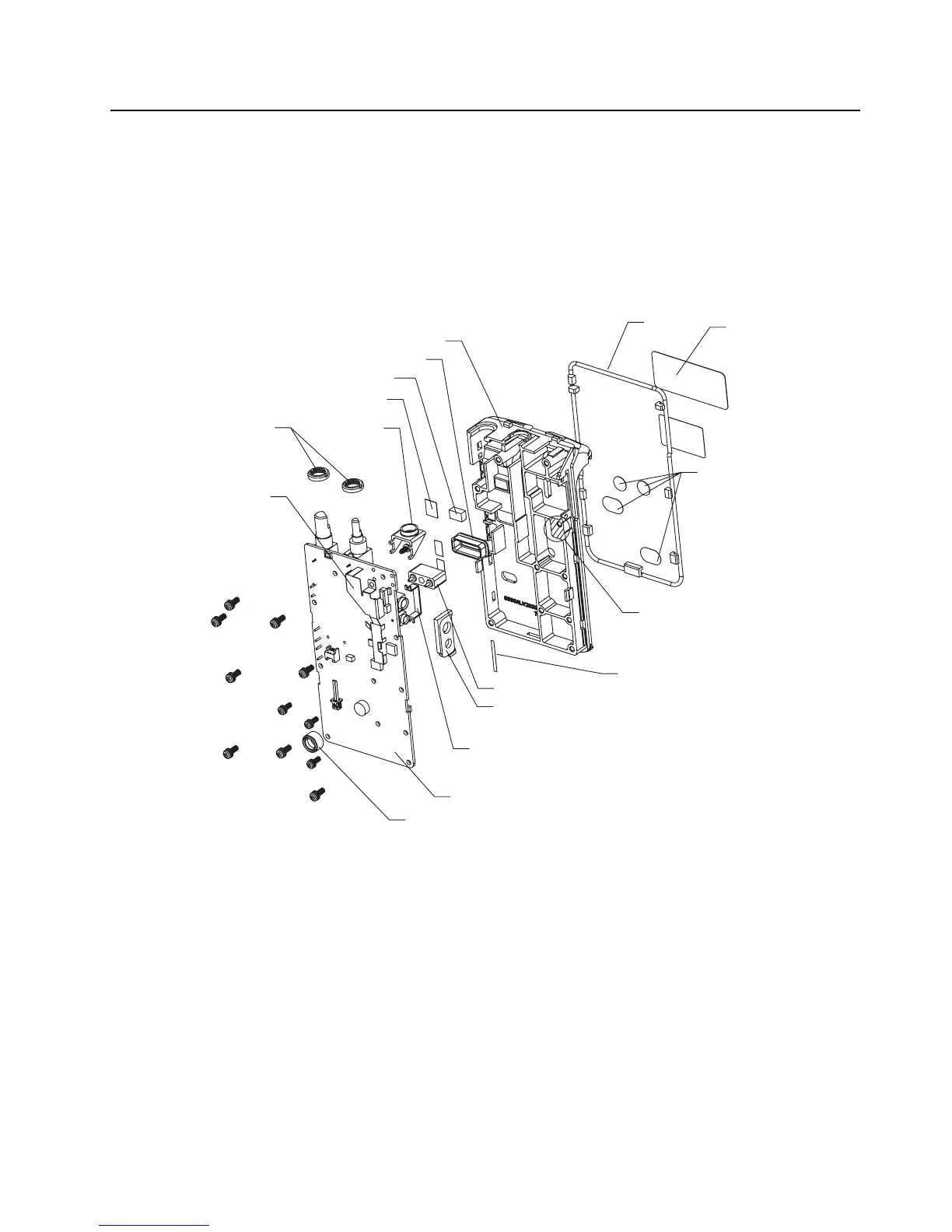
5. The completely disassembly PC board is shown in “Figure 2-7”.
7.0 Radio Reassembly – Detailed
7.1 PC Board Reassembly
1. Place the PC board on the rear diecast.
2. Tighten the screws and the nuts on the two knobs.
Figure 2-7 Completely Disassembled PC Board
Stickers for
Tuning Holes
O-ring
Radio Chasis
PCB
Antenna Bracket
Crab-eye Knob Nut
Audio Jack Seal
Microphone Boot
POGO Pin Housing
Audio Bracket
POGO Pin Seal
Tanapa Label
Thermal Pad
Thermal Paste
PTT Insulation Tape
Shield
PCB-Chassis Tape


 To Next Page