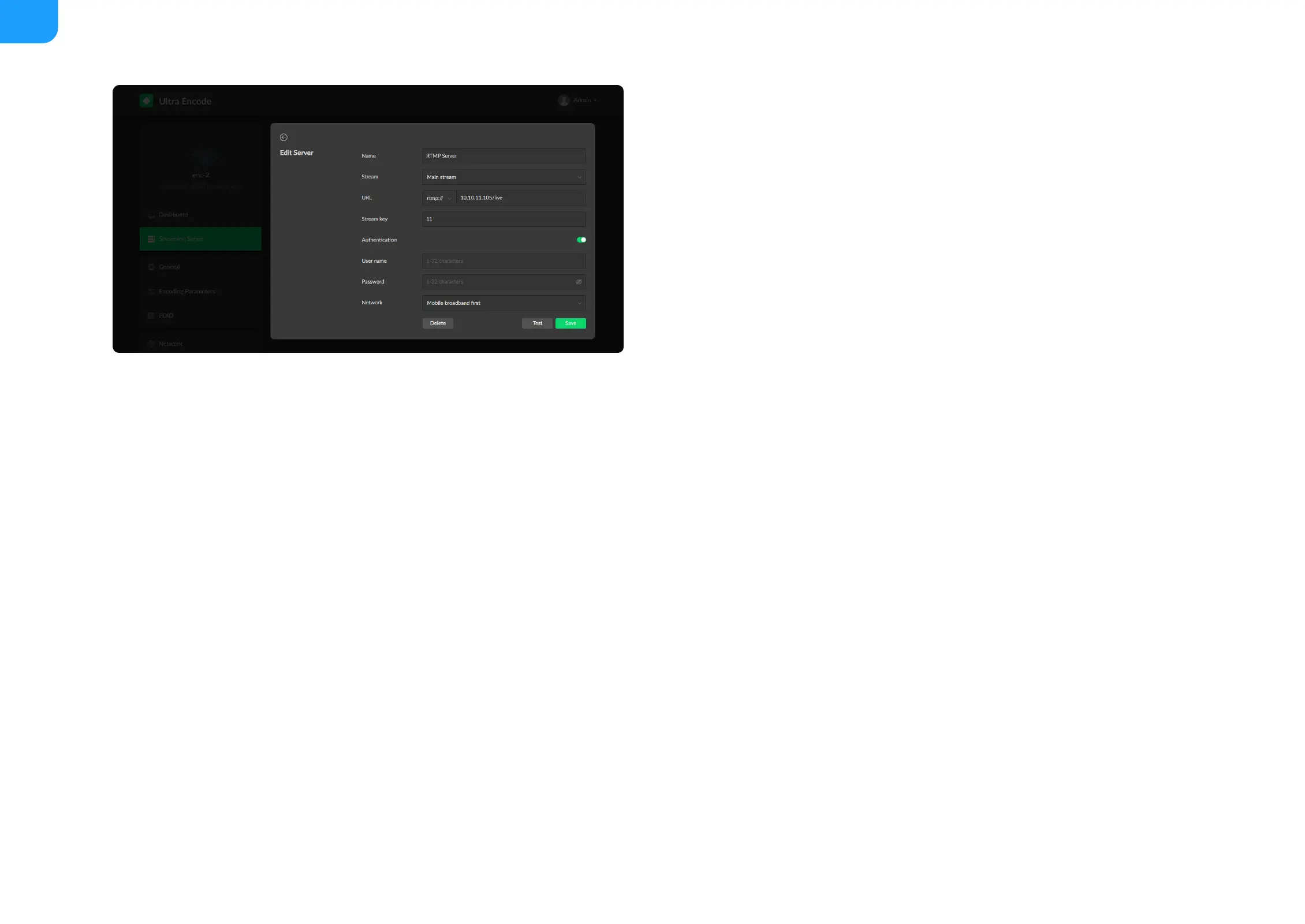
RTMP/RTMPS
Name: specify a name for current task to facilitate server management,
which will be displayed in the server list.
■
Stream: choose to deliver a main or sub stream, which can be customized
in Encoding Parameters tab.
■
URL: enter the RTMP URL address, or an RTMP address you have obtained
from the live stream platform. Full address
example:rtmp://192.168.1.136:1935/live. The port number part :1935 can
be omitted, and the value range is 1 to 65535. If the RTMP address is a
domain name, live can be omitted. If the RTMP address is an IP address, The
part live cannot be omitted.
■
Stream key: enter the stream key obtained from the live stream platform. If
none, leave it empty.
■
Authentication: turn on if your live streaming service provider requires.
Obtain the User Name and Password from your live streaming service
provider.
■
Network: The device scans for the available network according to the
connection priority and connect to it for streaming. If the current network is
disconnected, the unit automatically re-scans according to the priority.
By default, the network connection priority is: Mobile Broadband > Ethernet
> Wi-Fi.
Plug a USB modem into your encoder while using mobile network to
stream.
■
Test: check the connection between the server and encoder.
■
Save: save current configuration.
■



 To Next Page