USING YOUR OVEN
OVEN OVEN INDICATOR LIGHT
CHARACTERISTICS The OVEN indicator light, located onthe
backguard or control panel turns on
Eve_ ove_ _ !_ _ _act_ris whenever the oven is turned on. When
_ YO_ _ay _i_d _ _ _l'J_g the oven reaches the preset tempera-
__ _ _m_at_e_ _ we_ ac ture, the indicatorlight turns off andthen
_st_ to_!_h_ _ev _ _g_ cycles on and off as the oven elements
_ay _d t_ b_ _lt_e_ _l_tly _i_h cycle on and off.
On some models, the indicator light is __
controlled by the thermostat knob. ,/
When the thermostat knob isturned on /
OVEN CONTROLS and off, the oven indicator light will turn
on and off.
HINTS:
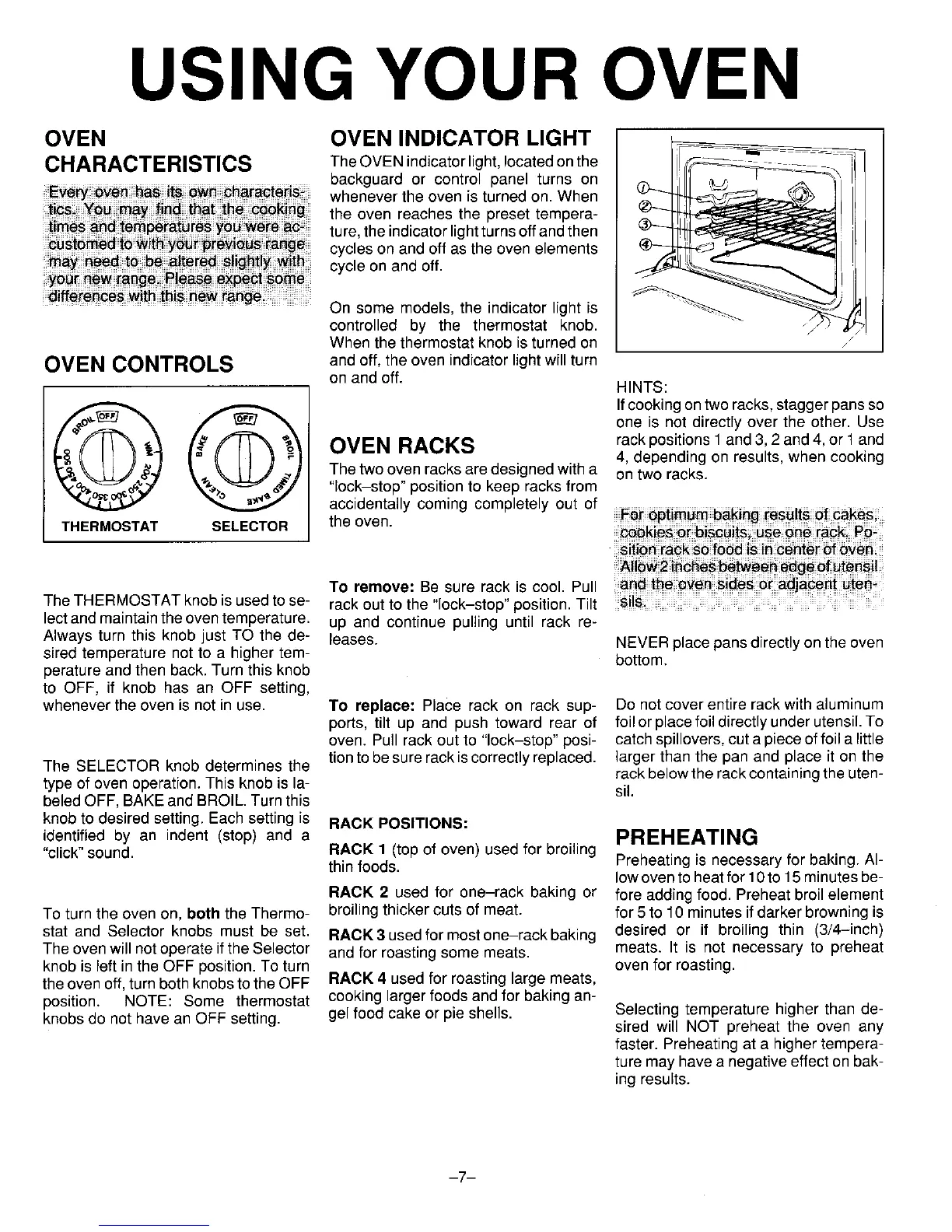
_ Ifcooking on tworacks, stagger pans so
one is not directly over the other. Use
rack positions 1and 3, 2and 4, or 1 and
OVEN RACKS 4, depending on results, when cooking
The two oven racks aredesigned with a on two racks.
"lock-stop" position to keep racks from
accidentally coming completely out of
THERMOSTAT SELECTOR the oven.
_ies o_biscuits us_ _ne rack P_
TO remove: Be sure rack is cool. Pull _d _ _ve_ _d_ _ adj_e_ _@_
The THERMOSTAT knob is used to se- rack out to the "lock-stop" position. Tilt
lectand maintainthe oventemperature, up and continue pulling until rack re-
Always turn this knob just TO the de- leases. NEVERplace pans directly on the oven
sired temperature not to a higher tem- bottom.
perature and then back, Turn this knob
to OFF, if knob has an OFF setting,
whenever the oven is not in use. To replace: Place rack on rack sup- Do not cover entire rack with aluminum
ports, tilt up and push toward rear of foil or place foildirectly under utensil.To
oven. Pull rack out to "lock-stop" posi- catch spillovers, cuta piece of foil a little
The SELECTOR knob determines the tion to be sure rackis correctly replaced, larger than the pan and place it on the
rack below the rackcontaining the uten-
type of oven operation. This knob is la- sil.
beledOFF, BAKEand BROIL.Turnthis
knob to desired setting. Each setting is RACK POSITIONS:
identified by an indent (stop) and a PREHEATING
"click"sound. RACK 1 (top of oven) used for broiling
thin foods. Preheating is necessary for baking. Al-
low ovento heatfor 10to 15 minutesbe-
RACK 2 used for one-rack baking or fore adding food. Preheat broil element
To turn the oven on, both the Thermo- broiling thicker cuts of meat. for 5 to 10 minutes if darker browning is
stat and Selector knobs must be set. RACK 3 usedfor mostone-rack baking desired or if broiling thin (3/4-inch)
The ovenwill notoperate if the Selector and for roasting some meats, meats. It is not necessary to preheat
knob is left in the OFF position. To turn oven for roasting.
the oven off, turn both knobsto the OFF RACK 4 used for roasting large meats,
position. NOTE: Some thermostat cooking larger foods and for baking an-
knobsdo not have an OFF setting, gel food cake or pie shells. Selecting temperature higher than de-
sired will NOT preheat the oven any
faster. Preheating at a higher tempera-
ture may have a negative effect on bak-
ing results.
-7-




 To Next Page