CLOCK AND OVEN CONTROL
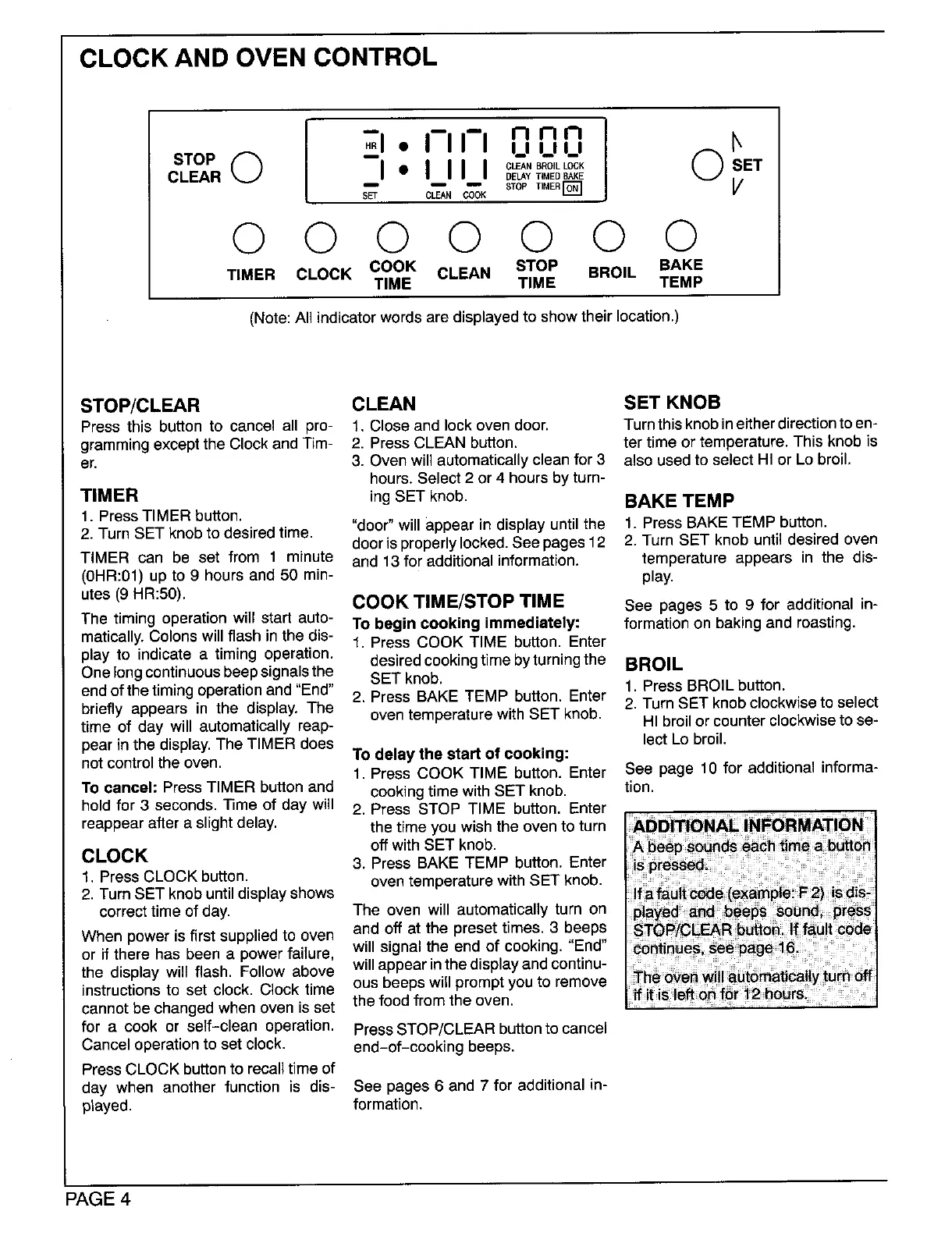
I 71. I-II-Innn O}
STOP _ -- I_1 L I L I
CLEAR I" IIII O,.SBO,LLCOK ET
DELAYTIMEDBAKE
_ =m STOP _MERI_ 1
SET CLEAN COOK
0 0 0 0 0 0 0
TIMER CLOCK COOK CLEAN STOP BROIL BAKE
TIME TIME TEMP
(Note:All indicator words are displayed to show their location.)
STOP/CLEAR CLEAN SET KNOB
Press this button to cancel all pro- 1. Close and lockoven door. Turnthis knobineitherdirectiontoen-
gramming except the Clock and Tim- 2. Press CLEAN button, ter time or temperature. This knob is
er. 3. Oven will automatically clean for 3 also used to select HI or Lo broil,
hours. Select 2 or 4 hours by turn-
TIMER ing SET knob. BAKE TEMP
1. Press TIMER button. "door" willappear in displayuntil the 1. Press BAKE TEMP button.
2. Turn SET knob to desired time. door is properlylocked. See pages 12 2. Turn SET knob until desired oven
TIMER can be set from 1 minute and 13 for additional information, temperature appears in the dis-
(0HR:01) up to 9 hours and 50 min- play.
utes (9 HR:50). COOKTIME/STOP TIME See pages 5 to 9 for additional in-
The timing operationwill start auto- To begin cooking immediately: formationon bakingandroasting.
matically.Colonswillflash inthe dis- 1. Press COOK TIME button. Enter
play to indicatea timing operation, desiredcookingtimebyturningthe BROIL
Onelong continuousbeep signalsthe SET knob. 1. Press BROIL button.
endof the timing operation and "End" 2. Press BAKE TEMP button. Enter 2. Turn SET knob clockwise to select
briefly appears in the display. The oven temperature with SET knob.
time of day will automatically reap- HI broil or counter clockwiseto se-
pear in the display. The TIMER does lect Lo broil.
notcontrolthe oven. To delay the start of cooking:
1. Press COOK TIME button. Enter See page 10 for additionalinforma-
To cancel: PressTIMER buttonand cookingtimewithSET knob. tion.
holdfor 3 seconds,Time of day will 2. Press STOP TIME button. Enter
reappear after a slightdelay, the time you wish the oven to turn
off with SET knob.
CLOCK 3. Press BAKE TEMP button. Enter
1. Press CLOCK button, oven temperature with SET knob.
2. Turn SET knob until display shows
correct time of day. The oven will automatically turn on
When power is first supplied to oven and off at the preset times. 3 beeps
or if there has been a power failure, will signal the end of cooking. "End"
the display will flash. Follow above will appear in the displayand continu-
instructions to set clock. Clock time ous beeps will prompt you to remove
cannot be changed when oven is set the food from the oven.
for a cook or self-clean operation. PressSTOP/CLEAR buttonto cancel
Cancel operation to set clock, end-of-cooking beeps.
Press CLOCK button to recall time of
day when another function is dis- See pages 6 and 7 for additional in-
played, formation.
PAGE4



 To Next Page