2 - Installation
tDynamo| Three-way Secure Card Reader Authenticator | Installation and Operation Manual
Page 17 of 39 (D998200257-20)
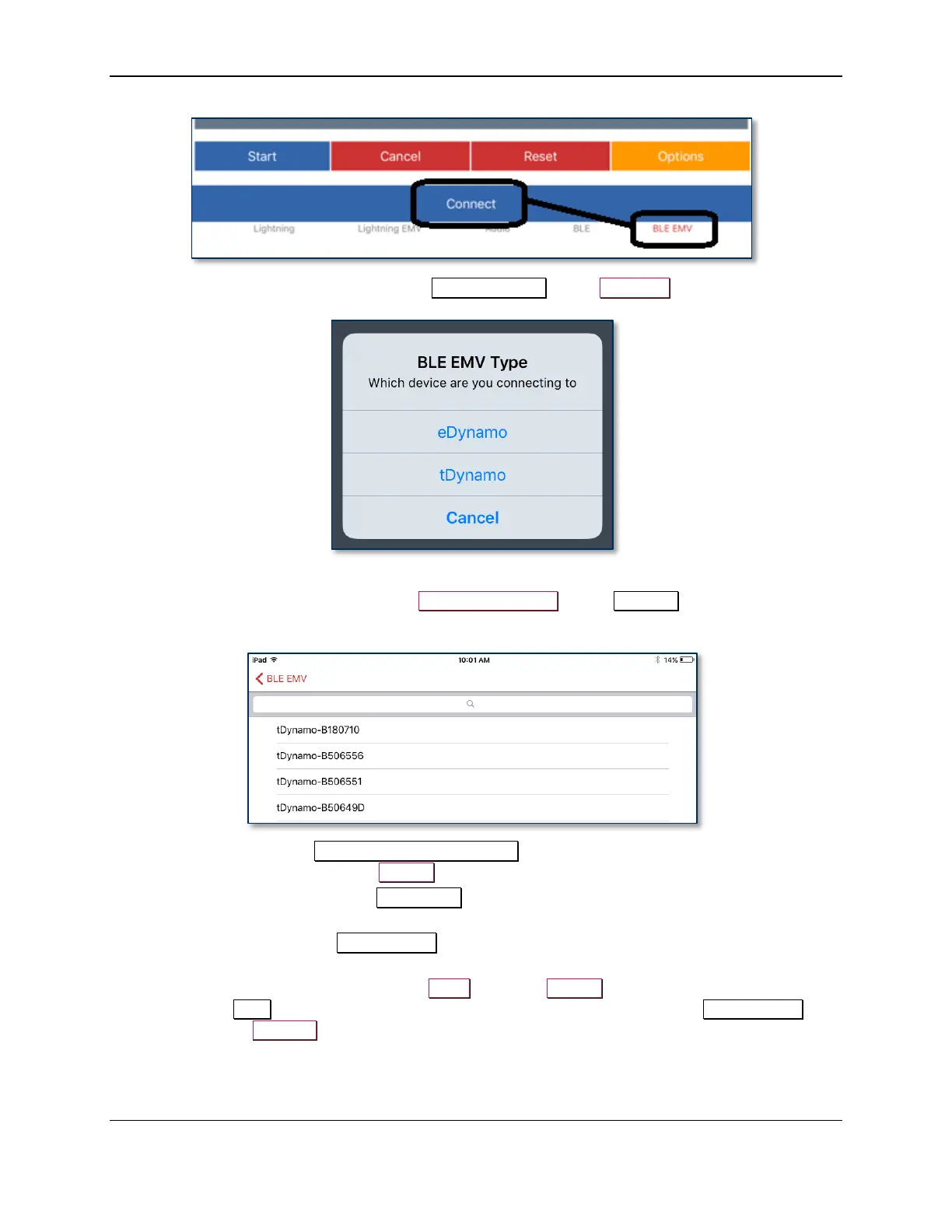
d) When the app prompts you to select a BLE EMV Type, select tDynamo.
e) Locate the seven-digit serial number on the label on the back of the device.
f) In the list of pairable devices, select tDynamo-xxxxxxx, where xxxxxxx is the device’s serial
number.
8) When the host pops up a Bluetooth Pairing Request message asking for a code, enter the
configured passkey (or the default 000000).
9) The app reports the device is now Connected, and the device indicates it is in Connected mode (see
section 3.2 About the Status LEDs).
10) Use the host software or the MagTek Test app to test swiping, inserting, and tapping a card. For
details about reading each payment type, see section 3.5 Card Reading.
a) Before testing a swipe, use the app to Send command 580101 to the device and receive
response 0000 to enable the magnetic stripe read head. For convenience, the MagTek Test app
provides an MSR On button that sends this command to the device with a single press.



 To Next Page