1
Controls And Funcons
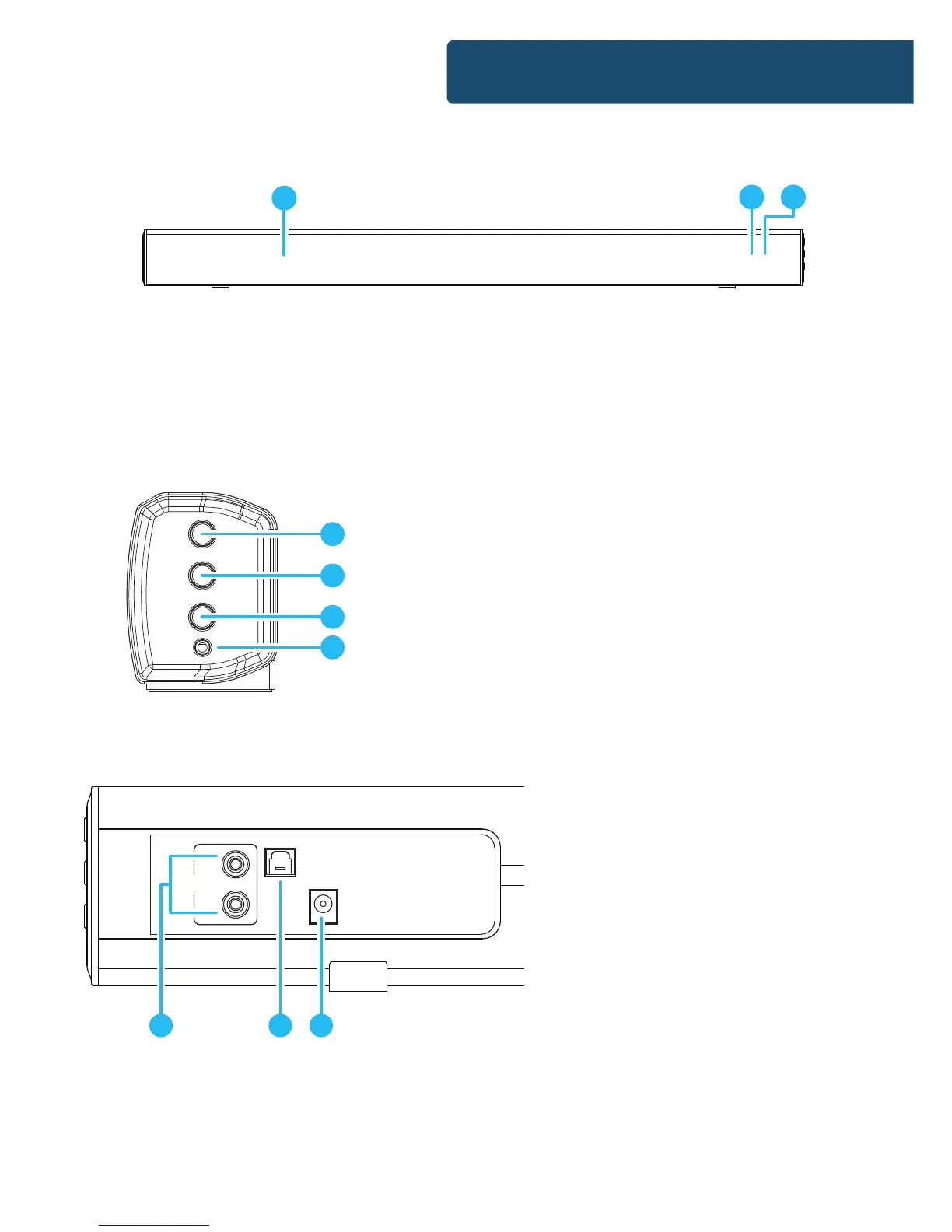
Front View/LED Indicator Light
Side View: Buttons
4. Press and hold for 3 seconds to
switch on/o the unit. Press to
switch between Bluetooth, AUX &
RCA) in, LINE in or OPTICAL in.
5. Volume increase
6. Volume decrease
7. 3.5mm stereo LINE in
1. Speaker Drivers
2. Remote Control Sensor
3. LED Indicator Light
Rear View: Panel Interface Connection
8. AUX (RCA) Socket
9. OPTICAL In Socket
10. DC 15V 1.5A Socket
Automatic Power O Function
The Majority Skiddaw will automatically go to standby mode
after 60 minutes in the TV of external unit is discontinued or
switched o.
1
2 3
POWER
SOURCE
VOL
VOL
LINE
4
5
6
7
AUX1 IN
OPTICAL IN
DC 15V
L
R
8
9 10


 To Next Page