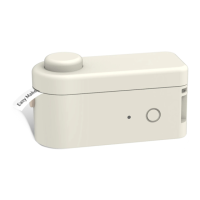
The MakeID Label Printer-S1 Pro is a thermal label printer designed for printing die-cut labels. It is powered by a lithium battery and connects via Bluetooth for operation through a dedicated mobile application.
Function Description:
The primary function of the MakeID Label Printer-S1 Pro is to print die-cut labels for various organizational and identification needs. It supports several pre-defined label categories such as "Kitchen," "Custom," "Date," and "EXP" (Expiry Date), which can be configured and accessed directly from the printer's buttons after initial setup via the MakeID-Life APP. Users can also create and edit custom text, add stickers or icons, and set print copies through the APP's label-editing page. The printer is designed for ease of use, with a simple label roll installation process and intuitive button controls for printing.
Important Technical Specifications:
- Printing Method: Thermal Printing
- Printing Resolution: 203dpi
- Supported Label Type: Die-cut Label
- Label Tearing Method: Manually
- Printing Width: 12mm
- Compatible Label Width: 9-12mm wide; 7.4m long
- Printer Size: 85.5mm x 85.5mm x 33mm
- Package Size: 117mm x 117mm x 43mm
- Battery Capacity: 3.7V/1450mAh
- Battery Life: 90 days (standby)
- Connection Method: Bluetooth connection / Shortcut button panel operation
- Charging Input: Type-C port, 5V=2A
- Operating Temperature Range: 5°C to 35°C
- FCC Compliance: This device complies with part 15 of the FCC Rules, ensuring it does not cause harmful interference and accepts any interference received. It has been evaluated to meet general RF exposure requirements for portable use.
Usage Features:
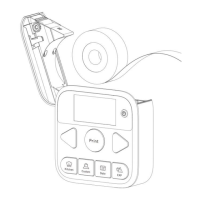
- Label Roll Installation: Labels are installed by pushing the Cover-Open button, placing the label roll with the printable side facing down, and pulling the transparent leading label out of the Label Exit. The transparent leading label is unprintable and should be torn off before use.
- APP Download and Connection: The MakeID-Life APP can be downloaded by scanning a QR code or searching in Google Play/APP Store. Initial setup requires connecting the printer to the APP (not directly via phone's Bluetooth settings) to configure button functions.
- Button Initial Settings: After powering on the printer by long-pressing the Power button for 2 seconds, the APP guides the user through setting up the "Date" and "Kitchen" buttons. This involves selecting calendar formats and pre-defined label content. The "Custom" and "Expiry Date" buttons also require similar setup through the APP.
- Direct Printing from Buttons: Once configured, users can directly print labels by clicking the "Kitchen" or "Custom" buttons, using the "Selection" button to choose text, and then the "Print" button. For "Date" and "Expiry Date" buttons, users can select dates within a 30-day range before or after the current date.
- APP-based Label Editing: The APP offers a "Gap editor" for creating and customizing labels. Users can edit text, change fonts, resize text, insert stickers or icons, and set print copies before printing.
- Label Adhesion: Each label has an adhesive backing; users should tear off the backing paper before sticking the label onto surfaces.
- Charging: The printer is charged via a Type-C input port. It is recommended to use the provided Type-C charging cable and a standard Type-C charging head. For long periods of disuse, charging every 3 months is advised to prevent battery degradation.
Maintenance Features:
- Label Compatibility: Only official MakeID labels should be used to prevent damage to the printhead and ensure optimal performance. Damage caused by non-official or poor-quality labels is not covered by the warranty.
- Printhead Cleaning: The printhead should not be touched to prevent static electricity damage. If dirty, it should be cleaned with anhydrous alcohol. Avoid scratching the printhead with hard objects.
- Environmental Conditions: The printer should be kept away from direct sunlight, rain, heat sources, and areas with extreme temperatures, high humidity, or dust. The recommended operating temperature is 5°C to 35°C. Avoid using the printer immediately after moving it from outdoors to indoors if there's a large temperature difference; allow it to stand to prevent frost.
- Label Handling: To prevent jamming, labels should be removed from the label exit after each printing task. Avoid sticking labels where hands frequently touch, as sweat and friction can cause fading. Do not expose labels to chemical liquids (e.g., hand sanitizer, detergent, alcohol) for extended periods, as this can affect preservation.
- Printhead Longevity: To protect the printhead and extend its life, it's recommended not to print more than 2 meters for each continuous printing and not more than a total length of 20 meters per day. Avoid touching the printhead surface, using carbon ribbons or thermal labels containing sodium, potassium, or chloride ions, and contact with liquids or wet objects.
- Troubleshooting: The manual provides troubleshooting steps for common issues like the printer not powering on (check battery), incomplete printing (check label roll, cover, temperature, printhead cleanliness), APP download failure (check internet, scan QR code), and connection failure (check APP download, printer power, Bluetooth permissions, connect via APP not phone settings). For persistent issues, users are advised to reboot the printer and APP, or contact customer support.
- Safety Precautions: Do not disassemble the printer to avoid electrocution or mechanical injury. Power off the printer immediately if it shows abnormalities like smoke or odor. Do not force open the cover while the printer is operating. Avoid touching the printhead immediately after printing, as it may be hot.


 To Next Page
 General