UDD-SD-116/ Release Date: 31.12.2014/Rev No: 1/Rev. Date: 27.04.2015 20
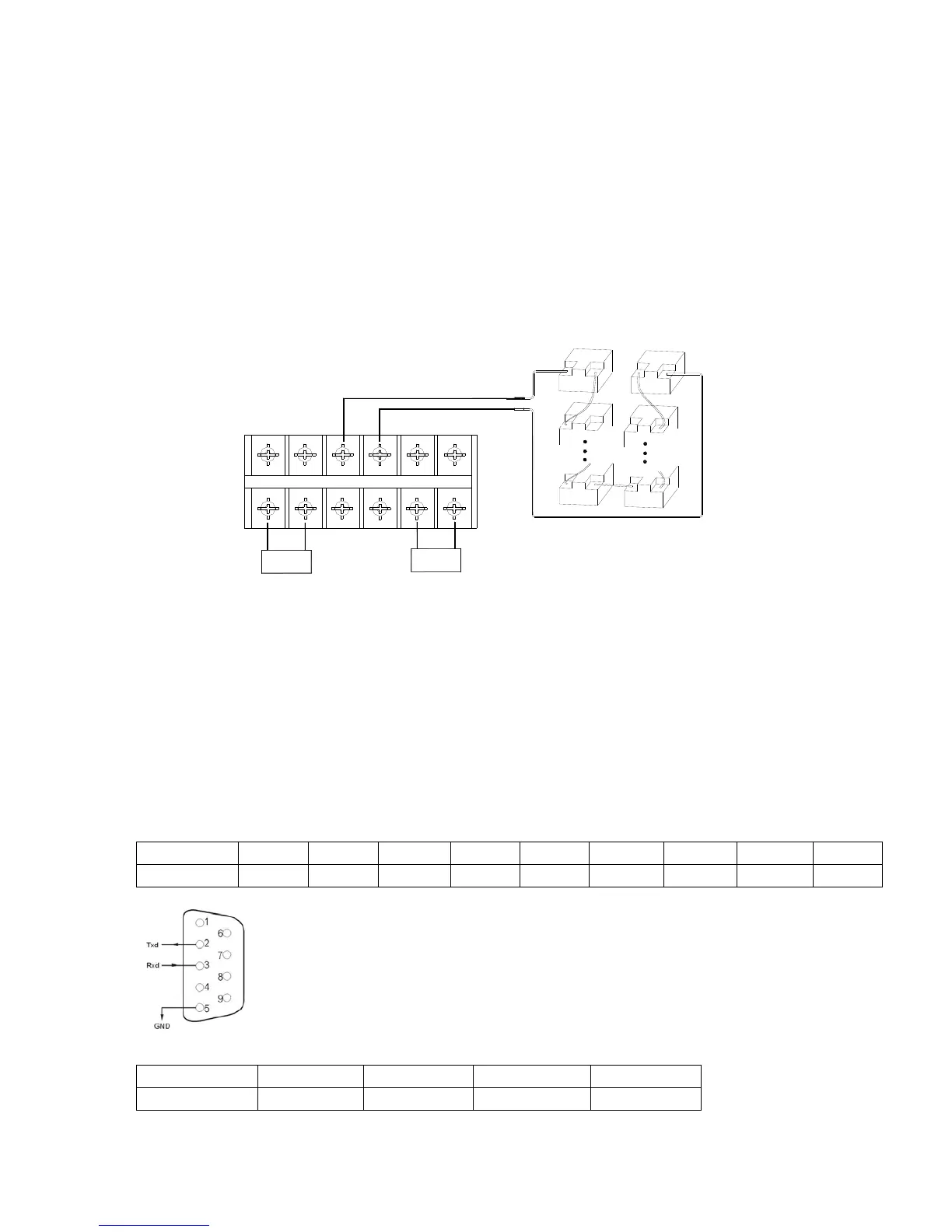
Correctly connect the long battery cable to battery terminals first, red wire is to positive plate
while black is to negative. If users connect the UPS first, electric shock or other danger could
not be avoided.
Before connecting load after UPS, users should supply main power to UPS and energize it.
Connect long battery cable to UPS terminals with correct poles link (red is for “+”, black is for“-
”), UPS will start the charging work automatically.
For the type of 1-3K UPS, please connect the battery pack to the battery slot; For the type of 6-
10k UPS, please connect the battery pack to the terminal block. Make sure all cables are
connected firmly.
N
BAT-
LN
L
BAT+
RED
BLACK
-
+
-
+
-
+
-
+
-
+
-
+
Input
output
3.6 Network Functions
3.6.1 Communication Port
Users could monitor the UPS system through the communication port such as standard RS232
port and standard USB port with computer. With a communication wire to connect UPS and
computer, could simply achieve UPS management.
☆RS232 port:
Foot 1 2 3 4 5 6 7 8 9
Explanation empty send receive empty ground empty empty empty empty
☆USB port:
Foot 1 2 3 4
Explanation +5V date+ date- GND









 To Next Page