UDD-SD-116/ Release Date: 31.12.2014/Rev No: 1/Rev. Date: 27.04.2015 24
Press and hold for more than 2 seconds: Circularly and orderly display the items every 2
seconds, when press and hold the key for some time again, it will turn to output status.
Function setting mode:
Press and hold the key or for more than half a second (less than 2 seconds): Select the
set option.
※ FUNCTION SETTING KEY
Non-function setting mode:
Press and hold the key for more than 2 seconds: Function setting interface.
Function setting mode:
Press and hold the key for more than half a second (less than 2 seconds): Enter the function
setting option.
Press and hold the key for more than 2 seconds: exit from this function setting interface.
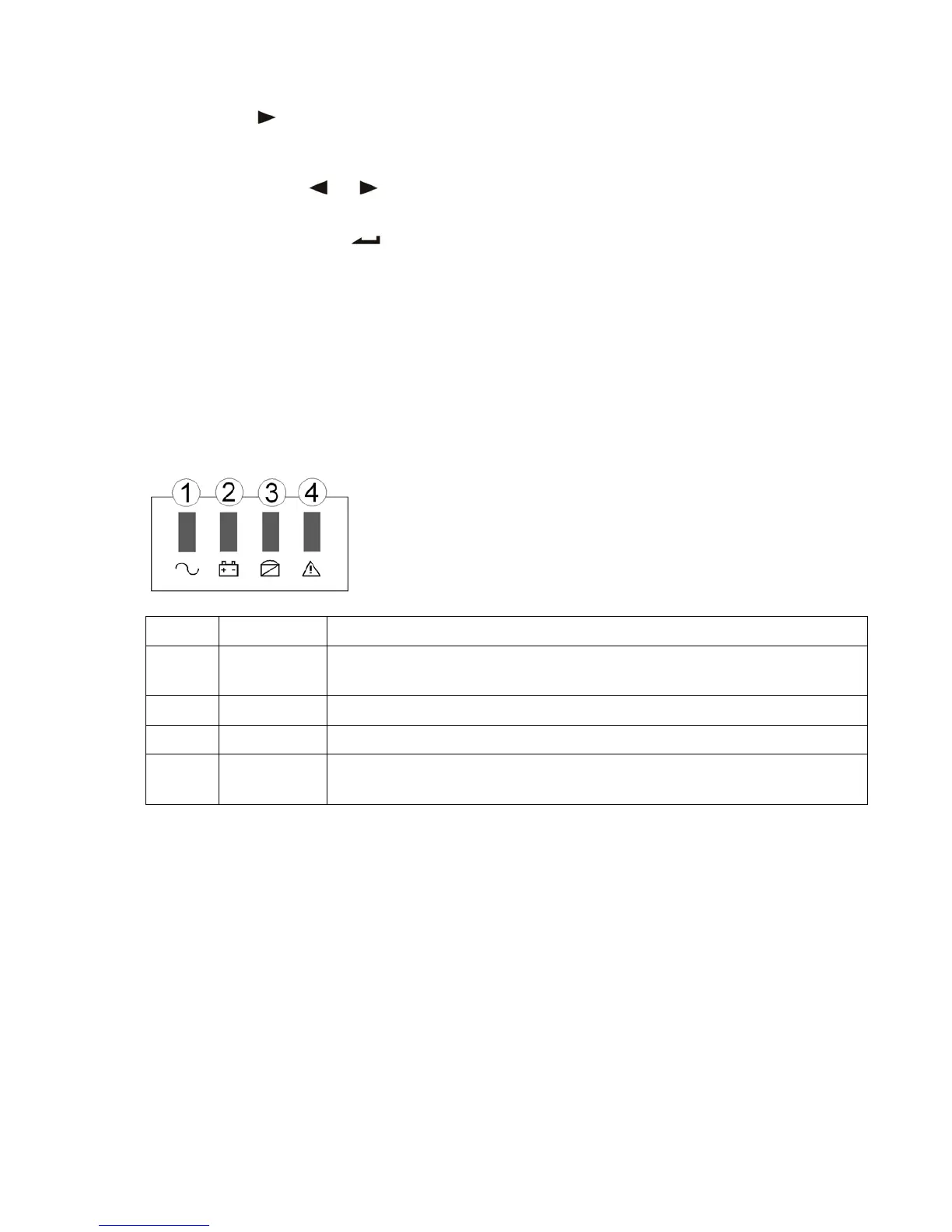
4.2 LED Function
Number LED Explanation
① Inverter LED
Inverter green LED is on: UPS is normally powered by Line mode or ECO
mode or BAT mode.
② Battery LED
Battery yellow LED is on: Battery mode.
③ Bypass LED
Bypass yellow LED is on: Bypass mode or ECO mode, etc.
④ Warning LED
Warning red LED is on: UPS fault. For example: Overload beyond the
allowed time, inverter fault, BUS fault, over temperature fault, etc
PS: LED display detail in different mode is listed at the back.
4.3 LCD Display Function
LCD displays as following figure.









 To Next Page