2-102
IT
EN PL
79
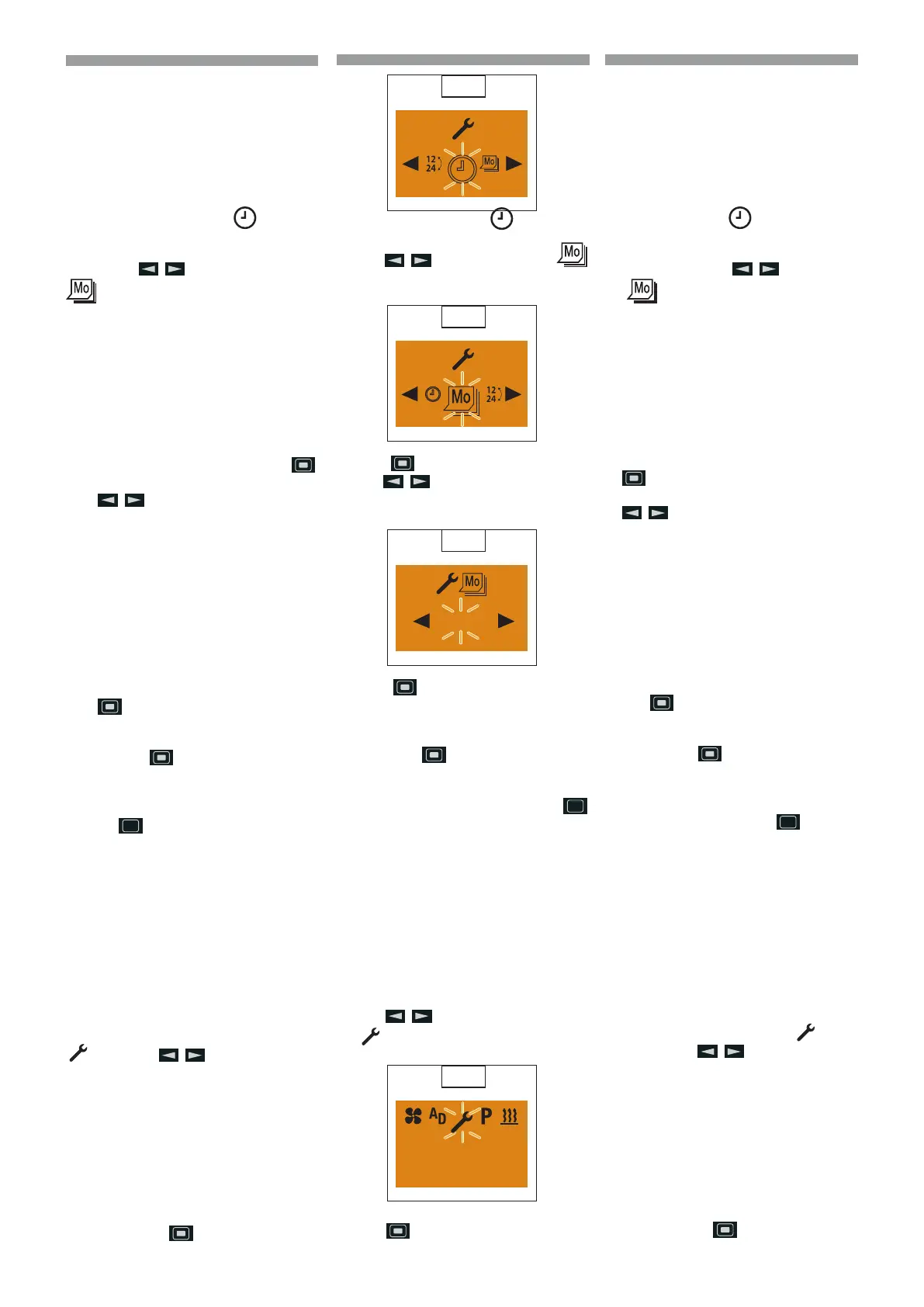
The Set the Time symbol is displayed
(
79).
Use the
button to select the
Weekday symbol. (80)
80
Press the button to conrm the setting.
Use the
button to select the week-
day.
(
81)
81
Mo.
Press the button to conrm the week-
day.
p
Please note! Do not press
the
button, as otherwise
Set the Weekday appears in
the display a gain. After ma-
king the setting, press the
button to return to the Set-
tings menu item or wail until
- if the vehicle lighting is On the
Settings menu item is displayed,
- if the vehicle lighting is O the
display lighting goes out.
Setting the time format
Display ON, the Start display appears.
Use the
button to select the sym-
bol
in the Menu bar. (82)
82
10:30
Mo.
Conrm the Settings menu item by pres-
sing the
button.
Viene visualizzato il simbolo
Impostare
l’ora. (
79)
Con il tasto selezionare il simbolo
Giorno della settimana. (80)
Confermare l’impostazione con il tasto
.
Selezionare il giorno della settimana con il
tasto .
(
81)
Confermare il giorno della settimana con il
tasto
.
p
Avvertenza! Non premere il ta-
sto
, altrimenti sul display
riappare Impostare giorno della
settimana. Al termine dell’im-
postazione tornare con il tasto
all’opzione Impostazioni del
menu oppure attendere nché
- in Illuminazione veicolo On
viene visualizzata l’opzio-
ne Impostazioni del menu,
- in Illuminazione veicolo O si
spegne l’illuminazione del di-
splay.
Impostare formato dell’ora
Display On, viene visualizzata la videata in-
iziale.
Selezionare dalla barra del menu il simbolo
con il tasto .
(
82)
Confermare l’opzione Impostazioni del
menu con il tasto
.
Wyświetli się symbol
ustawienia godzi-
ny. (
79)
Za pomocą przycisku wybrać sym-
bol dnia tygodnia. (80)
Potwierdzić ustawienie za pomocą przycis-
ku
.
Wybrać dzień tygodnia za pomocą przycis-
ku .
(
81)
Potwierdzić dzień tygodnia za pomocą pr-
zycisku
.
p
Ostrzeżenie! Nie naciskać przy-
cisku
, ponieważ spowoduje
to ponowne wyświetlenie opcji
Ustawianie dnia tygodnia. Po za-
kończeniu ustawiania wrócić, za
pomocą przycisku
do opcji
menu Ustawianie lub poczekać, aż
- przy włączonym oświet-
leniu pojazdu wyświetli
się opcja menu Ustawianie
- przy wyłączonym oświetleniu
pojazdu wyłączy się podświetla-
nie wyświetlacza.
Ustawianie formatu godziny
Wyświetlacz włączony, wyświetlany jest ek-
ran początkowy.
Wybrać na pasku menu symbol
za po-
mocą przycisku
.
(
82)
Potwierdzić opcję w menu Ustawienia za
pomocą przycisku
.
648870 IT-EN-PL (04/05/2015)










 To Next Page