Installation manual / Manusa
DTCXSO01EN-V10
109. Locking the keypad
8. Setting admin and user passwords
To access the advanced settings submenu, first access the FD service function. Numerical parameters are adjusted in
the same way as Technical Service functions (see section 5.1).
Setting admin password
Length of admin password and factory default
password.
The admin password must contain between 4 and 8.
The factory default password is [9999].
Admin password prompt. When the admin password is required, “SP” is displayed on the
screen.
Entering the numeric code. When entering the admin password, the digits on the display
should be noted, representing 2 numbers.
The number on the le shows the position in the password of
the digit being typed.
The number on the right shows the numbers making up the
password. Pressing key (2) increases the number on the le
(from position 1 to position 8) and pressing key (3) confirms the
number.
Setting user password
Factory default user password. The factory default sequence is to press the key four times (3).
User password prompt. When “US” appears on the display, this is a prompt for the user
password.
Setting user password. The user password is a sequential combination of 4 presses of
key (3) and door modes.
The number on the le indicates which element in the
sequence (position) is to be entered and the digit on the right
shows the key to be entered.
9. Locking the keypad
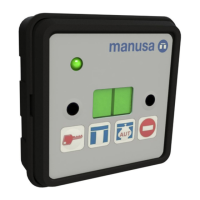
To avoid accidental operation, the switch keypad can be locked by simultaneously pressing keys (2) and
To unlock the keypad, simultaneously press keys (2) and
Depending on the operator used, locking the keypad may require a user password.


 To Next Page