Installation manual / Manusa
DTCXSO01EN-V10
66.2 Self-adjustment
6. Accessing Technical Service functions
To access Technical Service functions, follow the instructions below.
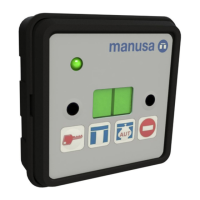
Press and hold key (3) and press key (2) repeatedly until F0 is displayed.
Release key (3).
Press (2) repeatedly for the functions to be shown in sequence on the display.
The available functions are:
F1
Opening speed setting, each leaf:
between (0)=40 cm/s and (9)=100 cm/s (Visio, Bravo),
between (0)=40 cm/s and (6)=80 cm/s (Activa+). Note 1
F2
Closing speed setting, each leaf: between (0)=15 cm/s and (9)=40 cm/s. Note 1
F3
Closing force setting: between (0)=40N and (9)=150N. Note 1
F4
Hold-open time setting: between (0)=0s and (9)=9.9s.
F5
Delayed closure setting: between (0)=0and (9)=99.9s.
F6
Inner radar sensitivity setting between (0)=1 and (8)=25
(only for Visio or Bravo operator with PWM radar or planar radar).
F7
Outer radar sensitivity setting between (0)=1 and (8)=25
(only for Visio or Bravo operator with PWM radar or planar radar)..
F8
Self-adjustment (Visio, Activa+ operator from v.523 and all versions of Bravo operator).
Clear width recognition self-adjustment (Visio+ operator).
F9
Language selection.
FA Reduced Opening or Pharmacy settings.
FB
Deletion of the authorised remote control list.
FC
Addition of remote controls to authorised list (max. 4).
FD
Advanced settings. Note 2
F0
EXIT Technical Service menu.
6.1 Changing numerical parameters
Press (2) repeatedly until the desired function appears. Next, press (3) to modify that function.
The parameter’s current value is shown on the display, represented by a number between 0 and 9.
Press (2) repeatedly until the desired value appears. Then press (3) to confirm.
Note 1: Setting unavailable for Visio+ operators / Note 2: Setting unavailable for Visio operators
6.2 Self-adjustment
Self-adjustment function depending on operator:
• Safety self-adjustment for Visio, Activa+ (from v.523) and Bravo operators (all versions).
• Clear width recognition self-adjustment for Visio+ operator. This does not change the operator settings; it only verifies
the positions of the mechanism’s travel limits.


 To Next Page