Installation manual I Manusa
D01230EN-v4
132. Commissioning
2.5.3 Administrator menu
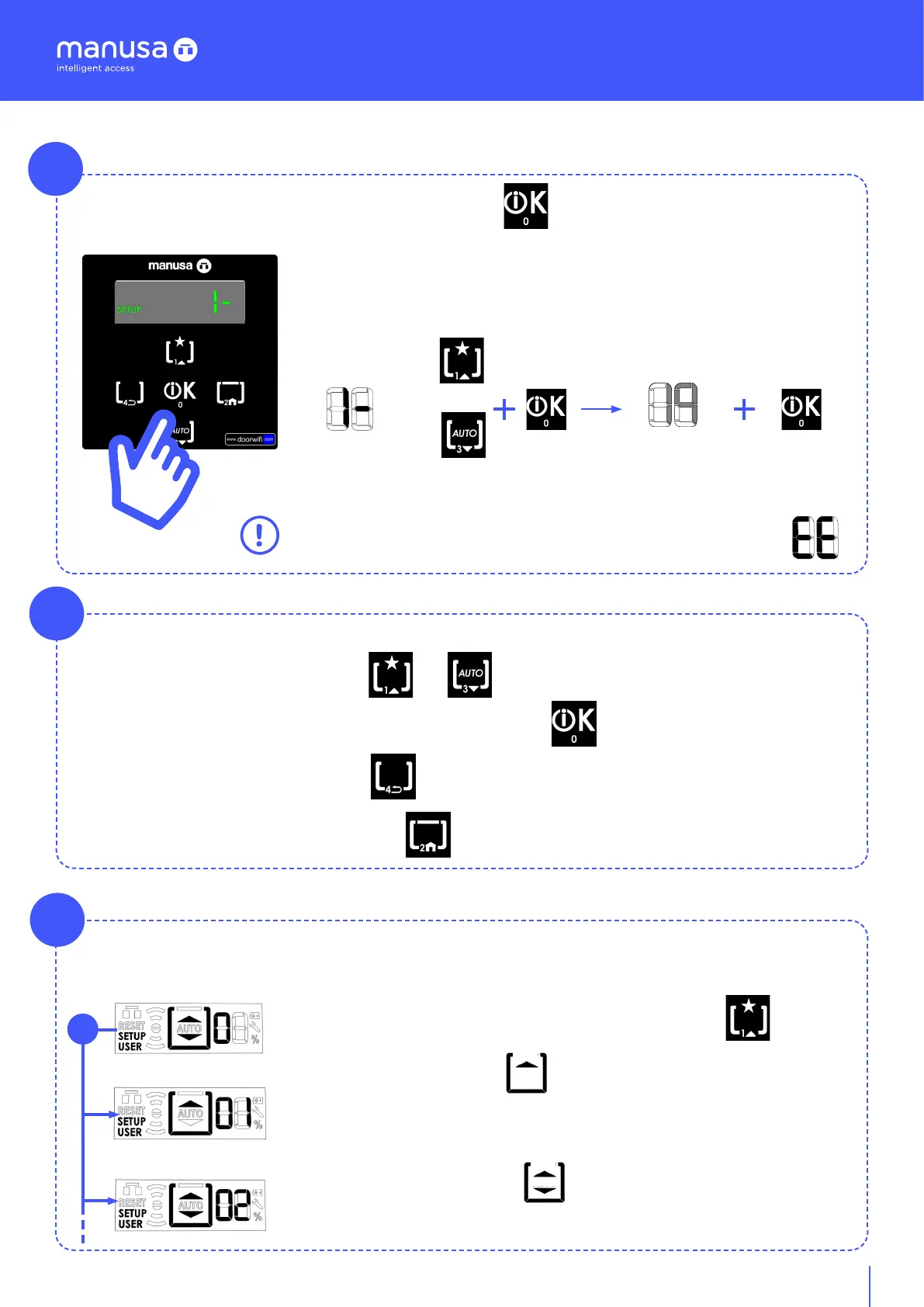
You access the administrator menu by pressing the key [T0] for 3 seconds. You are asked to enter a
PIN with [n] digits.
A
dígito -
dígito +
Enter PIN (default [9 9 9 9]):
The value of digits in “x” is increased or decreased by means of the keyboard
arrows, each time the desired digit is selected, confirm with the OK key.
With each confirmation the digit in “n” will increase in value, once the 4 PIN
values have been entered, confirm with the OK key.
• The PIN can be between 4 and 8 digits.
• If the error message appears, repeat sequence from the beginning.
Example: 1 digit PIN entry sequence
Once you are in the administrator menu and its submenus, you use the keys [T1] and [T3] to navigate.
o
To confirm the menu or an option in the menu, choose the key [T0].
To go back one step, choose the key [T4].
To return to the menu [0], choose the key [T2].
Workflow:
This menu defines the function of the configurable key [T1]:
Exit only mode. Menu 0.1:
The door opens only when the internal sensors actuate. In this mode, the
door works with the lock activated. If this mode is set, the screen shows a
flashing “Exit only” icon.
Pushbutton mode. Menu 0.2:
Actuates a single automatic opening/closing of the door. If this mode is set,
the screen shows a flashing “Pushbutton” icon:
Menu 0: User function
0
0.1 Sólo salir.
0.2 Modo pulsador
B
C
[n] - [x]
“ “


 To Next Page