Installation manual I Manusa
D01230EN-v4
172. Commissioning
A
2.5.4 e-SAT menu
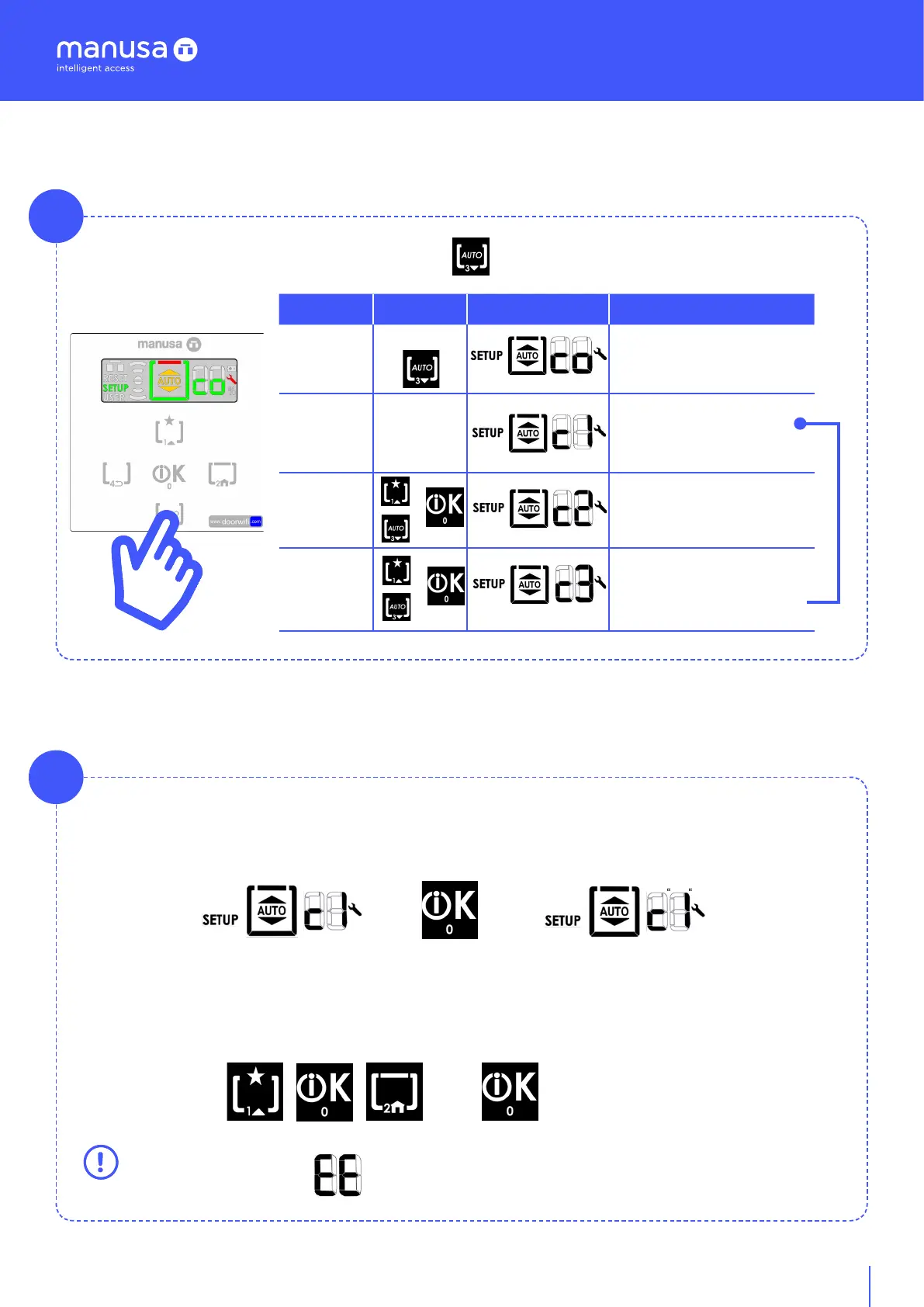
You access the e-SAT menu by pressing the key [T3] for 3 seconds.
Menu Keypad Screen Screen
e-SAT
3 sec
Access to e-SAT menu
........ ........
Submenu 100
Enter sequence
1xx
........
+
Submenu 200
Enter sequence
2xx
........ +
Submenu 300
Enter sequence
3xx
B
Navigation in the e-SAT menus takes place directly using codes, so once you confirm the desired level,
you enter the sequence associated with a specific function. For example:
+ =
[Shown on submenu screen] + [key] = [shown on screen of confirmed submenu]
When the level digit flashes, you enter the sequence and confirm with the key [T0].
Example: [ 1 0 2] + OK
+ =WiFi On
If the sequence is incorrect appears on the screen and you return to the start of the relevant
menu [c X]..


 To Next Page