14
Getting started
Basic connections Basic operation Specifications IndexAdvanced connections Advanced operations Explanation of terms Troubleshooting
ENGLISH
14
Getting started
Basic connections Basic operation Specifications IndexAdvanced connectionsAdvanced connections Advanced operations Explanation of terms Troubleshooting
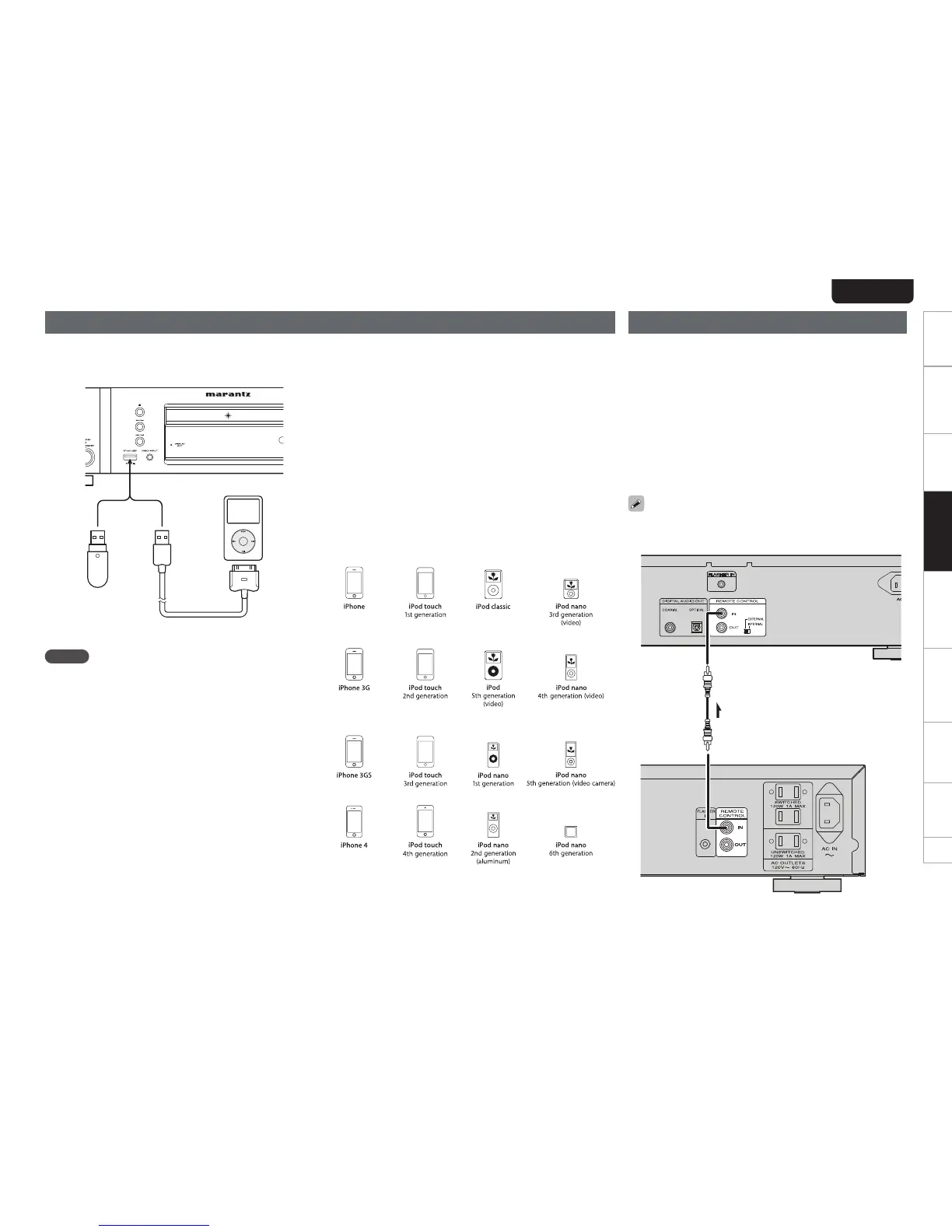
USB memory device/iPod connection
Connect a USB memory device or iPod to the USB port on the front
panel of the unit.
iPod cable
(Sold separately)
NOTE
tWhen connecting an iPhone to this unit, keep the iPhone at least
20 cm away from this unit. If the iPhone is kept closer to this unit
and a telephone call is received by the iPhone, noise may be output
from this device.
tIt is not possible to connect and use a computer via the USB port of
this unit using a USB cable.
Remote control connection
When you use this unit connected to a marantz amplifier, this unit
receives operation signals sent from the amplifier and operates
accordingly.
n Connection
Use the supplied remote connection cable to connect the REMOTE
CONTROL IN terminal of this unit to REMOTE CONTROL OUT
terminal of the amplifier.
n Setting
Turn the EXTERNAL/INTERNAL switch on the unit to “EXTERNAL”.
tThis setting will disable remote sensor reception of this unit.
tTo operate the unit, point the remote control at the remote
sensor of the amplifier.
To use this unit by itself without connecting an amplifier, turn the
switch to “INTERNAL”.
Signal flow
Amplifier
Remote
connector cable
(supplied)
Set to “EXTERNAL”.
The unit
n Supported iPod Models
Made for
tiPod touch (4th generation)
tiPod touch (3rd generation)
tiPod touch (2nd generation)
tiPod touch (1st generation)
tiPod classic
tiPod with video
tiPod nano (6th generation)
tiPod nano (5th generation)
tiPod nano (4th generation)
tiPod nano (3rd generation)
tiPod nano (2nd generation)
tiPod nano (1st generation)
tiPhone
tiPhone 3G
tiPhone 3GS
tiPhone 4



 To Next Page