18
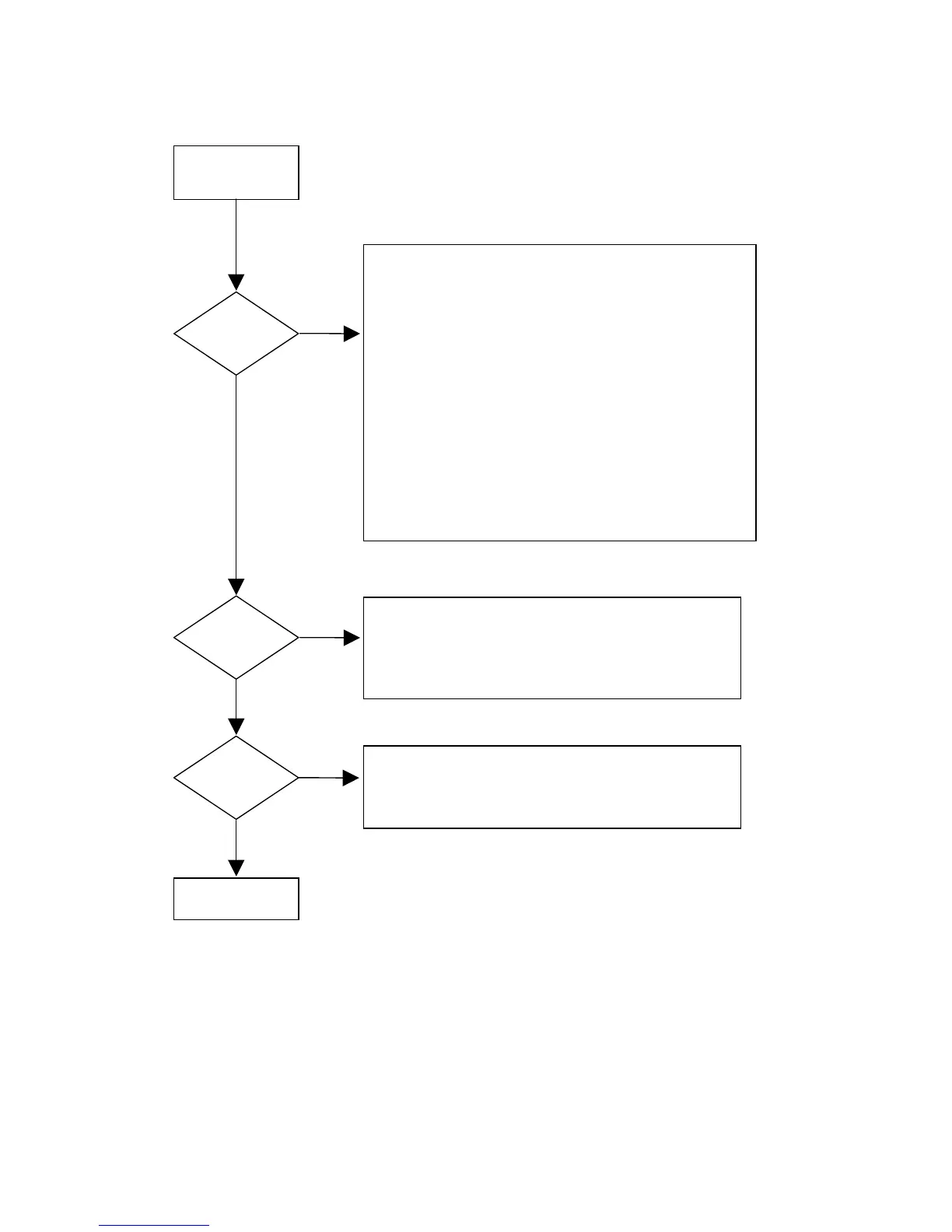
SWITCH POWER ON,
EXIT STAND BY
MODE
DISPLAY BOARD
OK
DISPLAY?
CHECK :
• SUPPLY VOLTAGES
⇒ -30V ±5% at conn. JY01-2
⇒ 4V3 ± 10% between conn. JY01-1 and JY01-3
⇒ +5V ± 5 % at conn. JY01-10
• CLOCK SIGNAL
⇒ 8Mhz at pins 8, 9 of QY01
• CONTROL SIGNALS
⇒ RESETN 3V3 (high) at conn.JY01-4 after start up
⇒ I2C DATA at conn. JY01-5
⇒ I2C CLK at conn. JY01-7
• FTD DRIVE LINES
⇒ Filament voltage 4V3 ± 10% between pins 1-2 and
pins 52-53 of the FTD (VY01)
⇒ Grid lines (see test instructions)
⇒ Segment lines (see test instructions)
• ELECTRICAL SERVICE DIAGNOSTICS - Local display test
YES
YES
YES
KEY
FUNCTIONS?
REMOTE
CONTROL?
NO
NO
CHECK:
• KEY MATRIX LINES (see test instructions)
• ELECTRICAL SERVICE DIAGNOSTICS – Keyboard test
• EASY JOG KNOB (see test instructions)
NO
CHECK:
• IR RECEIVER signal at pin 22 of QY01
• ELECTRICAL SERVICE DIAGNOSTICS – Remote control test
7.1.3 Display board troubleshooting guide
Figure 7-9



 To Next Page