30
Cable connection
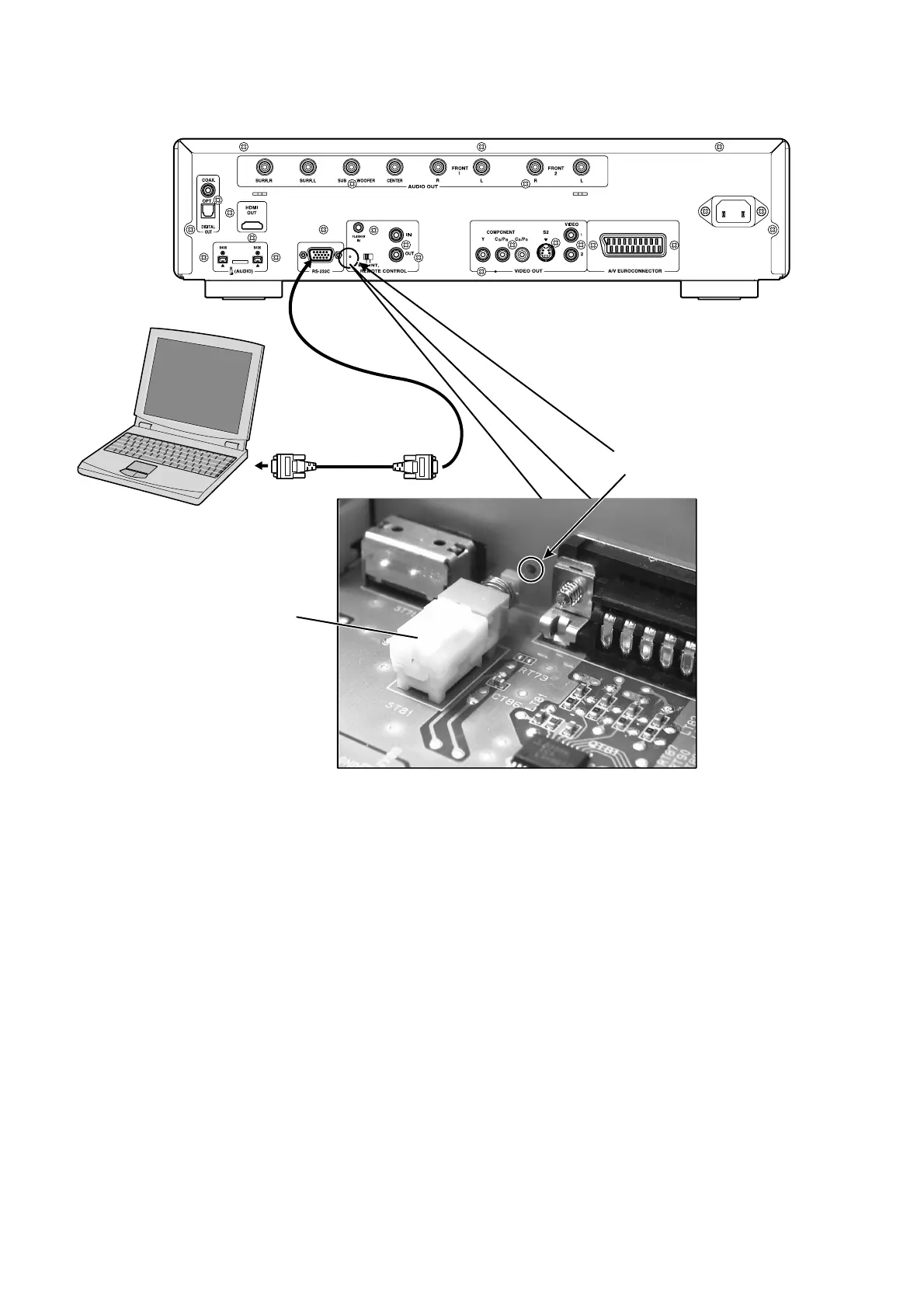
PC と DVD Player の接続
Connect RS-232C on the rear pan el of the DVD Player
and Serial Port of windows PC with RS-232C cable.
Insert a thin rod to the hole near the RS-232C Port and
push the switch inside to turn on the switch.
Turn on by the POWER switch of DVD Player.
The DVD Player’s STANDBY (red) and DISPLAY OFF
(red) in di ca tors turn on lights simultaneously.
Windows PC の Serial Port と DVD Player の RS-232C
Port
を RS-232C ケーブルで接続します。
細い棒を使い
DVD Player の RS-232C Port の右となりに
ある穴からスイッチ
(ST81) を押して書き込みモードに入
ります。
DVD Player の Front Panel にある電源スイッチを押して電
源を入れます。
DVD Player の STANDBY( 赤 )、DISPLAY OFF( 赤 ) が点
灯します。
RS232C Dsub-9 pin cable
(female to female/Straight cable)
Hole
ST81
PC (Windows 2000, XP )
with RS-232C port



 To Next Page