29
3. Writing Procedure
When you carry out continuously from "2. The writing
software set up procedure", please move on to "Cable
connection" of next page.
Software is launched when the writ ing software is being
terminated.
Click Start, Programs, Renesas, Flash Development
Toolkit 3.3 and Flash Development Toolkit 3.3.
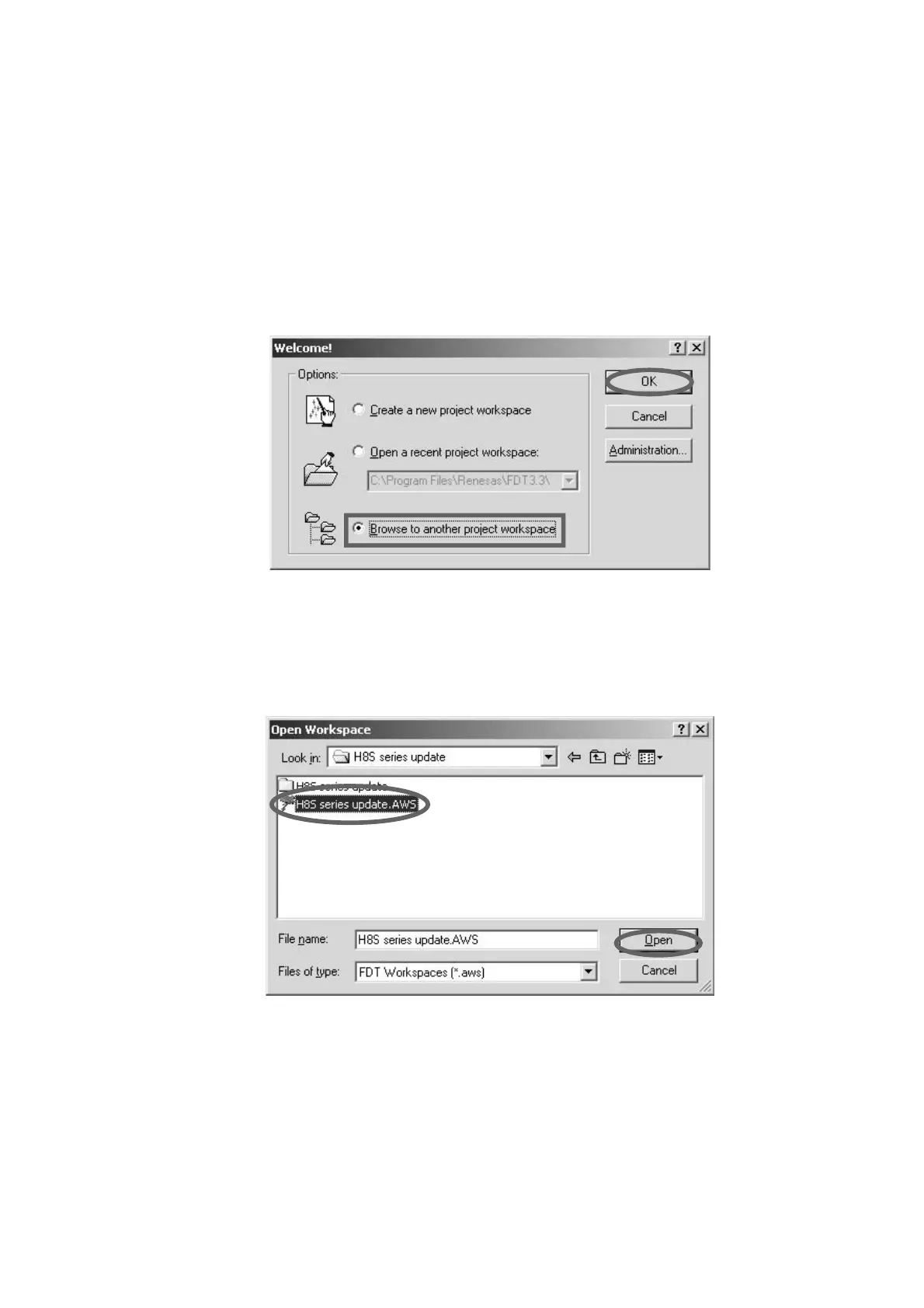
Check Browse to another project workspace, and
click OK.
3. 書き込み方法
インストールから引き続いて作業をしている場合は次頁の
「
PC と DVD Player の接続 」 に進んでください。
書き込みソフトウェアを終了させている場合は
Start →
Programs → Renesas → Flash Development Toolkit
3.3
→ Flash Development Toolkit 3.3 をクリックして起
動します。
Browse to another project workspace にチェックを入
れて
OK をクリックします。
Click the H8S series update.AWS, and click Open.
Remark: The file is stored in c:\Program Files\Renesas\
FDT3.3\Workspace\H8S series update.
H8S series update.AWS をクリックして、Open をク
リックします。
注意)
ファイルは c:
\
P
rogram Files
\
R
enesas
\
FD
T3.3
\
Workspace
\
H8
S series update に格納されてい
ます。



 To Next Page