Remote control unit
.
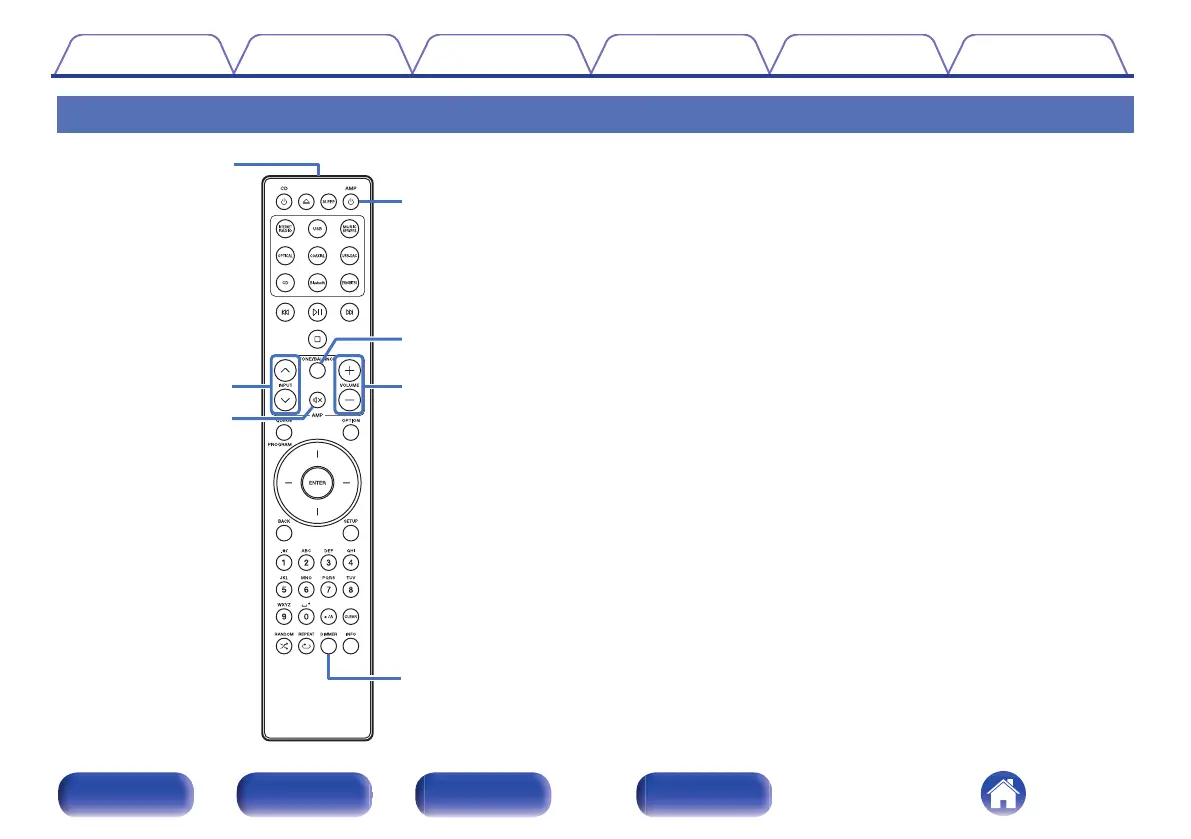
The remote control provided with this unit can control a Marantz Network
SACD player.
0
“Network SACD player operations” (v p. 12)
o
Operating this unit
A
Remote control signal transmitter
This transmits signals from the remote control unit. (v p. 5)
B
INPUT buttons (ml)
This selects the input source. (v p. 24)
C
Mute button (:)
This mutes the output audio. (v p. 24)
D
Power operation button (AMP X)
0
This turns the power on/off (standby). (v p. 23)
0
This turns Auto Standby mode on/off. (v p. 30)
E
TONE/BALANCE button
0
This turns tone balance control on/off. (v p. 24)
0
The lighting setting menu appears on the display. (v p. 29)
F
VOLUME buttons (no)
These adjust the volume level. (v p. 24)
G
DIMMER button
Adjust the display brightness of this unit. (v p. 28)
Contents
Connections Playback Settings Tips Appendix
11
Front panel Rear panel
Remote control
unit
Index



 To Next Page