10
ENGLISH
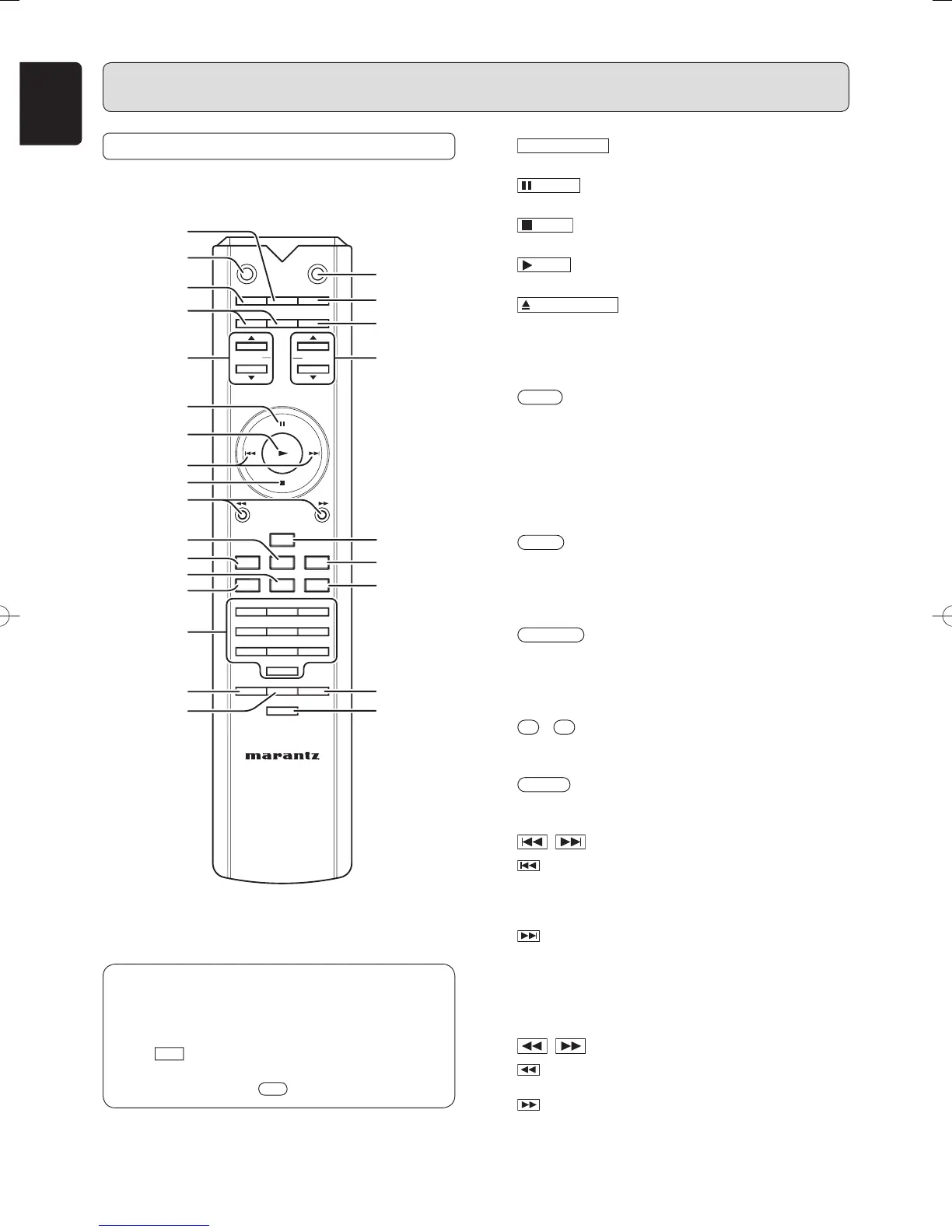
NAMES AND FUNCTIONS
REMOTE CONTROLLER
CANCEL
A-B
SOUND
INPUT
QUICK
VOLUME
OPEN/
RECALL
NOISE
MODECLOSE
DISPLAY TIME TEXT
MENU SCROLLENTER
AMP
REPLAY
AMS
PROG
RANDOM
REPEAT
4
123
56
789
0
DIGITAL OUT
DC FILTERSHAPER FILTER
⁄8
⁄1
¤0
‹1
‹7
n
,
¤3
m
¤4
¤7
¤9
¤6
¤2
‹3
¤1
‹4 ‹6
‹5
¤8
‹0
‹2
‹8
¤5
⁄9
b
b
SOUND MODE
button
n
PAUSE
button
m
STOP
button
,
PLAY
button
⁄1
OPEN/CLOSE
button
The buttons listed above are the same to the buttons on
the front panel of the main unit.
Please see the correspond items in “Front Panel” section.
⁄8
TIME
button
This button is used to switch from the text display to the
time display when using a text-compatible Super Audio
CD. It is also used to change the time display.
Each time that it is pressed, the displayed time cycles
from track elapsed time → track remaining time → total
remaining time → track elapsed time. (See page 14)
⁄9
TEXT
button
This button is pressed to switch the main screen from
the time display to the text display when using a text-
compatible Super Audio CD. (See page 19)
¤0
DISPLAY
button
This button switches the display screen on and off.
The ⁄0 indicator turns on when Display Off is set. (See
page 20)
¤1
0
-
9
(Numerical buttons)
Use these buttons to select tracks directory.
¤2
PROG.
button
This button is for program play. (See page 17)
¤3 , (Track skip buttons)
: When this button is pressed, the unit goes back
to the beginning of the current track. If the button
is pressed more times, the track being played is
skipped back.
: Each time this button is pressed, the track being
played is skipped forward.
Note:
Search buttons are provided separately for the remote
control unit. Use ¤4 Search buttons for search function.
¤4 , (Search buttons)
: While this button is pressed during playback,
tracks are searched backward.
: While this button is pressed during playback,
tracks are searched forward.
In this instruction manual, some operations can only be
performed with the remote control. For operations that
can be performed with buttons both on the main unit
and on the remote control, the button names are shown
in the mark. And for operations that can only be
performed with buttons on the remote control, the button
names are shown in the mark.
SA-11S2U01Eng.indd10SA-11S2U01Eng.indd10 07.8.810:02:32AM07.8.810:02:32AM



 To Next Page