14
ENGLISH
NORMAL PLAYBACK
7 Super Audio CD player playback
DISPLAY OFF
176.4KHz
88.2KHz
44.1KHz
EXT.CLOCK
INV.PHASE
LOCK
OPEN/
CLOSE
PAUSE
STOP
PLAY
SOUND
MODE
POWER ON/OFF
DISPLAY OFF
qw, er
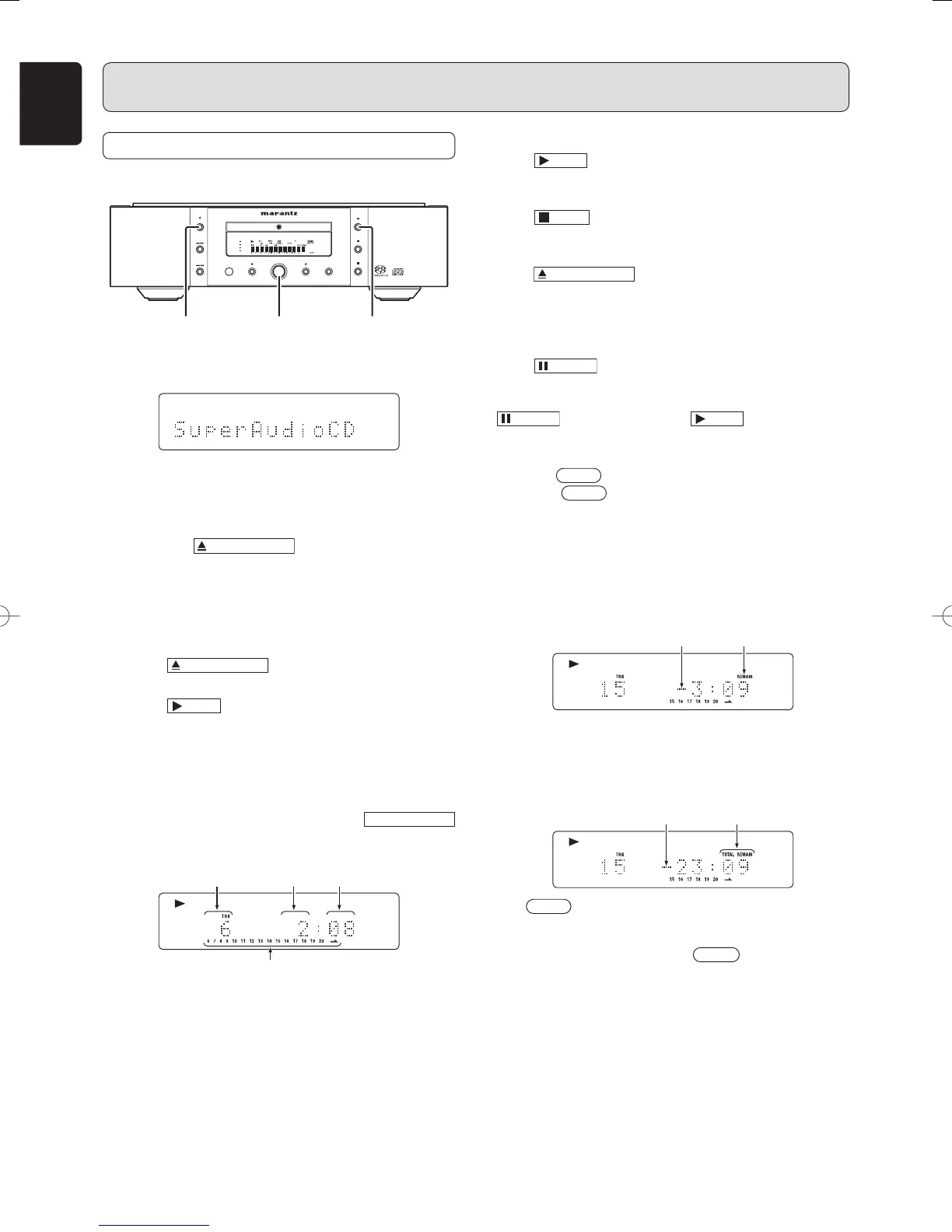
q Press POWER switch to turn on.
LCD
The display cycles from TOC Reading → No Disc (when
no disc is loaded) → Super Audio CD (when the start
sound mode setting is Super Audio CD).
w Press the
OPEN/CLOSE
button
The disc tray comes out. Place the disc with label side up
on the tray.
To play a single (8cm) CD, place the disc with the
indentation at the center of the tray.
e Press
OPEN/CLOSE
button.
r Press
PLAY
button.
Disc type is automatically detected and playback is
started. Track number and track elapsed time(minute,
second) appear on the display.
• For Super Audio CD/CD hybrid-layer discs (See page 3),
the layer that is set in the start sound mode (See page 15)
is played. To change the layer, use the
SOUND MODE
button. (See page 15)
(Exp.:Track 6, Elapsed time 2 min 8 sec)
Number of current track
Minutes Seconds
Remaining track numbers
Playback automatically stops at the end of the final track.
OPERATION
To start playback form the fi rst track
Press
PLAY
button.
To stop playback
Press
STOP
button.
To eject disc
Press
OPEN/CLOSE
button to open the disc tray and take
the disc off. Press the button again to close the tray.
Disc tray must be closed when the unit is not be used.
To pause playback
Press
PAUSE
button.
PAUSE indicator will light and playback is paused at the
point that the button is pressed. To restart playback, press
PAUSE
button again or press
PLAY
button.
To change time display
Press the
TIME
button on the remote control.
Each time
TIME
button is pressed, display will change in
the following order. “Track elapsed time” → “Track remaining
time” → “Total remaining time” → “Track elapsed time”.
• Track remaining time
(The remaining playing time from the playing point
to the end of the current track)
“–” is displayed
“REMAIN” is
displayed
• Total remaining time
(The remaining playing time from the playing point
to the end of the last track)
“–” is displayed
“TOTAL REMAIN”
is displayed
• If
TIME
button is pressed when Super Audio CD disc
that supports text is in use, time display is given priority
and the text information will not be displayed afterward. To
see the text information, press
TEXT
button.
SA-11S2U01Eng.indd14SA-11S2U01Eng.indd14 07.8.810:02:34AM07.8.810:02:34AM



 To Next Page