19
ENGLISH
BASIC
CONNECTIONS
BASIC OPERATION
ADVANCED
CONNECTIONS
SETUP
ADVANCED
OPERATION
TROUBLESHOOTING
OTHERS
NAMES AND
FUNCTIONS
ADVANCED
CONNECTIONS
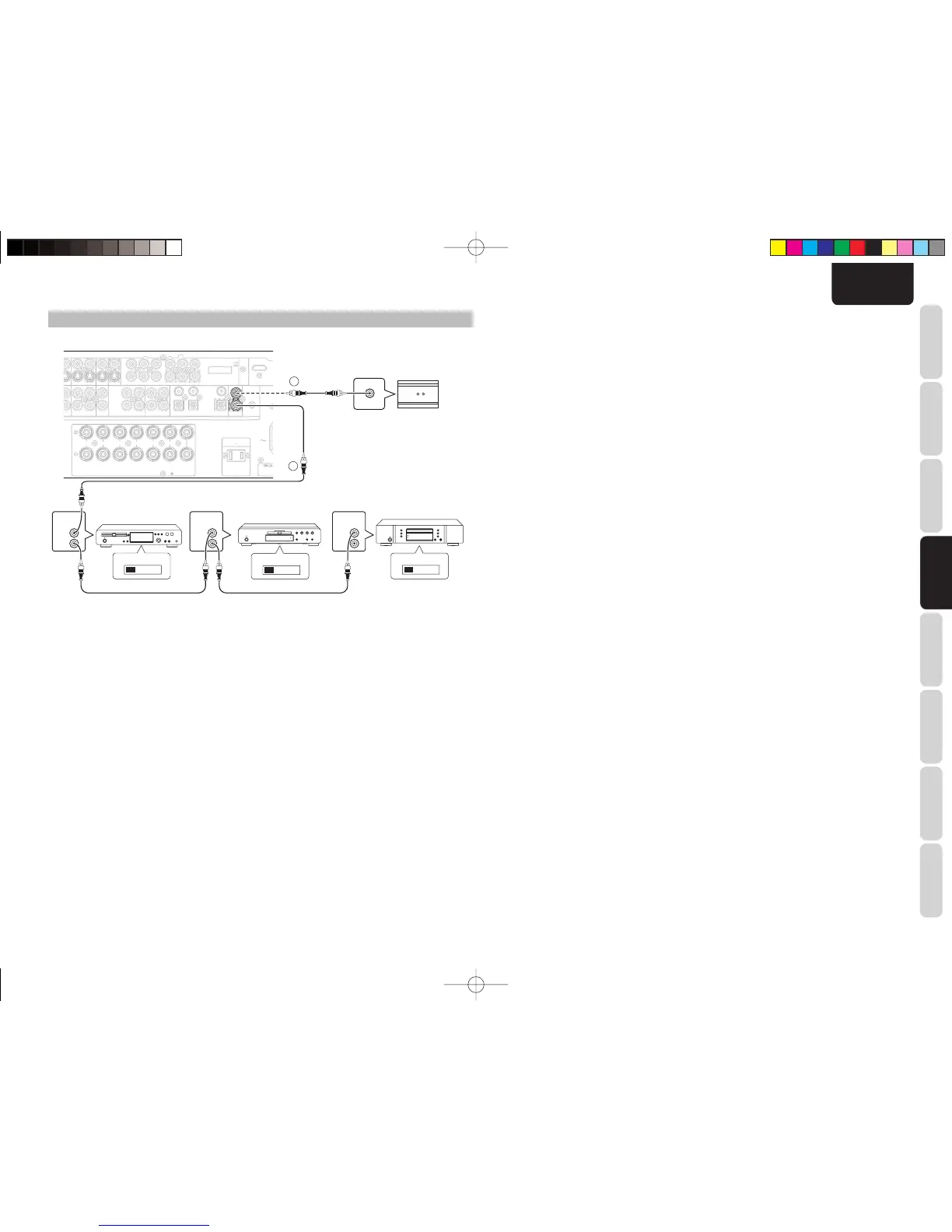
CONNECTING THE REMOTE CONTROL JACKS
q
You can control other Marantz products through this
unit with the remote controller by connecting the
REMOTE CONTROL terminals on each unit.
The signal transmitted from the remote controller
is received by the remote sensor on this unit. Then
the signal is sent to the connected device through
this terminal. Therefore you need to aim the remote
signal only to the unit. Also, if a Marantz power
amplifi er (some models excluded) is connected to
one of these terminals, the power amplifi er’s, power
switch is synchronized with this unit’s power switch.
Set the REMOTE CONTROL SWITCH on the back of
other units (not the SR4003) to “EXT”.(EXTERNAL)
to use this feature.
R
REMOTE
CONTROL
REMOTE
CONTROL
REMOTE
CONTROL
IN
OUT
IN
OUT
IN
OUT
EXTERNAL INTERNAL
EXTERNAL INTERNAL
EXTERNAL INTERNAL
1
RC OUT
2
DVD playerCD recorder CD player
OPTION
w
Whenever external infrared sensors or similar
devices are connected to RC-5 IN of the unit, be sure
to always disable operation of the infrared sensor on
the unit by using the following procedure.
1.
Hold down the SURROUND MODE button and
MENU button on the front panel at the same
time for fi ve seconds.
2.
The setting “IR=ENABLE” is shown on the FL
DISPLAY.
3.
Press the 1 or 2 cursor button to change this to
“IR=DISABLE”.
4.
Press the ENTER button. Once this setting
is made, the infrared sensor on the unit is
disabled.
Note:
Be sure to set to “IR=ENABLE” when external
infrared sensors or similar devices are not connected.
Otherwise, the unit will be unable to receive remote
control commands.
5.
To restore the original setting, perform steps 1
to 4 to set to “IR=ENABLE”.
SR4003U01E22.indd19SR4003U01E22.indd19 08.6.205:06:26PM08.6.205:06:26PM



 To Next Page