To Next Page
A
Angelica SpencerSep 8, 2025
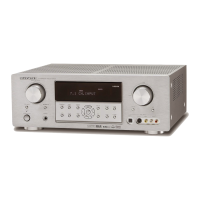
Why won't my Marantz Stereo Receiver turn on?
- DDiane GarzaSep 8, 2025
If your Marantz Stereo Receiver cannot be turned on, ensure that the power plug is properly connected to the outlet.

Why won't my Marantz Stereo Receiver turn on?
If your Marantz Stereo Receiver cannot be turned on, ensure that the power plug is properly connected to the outlet.
How to fix FM or AM reception on Marantz Stereo Receiver?
If your Marantz Stereo Receiver is not receiving FM or AM signals, ensure that the indoor FM and AM antennas are correctly connected to the FM and AM antenna outlets.
What to do if there is no speaker output from Marantz Stereo Receiver?
If there is no speaker output from your Marantz Stereo Receiver, disconnect the headphones from the headphone jack. The speakers will not output sound when headphones are connected.
Why is there no audio from the center channel speaker on my Marantz Stereo Receiver?
If there's no audio output from the center channel speaker of your Marantz Stereo Receiver, check these: * Ensure the center speaker cable is correctly connected. * If STEREO is selected for Surround mode, no sound will come from the center speaker; select another Surround mode. * Verify that Center is not set to NONE in SETUP mode; make the correct setting if needed.
Why is there no audio from the surround speakers on my Marantz Stereo Receiver?
If you are not getting any audio output from the surround speakers on your Marantz Stereo Receiver, check the following: * Ensure the surround speaker cable is correctly connected. * If STEREO is selected for Surround mode, no sound will be output from the surround speakers; set another Surround mode. * Verify that Surround is not set to NONE in SETUP mode; make the correct setting if needed.
Why can't I select CSII mode on my Marantz Stereo Receiver?
You cannot select CSII mode on your Marantz Stereo Receiver if the input signal is incompatible. Use a 2 channel Dolby Digital input signal, PCM input signal, or analog input signal.
Why can't I select Pro Logic IIx mode on my Marantz Stereo Receiver?
You cannot select Pro Logic IIx mode on your Marantz Stereo Receiver if the input signal is incompatible. Use a 2 channel Dolby Digital input signal, PCM input signal, or analog input signal.
Why can't I select Neo:6 mode on my Marantz Stereo Receiver?
You cannot select Neo:6 mode on your Marantz Stereo Receiver if the input signal is incompatible. Use a 2 channel Dolby Digital input signal, PCM input signal, or analog input signal.
What to do if I have incorrect audio from a channel on Marantz Stereo Receiver?
If you are experiencing incorrect audio from a channel on your Marantz Stereo Receiver, ensure the speaker cable is connected correctly by referring to the connection diagram.
Why is there noise during FM reception on my Marantz Stereo Receiver?
If you hear noise during FM reception with your Marantz Stereo Receiver, it may be due to weak radio waves from the broadcasting station. Try installing an FM outdoor antenna.
Explains DTS, DTS Neo:6, DTS ES, and DTS 96/24 audio formats.
Details Dolby Digital EX, Dolby Pro Logic IIx, and Dolby Headphone features.
Instructions for operating the remote, loading batteries, and handling cautions.
Procedures for programming, scanning, checking, and resetting remote codes.
Step-by-step guide to learning remote control codes.
Methods for erasing codes by buttons, sources, or all sources.
Instructions for connecting audio sources like CD, Tape, and Tuner.
Guide for connecting digital audio sources via coaxial or optical.
Instructions for connecting video sources like DVD, VCR, and TV.
Guide for connecting components via HDMI for digital video/audio.
Guide to using the OSD menu for system operations.
Covers Input, Speaker, Preference, Surround, and other setup menus.
Explains AUTO, EX/ES, DO, and DTS surround modes.
Details Circle Surround, Stereo, Virtual, and Multi CH. ST modes.
Guide to listening to the tuner, auto/manual tuning, and direct frequency input.
Instructions for storing, recalling, clearing, sorting, and naming presets.
Covers XM listening, signal check, display, search modes, and direct call.
Procedure to check XM signal strength and retrieve Radio ID.
Methods for searching and directly selecting XM channels.
How to lock/unlock front panel controls and reset the unit.
 General
| Total Harmonic Distortion | 0.08 % |
|---|---|
| Input Sensitivity | 200 mV |
| Tuner Bands | AM/FM |
| Input Impedance | 47k ohms |
| HDMI Switching | Yes |
| Speaker Impedance | 6-8 Ohm |
| Inputs | HDMI |
| Outputs | HDMI |
| Dimensions | 17.3 in x 15 in x 6.3 in |
| Weight | 10.5 kg (23.1 lbs) |