EasyManua.ls Logo

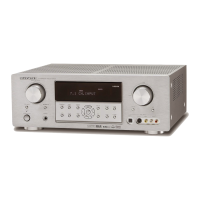
Marantz SR4002/SR5002 - User Manual

Marantz SR4002/SR5002
60 pages
Print Icon
To Next Page IconTo Next Page
Loading...
Model SR4002/SR5002 User Guide
AV Surround Receiver
SR4002-5002UDFU00cover.inddISR4002-5002UDFU00cover.inddI 07.7.92:46:20PM07.7.92:46:20PM

Table of Contents

Questions and Answers

  • T
    Tony WatsonAug 21, 2025
    What to do if my Marantz Stereo Receiver has no sound and picture?
    • S
      Shannon ThomasAug 22, 2025
      If your Marantz Stereo Receiver has power but no sound or picture, check the following: * Ensure that mute is off by using the remote controller to cancel it. * Verify the input cable is correctly connected according to the connection diagram. * Adjust the master volume, ensuring it's not turned all the way down. * Confirm the SOURCE position is correctly selected.
  • L
    lawrencemorrisSep 4, 2025
    Why is there noise during FM reception on my Marantz Stereo Receiver?
    • B
      Brittney ShahSep 4, 2025
      If you hear noise during FM reception with your Marantz Stereo Receiver, it may be due to weak radio waves from the broadcasting station. Try installing an FM outdoor antenna.
  • C
    Christina OrtizSep 2, 2025
    Why is there noise during AM reception on my Marantz Stereo Receiver?
    • M
      Mr. Dennis Sawyer MDSep 3, 2025
      If you hear noise during AM reception on your Marantz Stereo Receiver, try changing the location where the AM indoor antenna is set up, as the reception might be affected by other electrical fields.
  • M
    Mike WilliamsonSep 1, 2025
    Why is my Marantz Stereo Receiver remote not working?
    • K
      Kevin HaynesSep 1, 2025
      If the Marantz Stereo Receiver remote controller isn't working, try these steps: * Replace all batteries with new ones. * Ensure the remote controller’s function-key setting is correct by selecting the appropriate equipment to control. * Move closer to the unit. * Make sure there are no obstructions between the unit and the remote.
  • L
    Linda ClaytonAug 30, 2025
    What to do if there is no output to Sub Woofer Out on Marantz Stereo Receiver?
    • D
      Don MunozAug 30, 2025
      If there is no output to the Sub Woofer Out on your Marantz Stereo Receiver, check if Sub-woofer = NONE has been selected in SETUP mode. If so, select Sub-woofer = YES.
  • A
    Ariana WatsonAug 29, 2025
    Why is there no audio from the surround back speakers on my Marantz Stereo Receiver?
    • R
      robert00Aug 29, 2025
      If there is no audio output from the surround back speakers on your Marantz Stereo Receiver, check the following: * Ensure the surround back speaker cable is correctly connected. * Set the surround mode to EX/ES, as other modes will not output sound to these speakers. * Verify that Surround back is not set to NONE in SPEAKERS SIZE SETUP; make the correct setting if needed.
  • Z
    zadamsAug 27, 2025
    Why is there no audio from the surround speakers on my Marantz Stereo Receiver?
    • E
      Emily ConnerAug 27, 2025
      If you are not getting any audio output from the surround speakers on your Marantz Stereo Receiver, check the following: * Ensure the surround speaker cable is correctly connected. * If STEREO is selected for Surround mode, no sound will be output from the surround speakers; set another Surround mode. * Verify that Surround is not set to NONE in SETUP mode; make the correct setting if needed.
  • D
    Dr. Jeanette DavisAug 27, 2025
    Why is there no audio from the center channel speaker on my Marantz Stereo Receiver?
    • S
      Sarah FisherAug 27, 2025
      If there's no audio output from the center channel speaker of your Marantz Stereo Receiver, check these: * Ensure the center speaker cable is correctly connected. * If STEREO is selected for Surround mode, no sound will come from the center speaker; select another Surround mode. * Verify that Center is not set to NONE in SETUP mode; make the correct setting if needed.
  • R
    Robert DuarteAug 25, 2025
    What to do if there is no speaker output from Marantz Stereo Receiver?
    • D
      Deborah GonzalesAug 25, 2025
      If there is no speaker output from your Marantz Stereo Receiver, disconnect the headphones from the headphone jack. The speakers will not output sound when headphones are connected.
  • J
    Jason CarpenterAug 23, 2025
    How to fix FM or AM reception on Marantz Stereo Receiver?
    • B
      Barbara WyattAug 23, 2025
      If your Marantz Stereo Receiver is not receiving FM or AM signals, ensure that the indoor FM and AM antennas are correctly connected to the FM and AM antenna outlets.

Summary

Important Safety Instructions

Features

DTS Digital Surround Technologies

Explains DTS, DTS Neo:6, DTS ES, and DTS 96/24 audio formats.

Dolby Digital Technologies

Details Dolby Digital EX, Dolby Pro Logic IIx, and Dolby Headphone features.

Before Use

Remote Controller Usage

Instructions for operating the remote, loading batteries, and handling cautions.

Remote Controller

Remote Control Operation

Controlling Marantz Components

Basic Operation

Remote Control Code Setup

Procedures for programming, scanning, checking, and resetting remote codes.

Learn Mode

Learning Procedure

Step-by-step guide to learning remote control codes.

Erasing Programmed Codes

Methods for erasing codes by buttons, sources, or all sources.

Connections

Audio Component Connections

Instructions for connecting audio sources like CD, Tape, and Tuner.

Digital Component Connections

Guide for connecting digital audio sources via coaxial or optical.

Video Component Connections

Instructions for connecting video sources like DVD, VCR, and TV.

HDMI Component Connections

Guide for connecting components via HDMI for digital video/audio.

Setup

On-Screen Display Menu System

Guide to using the OSD menu for system operations.

Setup Main Menu Options

Covers Input, Speaker, Preference, Surround, and other setup menus.

Simple Setup

Basic Operation (Playback)

Surround Mode

Digital Surround Modes

Explains AUTO, EX/ES, DO, and DTS surround modes.

Other Surround Modes

Details Circle Surround, Stereo, Virtual, and Multi CH. ST modes.

Other Function

Basic Operation (Tuner)

Tuner Operations

Guide to listening to the tuner, auto/manual tuning, and direct frequency input.

Preset Memory Operations

Instructions for storing, recalling, clearing, sorting, and naming presets.

XM Tuner Operations

Covers XM listening, signal check, display, search modes, and direct call.

Listening to XM Satellite Radio (SR5002 Only)

Checking XM Signal and Radio ID

Procedure to check XM signal strength and retrieve Radio ID.

XM Search and Direct Call Modes

Methods for searching and directly selecting XM channels.

XM Satellite Radio (Troubleshooting)

Front Panel Lock and Reset Procedures

How to lock/unlock front panel controls and reset the unit.

Troubleshooting

Marantz SR4002/SR5002 Specifications

General IconGeneral
Total Harmonic Distortion0.08 %
Input Sensitivity200 mV
Tuner BandsAM/FM
Input Impedance47k ohms
HDMI SwitchingYes
Speaker Impedance6-8 Ohm
InputsHDMI
OutputsHDMI
Dimensions17.3 in x 15 in x 6.3 in
Weight10.5 kg (23.1 lbs)

Related product manuals