ENGLISH
13
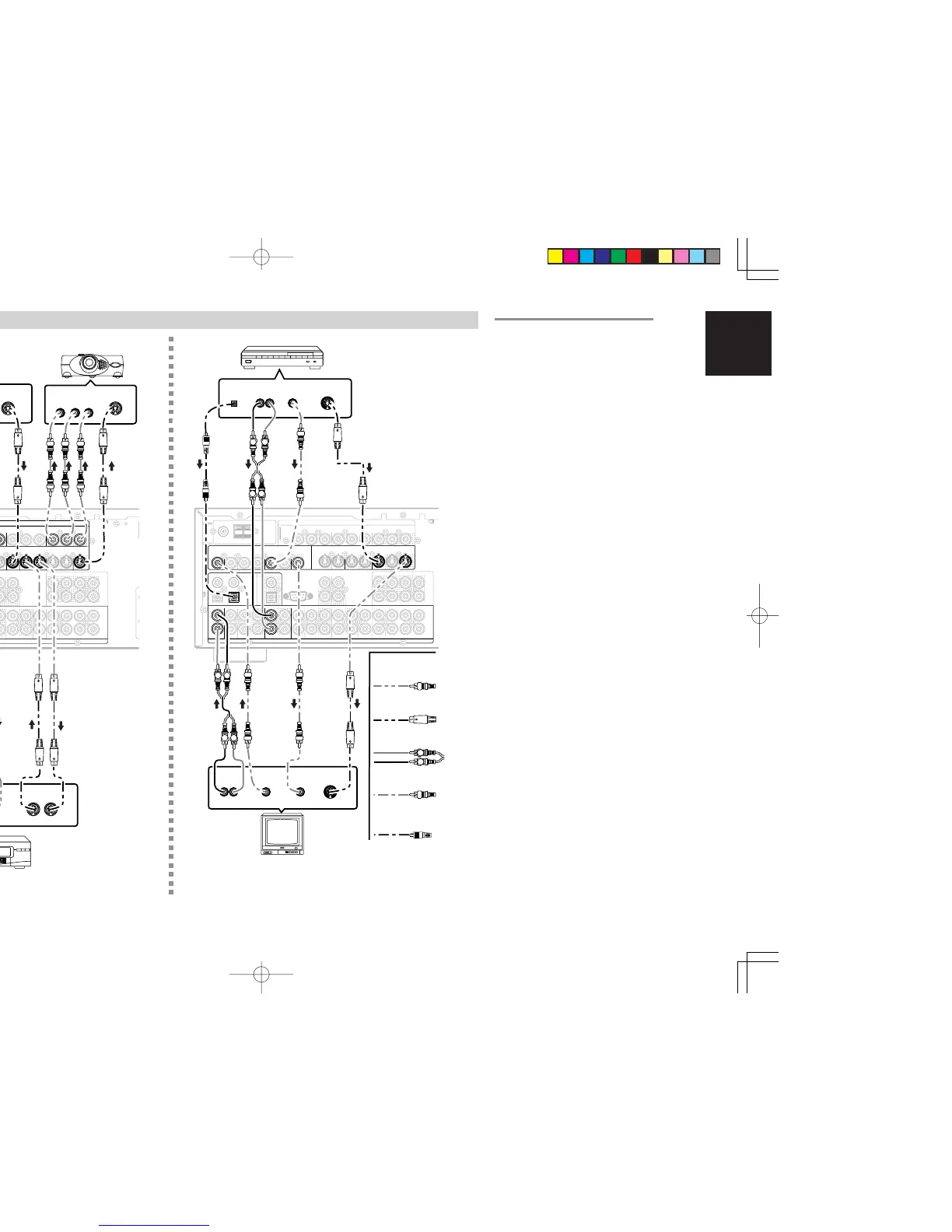
CONNECTING VIDEO COMPONENTS
ANALOG AUDIO
VIDEO
S-VIDEO
DVD PLAYER
VIDEO PROJECTOR
SATELLITE TUNER
DIGITAL AUDIO
(COAXIAL)
VCR
TV
VIDEO, S-VIDEO , COMPONENT JACKS
There are 3 types of video jacks on the rear panel.
VIDEO jack
The video signal for the VIDEO jacks is the
conventional composite video signal.
S-VIDEO jack
The video signal is separated into luminance (Y)
and color (C) signals for the S-VIDEO jack. The S-
VIDEO signals enables high-quality color
reproduction. If your video component has an S-
VIDEO output, we recommend to use it. Connect
the S-VIDEO output jack on your video component
to the S-VIDEO input jack on this unit.
Component jack
Make component video connections to a TV or
monitor with component inputs to produce higher
quality video images. Use a component video
cable or 3 video cords to connect the component
video out jacks on the SR5500 to the monitor.
Notes:
• Be sure to connect the left and right audio
channels properly.
Red connectors are for the R (right) channel, and
white connectors are the for L (left) channel.
• Be sure to connect the inputs and outputs of the
video signals properly.
• If you connect the S-VIDEO or component signal
to the S-VIDEO or component jack on this unit, it
is not necessary to connect the conventional video
signal to the VIDEO (composite) jack. If you use
both video inputs, this unit gives priority to the S-
VIDEO signal.
• Each type of video jack works independently.
Signals input to the VIDEO (composite) and S-
VIDEO jacks or component are output to the
corresponding VIDEO (composite) and S-VIDEO
or component jacks, respectively.
• This unit has the “TV-AUTO ON/OFF” function
to turn the TV ON or OFF automatically, by
sensing the incoming video signal from the
VIDEO jacks.
• You may need to setup the digital audio output
format of your DVD player, or other digital source
components. Refer to the instructions of the each
component connected to the digital input jacks.
• There is no Dolby Digital RF input jack. Please
use an external RF demodulator with a Dolby
Digital decoder to connect a video disc player
which has a Dolby Digital RF output jack to the
digital input jack on this unit.
DIGITAL AUDIO
(OPTICAL)



 To Next Page