ENGLISH
17
SETUP
After all components are connected, initial setup
must be performed.
ON SCREEN DISPLAY MENU
SYSTEM
The SR5500 incorporates an on-screen menu
system, which makes various operations possible
by using the cursor ( , , , ) and ENTER
buttons on the remote control or on the front panel.
Note:
•
To view the on-screen displays, make certain you
have made a connection from the Monitor Out jack
on the rear panel to the composite, S-Video,
component video input of your TV or projector.
(see page 13)
1.
Press the AMP button of the remote control.
(This step is not needed when operating the
setup menus from the receiver itself.)
2.
Press the MENU button on the remote control
or set to display the “SETUP MAIN MENU” of
the OSD menu system.
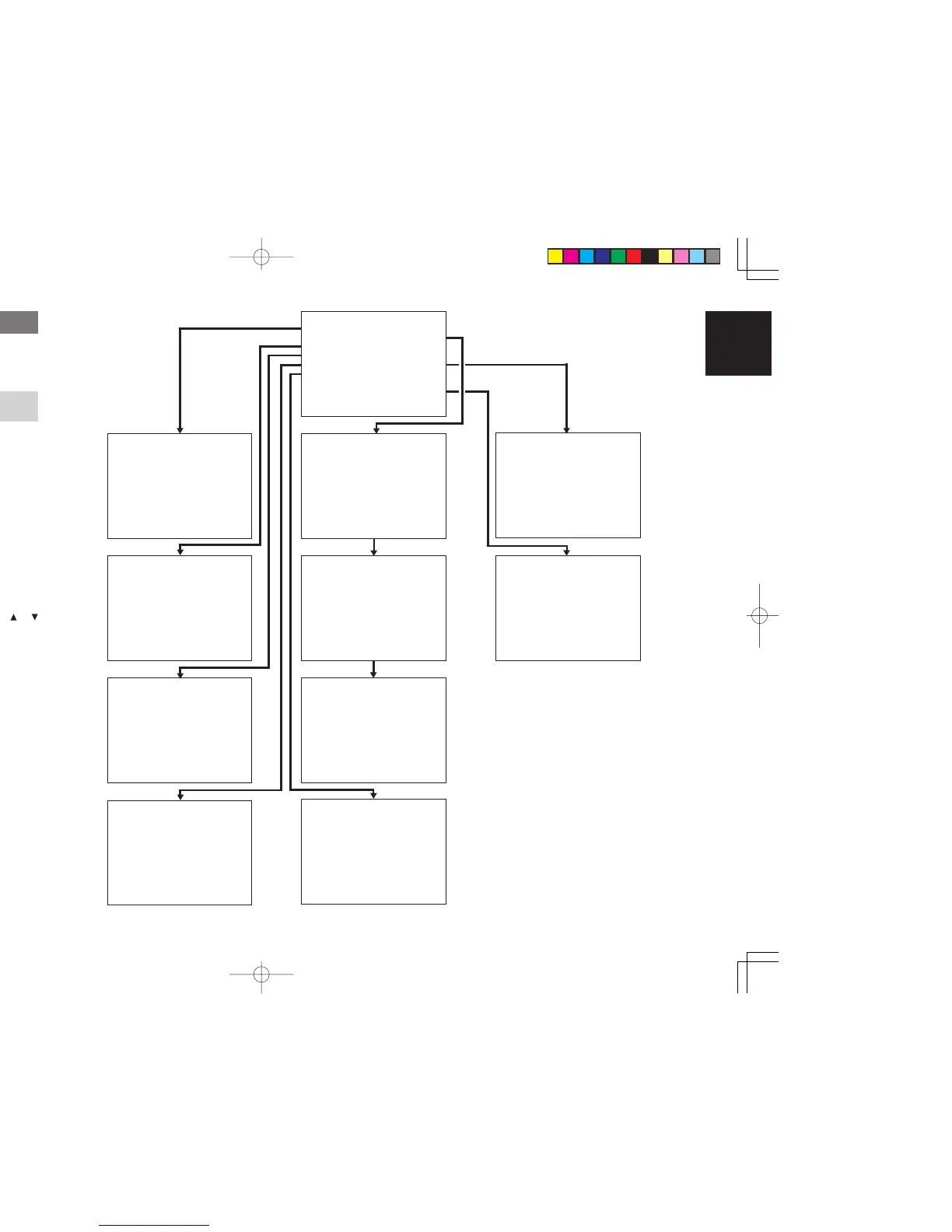
There are 8 items in the SETUP MAIN MENU.
3.
Select a desired sub-menu with the
or
cursor buttons, and press the ENTER button
to enter. The display will change to the
selected sub-menu. You can lock the
condition of setup to each sub-menu with the
or
or cursor buttons.
Note:
• If you desire to adjust any sub-menu, you need to
set it to UNLOCKED.
4.
If you desire to exit from this menu system,
press the EXIT button, or move the cursor to
EXIT and press the ENTER button.
SETU
U
PM
M
AIN MENU
1.INPUT SETUP :UNLOCK
2.SPEAKER SETUP:UNLOCK
3 . PREFERENCE : UNLOCK
4.SURROUND :
:
UNLOCK
5.PL ICII UNLOCK
6.CS
S
II :UNLOCK
7.MULTI ROOM :UNLOCK
:UNLOCK
EX I T
1INPUTSETUP
CD : D4 - AT TV :
TAPE :ANA DVD :D3 -AT
CD - R : D1 - AT VCR1 : ANA
DSS : D2 - AT
COMP 1 : DVD
COMP 2 : DSS
MA I N E X I T
MA I N E X I T
2-1 SPEAKERS SIZE
SUBWOOFER : YES
FRONT L / R : LARGE
CENTER : SMALL
SURROUND L / R : SMAL L
SURR . BACK : 2 CH
SURR . BACK S I Z E : SMAL L
LPF/HPF : 100 HZ
BASS M I X : BOTH
MA I N NE X T E X I T
2 - 2 S PEAKERS D I STANCE
FRONT L : 10 f t 3 . 0 m
FRONT R : 10 f t 3 . 0 m
CENTER : 1 0 f t 3 . 0 m
SURR . L : 1 0 f t 3 . 0 m
SURR . R : 1 0 f t 3 . 0 m
SUB W : 10 f t 3 . 0 m
SURR . B L : 1 0 f t 3 . 0 m
SURR . B R : 1 0 f t 3 . 0 m
MA I N RE T URN NEX T EX I T
2 - 3 SPEAKERS LEVEL
T ES T MODE : MANUAL
FRONT L : 0 dB
CENTER : 0 dB
FRONT R : 0 dB
SURR . R : 0 dB
SURR . B R : 0 dB
SURR . B L : 0 dB
SURR . L : 0 dB
SUB W : 0 dB
MA I N RE T URN E X I T
3 PREF ERENCE
STANDBY MODE : ECONOMY
TV-AUTO : ✽✽✽
OSD I NFO : ENABLE
VIDEO CONVERT : ENABLE
4SURROUND
S URR . MODE : AUTO
HT - EQ : OFF
LFE LEVEL :
MA I N E X I T
5PL II MUS I C PARAMETER
PARAMETER : DEFAULT
PANORAMA : OF F
DIMENSION : 3
CENTER W I DTH : 3
MA I N E X I T
6CSII PARAMETER
TRUBASS : 0
SRS D I ALOG : 0
MA I N E X I T
7MULTI ROOM
VIDEO : DVD
MU L T I : OF F MS PK B :
VOL : VAR I VOL :
L EVEL : - 9 0dB LEVEL :
- ---MAIN-ROOM STATUS----
V I DEO : DVD AUD I O : DVD
MA I N E X I T
✽✽✽
✽✽✽
✽✽✽
ANA
✽✽✽
SLEEP T IMER : OFF
87.1CHINPUTLEVEL
VIDEO IN : LAST
FRONT L : 0 dB
CENTER : 0 dB
FRONT R : 0 dB
S URR . R : 0 d B
S URR . B R : 0 d B
S URR . B L : 0 dB
S URR . L : 0 dB
SUB W : 0 dB
MA I N E X I T
87..1CHINPUT



 To Next Page