51
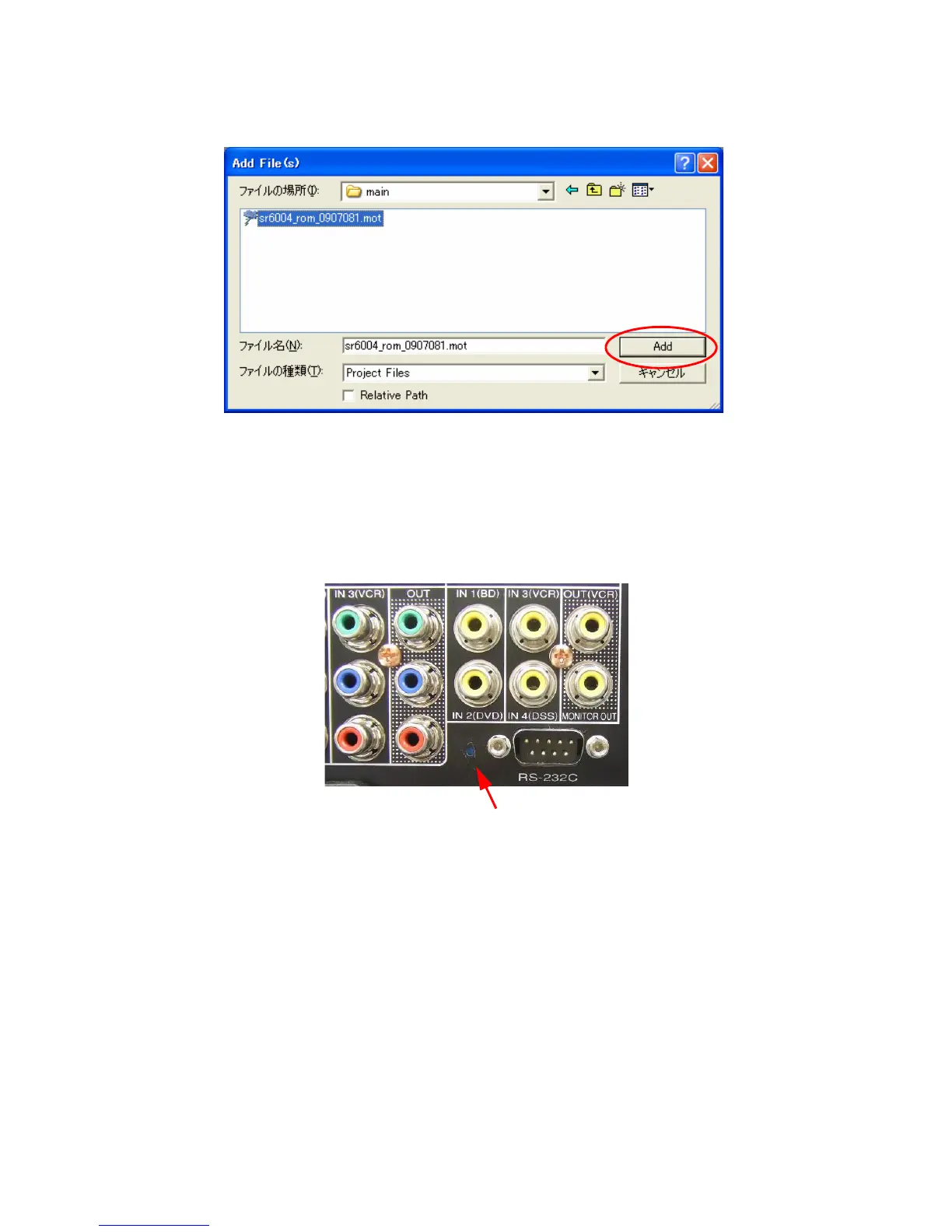
7. sr6004romyymmddw.mot を選択し、Add をクリッ
クします。
ご注意 : yy は西暦下 2 桁、mm は月、dd は日にち、v はリ
リース番号を表しています。
・ Update/DownloadDSP'ssoftwaretoFlash-
ROM
8. 本機のリアパネルの RS232C コネクターとパソコンのシ
リアルポートを RS-232C ケーブルで接続します。
9. 本機リアパネルの RS232C コネクター近くにある穴に細
い棒を挿して内部のスイッチを押します。
7. Browse and choose the sr6004_rom_yymmddv.mot, and
click the Add.
NOTE : The yy is two digits of year. The mm is month. The
dd is date. The v is release number.
• Update/Download DSP's software to Flash-ROM
8. Connect RS-232C on the rear panel of the unit and Serial
Port of windows PC with RS-232C cable.
9. Insert a thin rot to the hole near the RS-232C terminal
and push the switch inside to turn on the switch.
Holeofrearpanel



 To Next Page