INTRODUCTION
This chapter explains
how
to:
•
Set up
the
signal
generator
to produce a typical basic
signal.
•
Select the main
operating
parameters; carrier frequency, output
level
and type of
modulation.
•
Use
the
full range of supporting facilities.
CONVENTIONS
The following
conventions
are used in this
chapter:
RF OUTPUT
[MEM]
Int. F4
[Pulse]
Capitals refer to
titles marked on the panel.
Capitals in square brackets indicate hard key titles.
Italics refer to data or messages on the display.
Italics in square brackets indicate soft key titles, e.g. [Pulse] means the
soft key
adjacent
to the Pulse title box
at the side of the menu.
FRONT PANEL
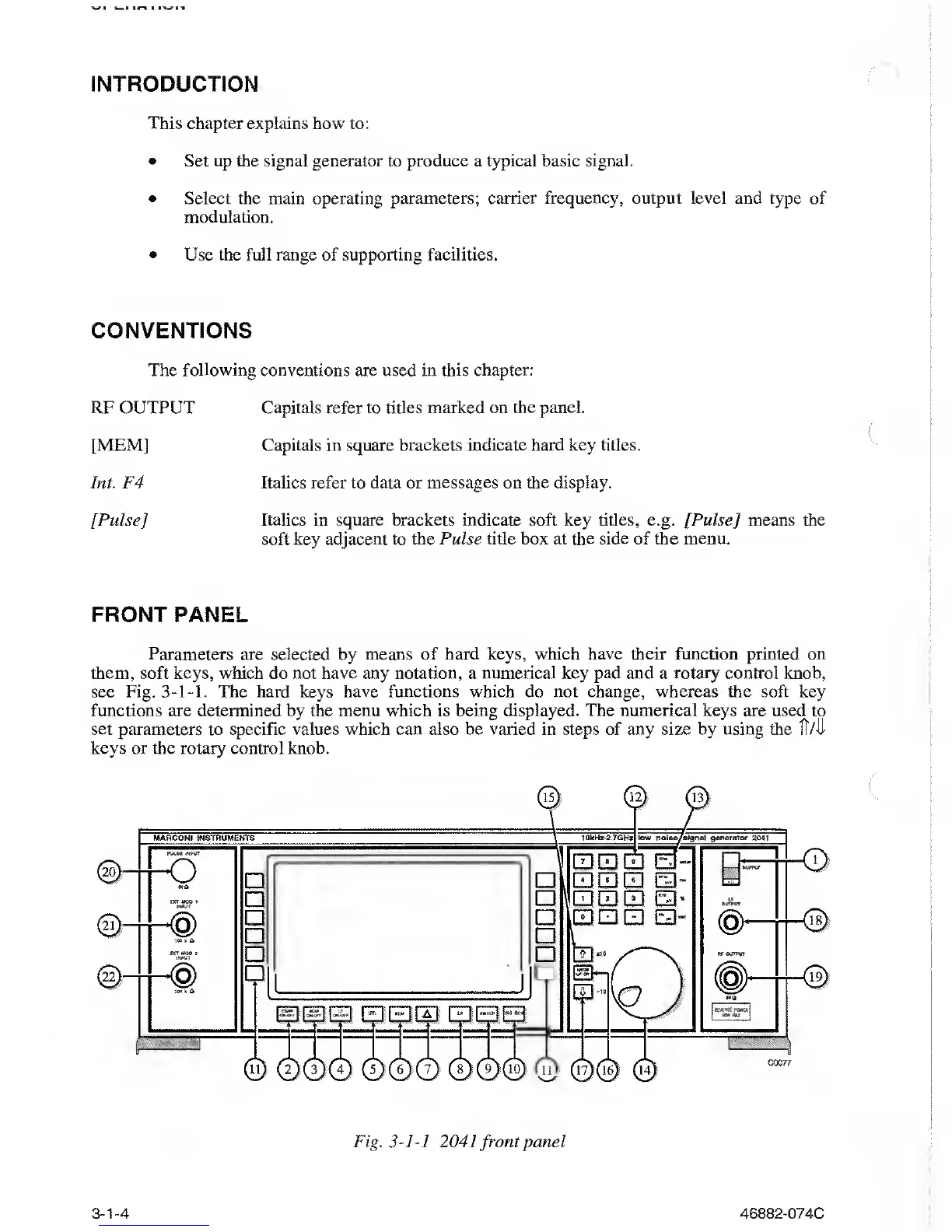
Parameters are selected by means of hard keys, which
have
their function
printed
on
them,
soft
keys,
which
do not
have any notation,
a
numerical key pad and a rotary control knob,
see Fig.
3-1-1.
The hard keys
have
functions which do not change,
whereas
the soft key
functions
are
determined
by
the menu which
is
being displayed. The numerical keys are used to
set parameters to specific
values which
can also be varied in steps
of
any
size
by
using
the 1T/-U-
keys
or the rotary control knob.
Fig.
3-1-1
2041 front
panel
3-1-4
46882-074C



 To Next Page