MODULATION MODE
MODE Set modulation mode
MODE?
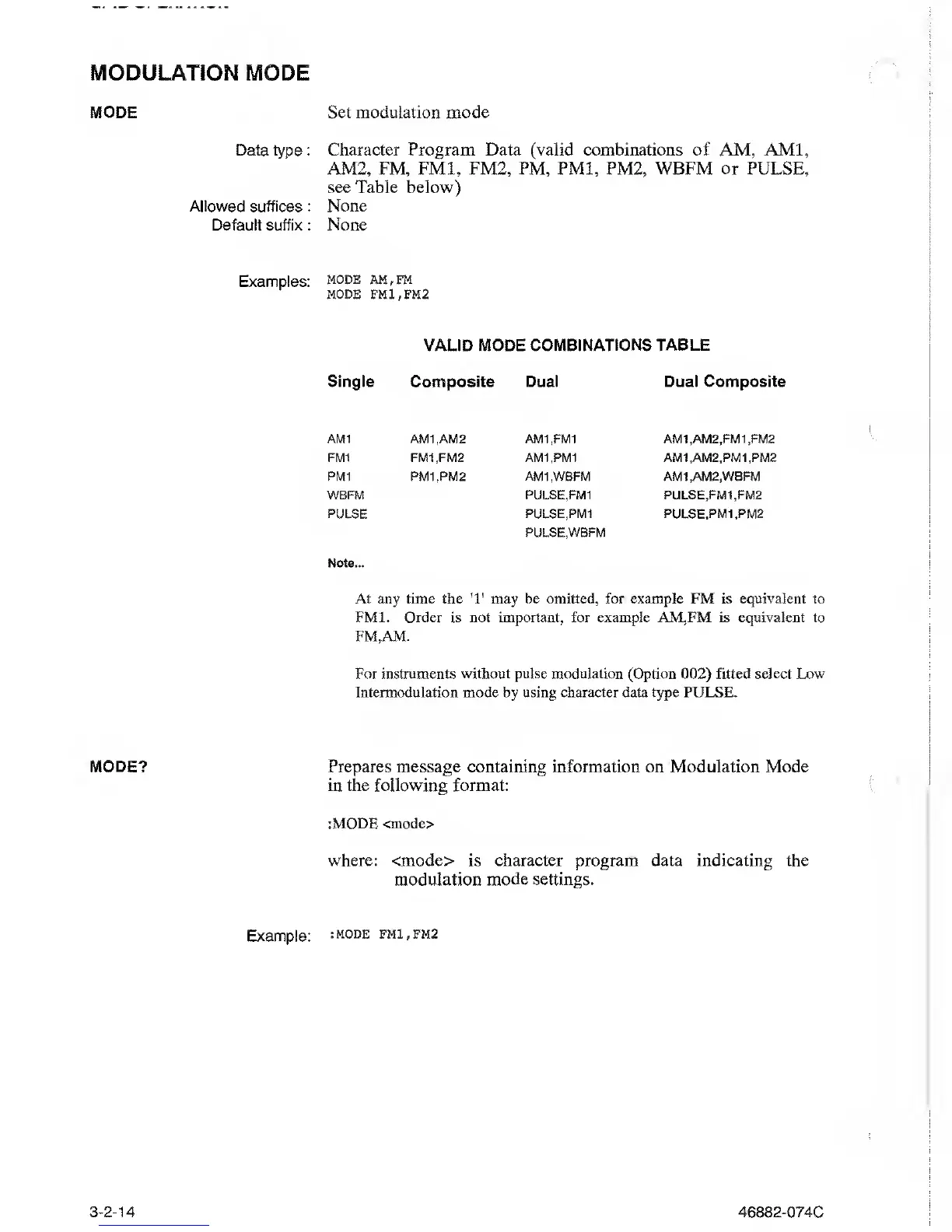
Data type : Character Program Data (valid combinations of AM, AMI,
AM2, FM, FM1, FM2, PM, PM1, PM2,
WBFM or
PULSE,
see Table below)
Allowed suffices : None
Default suffix
: None
Examples:
mode am,fm
MODE FM1 , FM2
VALID MODE
COMBINATIONS
TABLE
Single Composite Dual Dual Composite
AMI AM1.AM2 AM1.FM1 AM1.AM2.FM1.FM2
FM1 FM1.FM2 AM1.PM1 AM1.AM2.PM1.PM2
PM1 PM1.PM2
AMI
,WBFM AMI ,AM2,WBFM
WBFM PULSE,FM1 PULSE,FM1.FM2
PULSE PULSE,PM1
PULSE,WBFM
PULSE.PM1.PM2
Note...
At any time the
*1*
may
be omitted, for example FM
is
equivalent to
FM1. Order is not important, for example AM,FM is
equivalent to
FM.AM.
For instruments without pulse modulation (Option
002)
fitted select Low
Intermodulation mode by using character
data
type PULSE.
Prepares
message containing
information on Modulation
Mode
in the following format:
:MODE <mode>
where: <mode> is character program data indicating the
modulation
mode settings.
Example:
:mode fmi,fm2
3-2-14
46882-074C



 To Next Page