15
#5 - Door Lock/Unlock Timing
#6 - Parking Lights On/Off Upon Disarm
#7 - Current Sensing On/Off
Step 6: Remote Feature Programming (Part 2)
OFF
Step 4
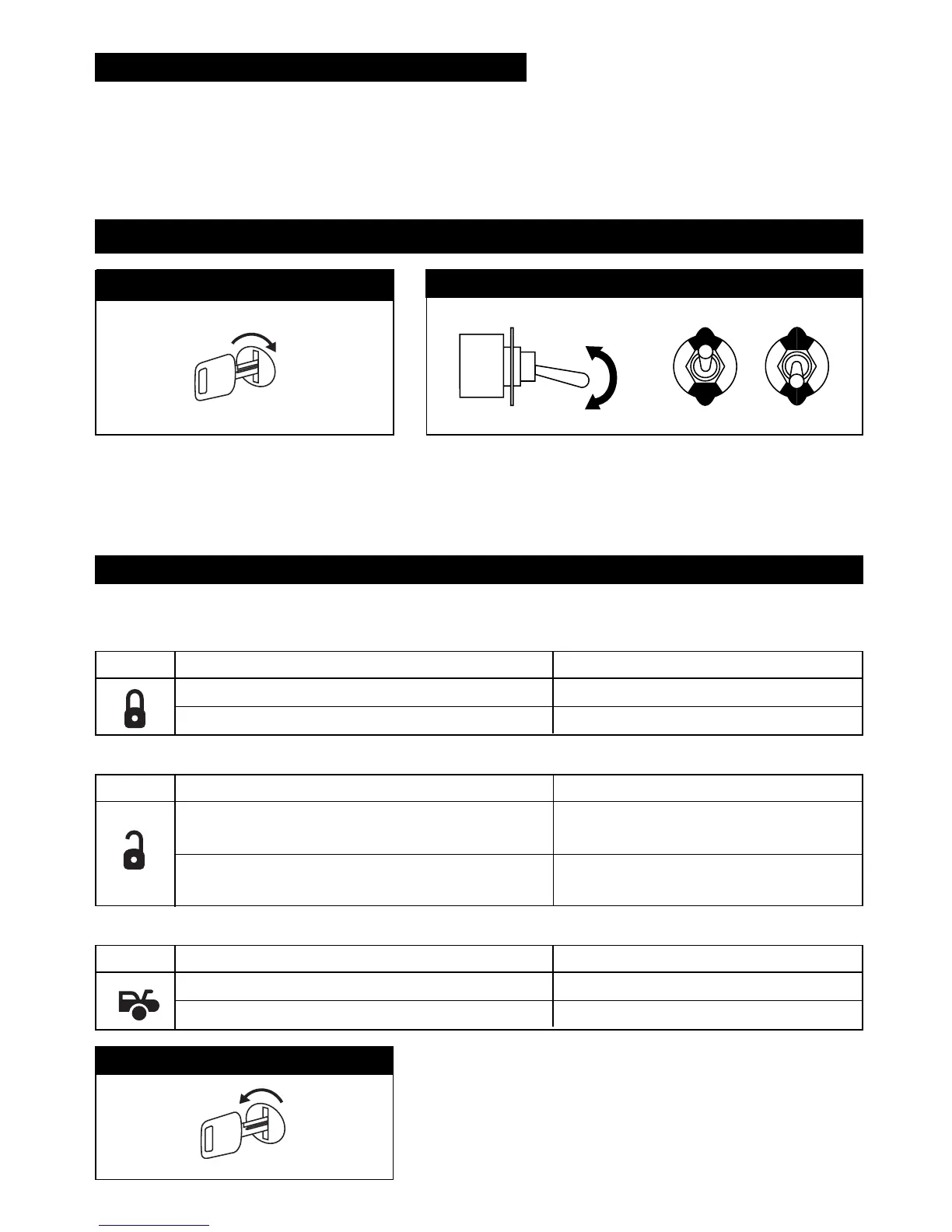
Turn Off the Ignition
The LED will be Off and the horn/siren will
emit 1 short beep and 1 long beep. You are
now out of the feature programming mode.
Turn On the Ignition Key
Flip the Valet Switch On/Off 8 Times
The LED will be on solid. The horn/siren will emit 8 short chirps
to indicate you are now in Part 2 “Remote Feature
Programming” mode.
Step 1
Step 2
ON
X8
Turn Off the Ignition
The LED will be Off and the horn/siren will emit 1 short beep and
1 long beep. You are now out of the feature programming mode.
Step 5
Button Changed Function Confirmation
3.5 Seconds Door Lock Timing
1 Chirp, LED and Parking Lights Flash
.8 Second Door Lock Timing (Default)
2 Chirps, LED and Parking Lights Flash
Button Changed Function Confirmation
Current Sensing "ON"
1 Chirp, LED and Parking Lights Flash
Current Sensing "OFF" (Default)
2 Chirps, LED and Parking Lights Flash
Button Changed Function Confirmation
Parking Lights Stay "ON" for 30 seconds
1 Chirp, LED
and
Parking Lights Flash
Upon Disarm of Security System
Parking Lights Features
2 Chirps, LED
and
Parking Lights Flash
Stay "OFF" (Default)
Step 3
To change a function, press and hold corresponding button (see chart below) until desired confirmation occurs.
OFF
ON
OFF
ON
M5A-IM 9/10/04 9:27 AM Page 15



 To Next Page