14
Quick Digit
TM
Bluetooth
®
Driver
25/10/17
3.6
MAIN PAGE
Use in Quick SPC
TM
Once the measurement has been performed correctly, it is sent automatically to the
Quick SPC
TM
, simulating an I/O that commands the Start Step.
In order to use this operating mode correctly in Quick SPCTM, it is necessary to
program the measurement STEP as follows:
● STATIC - AUTOMATIC - Acquisition Sample: 1 - Elaboration Sample: 1
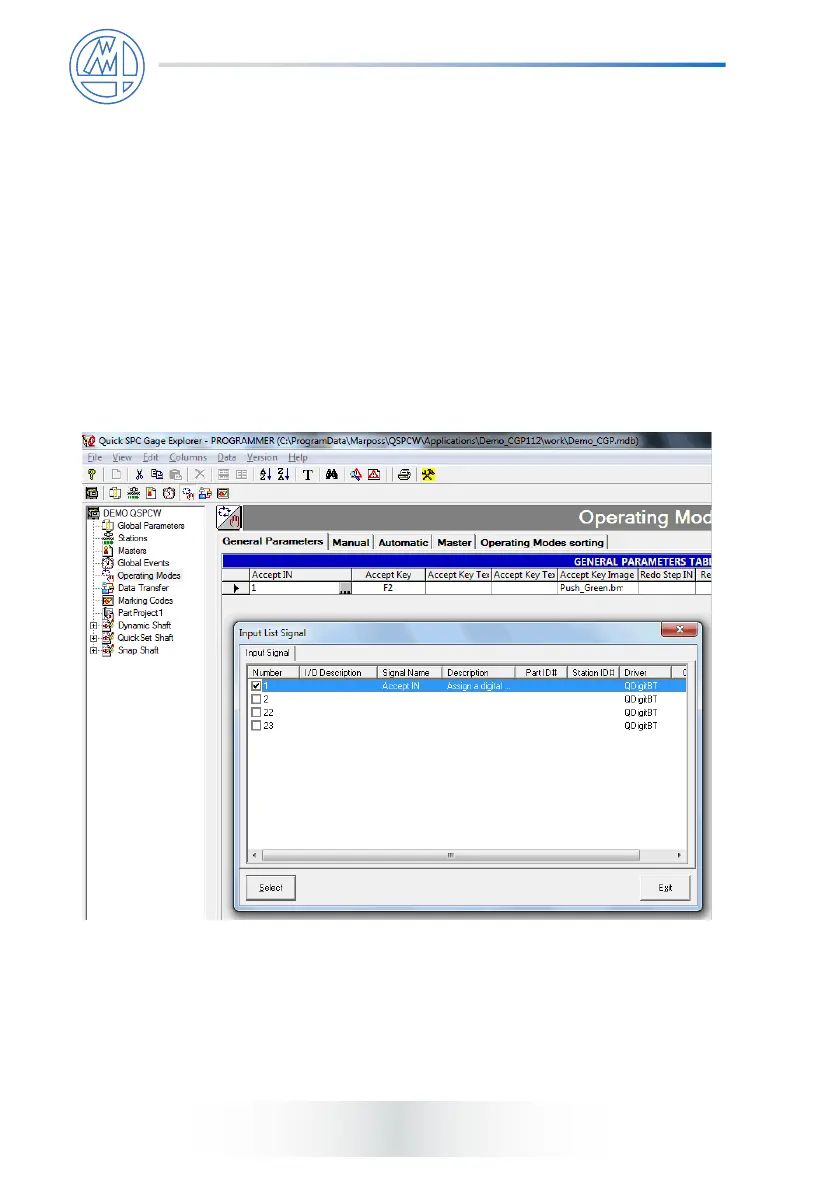
● program the Flow Control to execute the Start Step when the
I/O bit changes state: in the case of Guided Sequences:
this corresponds to programming the Operating Modes | General
Parameters | ACCEPT IN eld with the bit(s) associated with the handles.
The ACCEPT IN field accepts the measurement before
proceeding to the following guided procedure check.
This eld is normally programmed by conguring the ACCEPT IN parameter
as the rst BIT displayed by the Quick Digit
TM
Bluetooth
®
driver.
It is possible to associate the Start Step with any of the instruments by using the
rst programmed I/O (OR of all the instruments), or associating a specic Step with
a specic instrument using the I/O associated with it.



 To Next Page