8 RoboScan 812
Martin mode: The RoboScan 812 uses 1 channel to communicate with the controller. The
address may be any channel between 1 and 32.
DMX mode: The RoboScan 812 may be operated in tracking or vector mode; see the DMX
protocol for details. It uses 5 consecutive DMX channels in tracking mode and 7 consecu-
tive DMX channels in vector mode. The factory default is tracking mode. The address may
be any channel up to 508 within the controller’s range (506 if 7 channels are used).
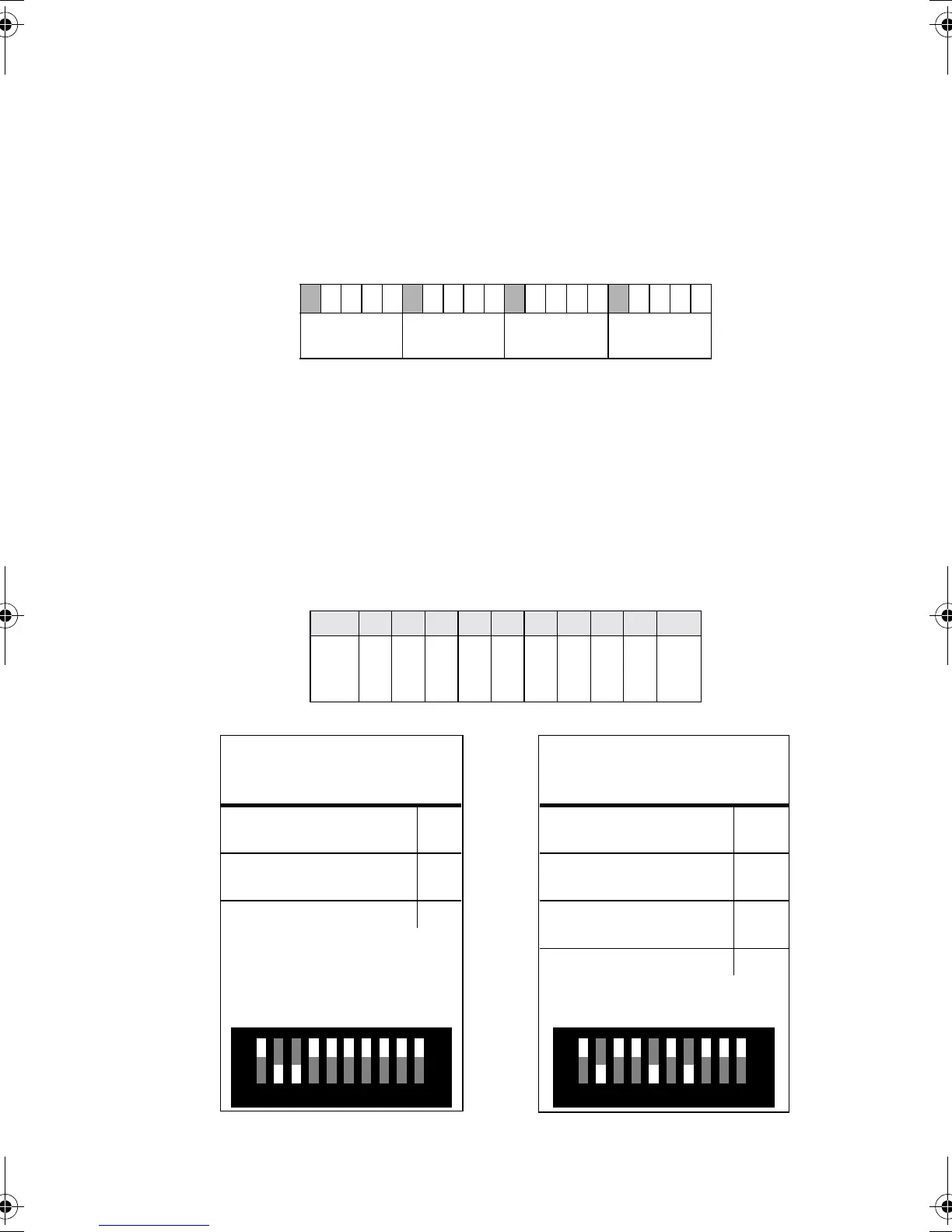
Example: 4 RoboScans using tracking mode (5 channels) may be addressed as follows:
Use the following procedure to set a Martin or DMX address.
1. Select an available address within the controller’s range.
2. Look up the DIP-switch setting on page 19. You can also calculate it by
subtracting pin values until the total of the values equals the address.
Start with the highest pin value that can be subtracted and work down
until there is no remainder. The table below shows the pin values.
3. Set the DIP-switch (3) by flipping ON the pins found in step 2.
.
1
2
3
4
5
6
7
8
9
10
11
12
13
14
15
16
17
18
19
20
812 No. 1
Address: 1
812 No. 2
Address: 6
812 No. 3
Address: 11
812 No. 4
Address: 16
pin 1 2 3 4 5 6 7 8 9 10
value
1
2
4
8
16
32
64
128
256
OFF
Example: Channel 6
Pins 2 and 3 ON
channel
- value of pin 3
6
-4
remainder
- value of pin 2
2
-2
remainder 0
Example: Channel 82
Pins 2, 5 and 7 ON
channel
- value of pin 7
82
- 64
remainder
- value of pin 5
18
- 16
remainder
- value of pin 2
2
- 2
remainder 0
102
3
4 51 86 7 9
On
102
3
4 51 86 7 9
On
812C.fm Page 8 Monday, September 3, 2001 4:23 PM












 To Next Page