Model: MTS200 (1U)
Doc. Ref. no. : m08/om/201
Issue no. : 03
User’s Manual Page 170 of 195 Page 170 of 195
As shown in above figure, user can configure general settings of device in webserver. Please refer
section 9.1 for each parameter description. Once user modify the required data, click on “Save” options
provided at end of page. This will save the changed parameters in MTS200.
Other options provided at end of page include “Default Configurations” used to default the settings of
GENERAL parameters, “Restore Configurations” which is used to restore previous saved settings if user
have defaulted all parameters and “View Configurations” to view the current GENERAL parameters
values. User need to click on “Save” option after doing “Default Configurations” or “Restore
Configurations” or change on any parameter.
“Network” Webpage:
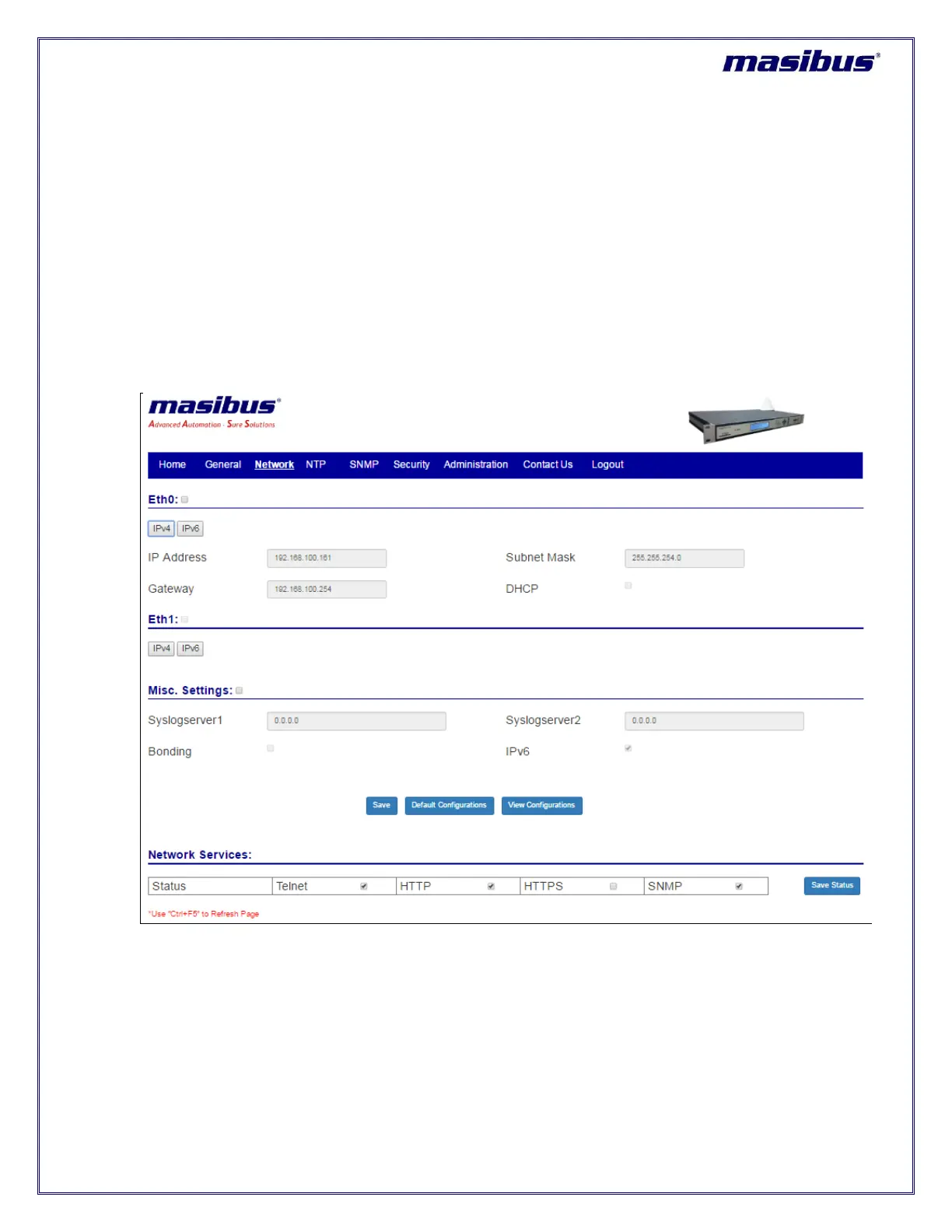
For MTS200 eth0 and eth1 network settings, user need to navigate and select the “NETWORK” option in
menu index. After, selecting below webpage will be displayed.
Figure 13-4 MTS200 Webserver Network configuration with IPv4



 To Next Page