Model: MTS200 (1U)
Doc. Ref. no. : - m08/om/201
Issue no.: 03
Page 19 of 195 User’s Manual
3. KEYPAD: masTER T-Sync Model MTS200 device is equipped with keypad buttons to configure
various parameters of Unit. Functionality/usage of each key is described below:
Table 5-1
mas
TER T-Sync Model MTS200 Front Panel Key Definitions
4. Terminal / USB: masTER T-Sync Model MTS200 device is equipped with Front serial console
terminal RS-232 port for serial based device configurations.
5.2
mas
TER T-Sync Model MTS200 Rear Panel
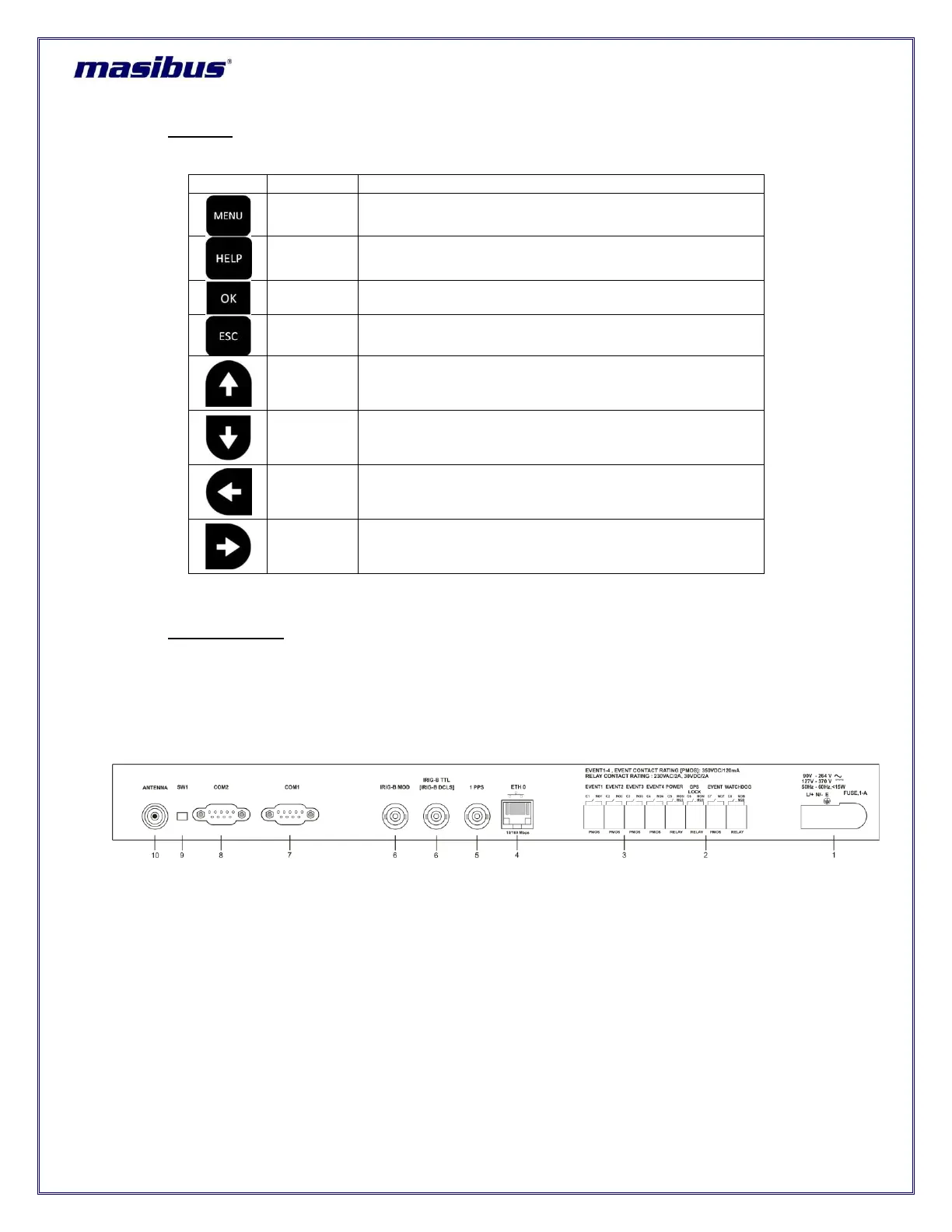
Below figure 5.2 shows masTER T-Sync Model MTS200 model rear panel.
Figure 5-2
mas
TER T-Sync Model MTS200 Rear Panel Description
Various outputs of masTER T-Sync Model MTS200 device is provided at rear panel of unit. Below is the
description of all possible outputs as per masTER T-Sync Model MTS200 configurations with 1 ethernet
output (ETH1) with 1 Gbps support, 1 IRIG-B AM output, 1 IRIG TTL/AM and 4 additional pulse outputs.
There may be other optional outputs present (as per ordered configuration) apart from standard outputs.
To enter in Configuration mode.
To Display help about every parameter configurations.
To save the final configurations changes done.
To come back into Run mode or main menu.
Scroll between various parameters in ascending order in
main menu and to change parameters value in
submenu.
Scroll between various parameters in descending order
in main menu and to change parameters value in
submenu.
To select various available options for the particular
parameter in main menu and scroll between various
parameters in submenu.
To select various available options for the particular
parameter in main menu and scroll between various
parameters in submenu.



 To Next Page