Model: MTS200 (1U)
Doc. Ref. no. : - m08/om/201
Issue no.: 03
Page 71 of 195 User’s Manual
8 = To check MTS200 ntp driver output status. This provides ntp driver status equivalent to status
generated by “ntpq -p” command in ntp client systems.
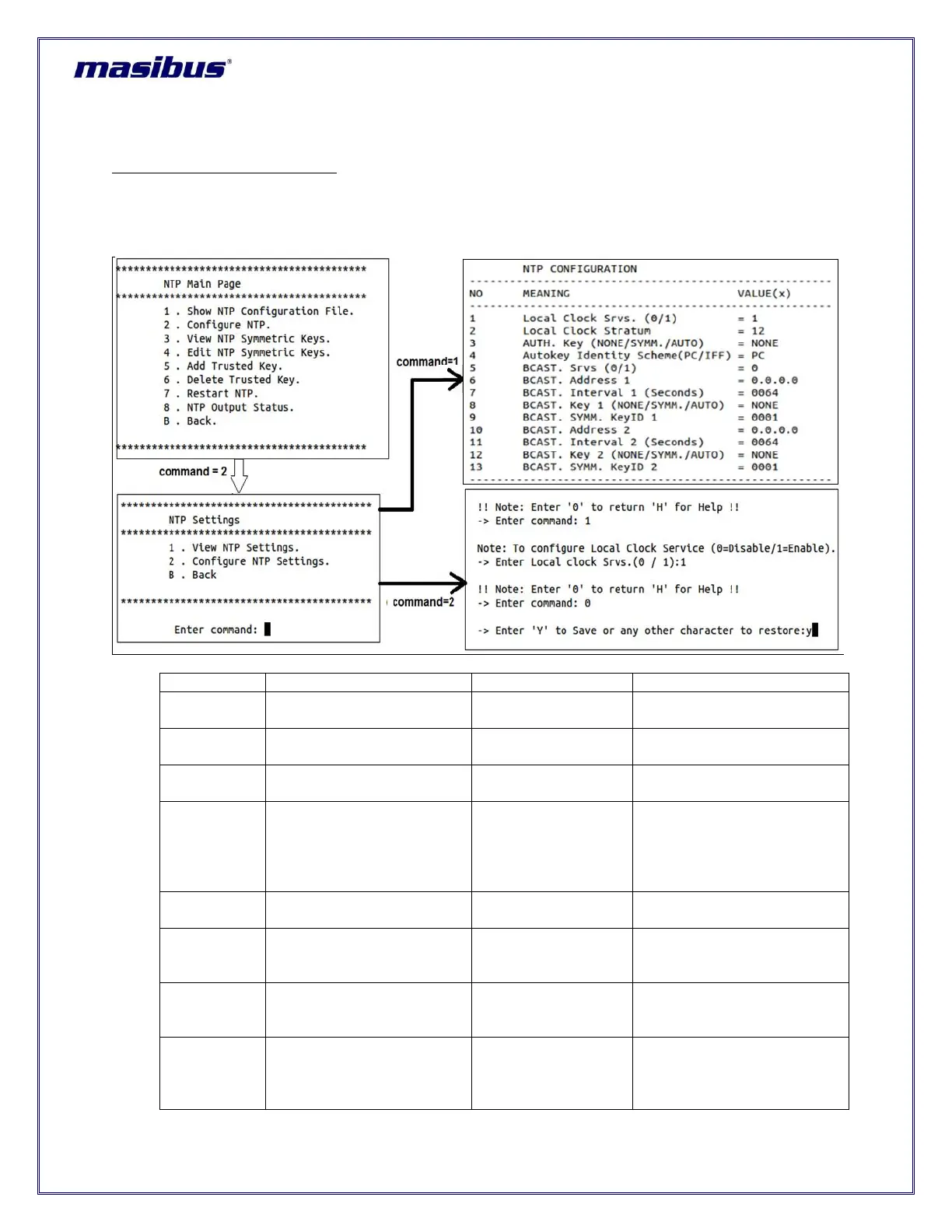
To configure basic NTP settings:
For configuring basic NTP settings, operator have to select option “2” in command and then press “enter”
from NTP main menu page.
After giving above option, user have to select option “1” to view current NTP settings or option “2” to
change current NTP settings. Please refer below figure for more details.
Disable(0) or enable(1) local
clock configuration
Stratum applicable during
MTS200 unlock conditions
NTP authentication type for
ntp service
Authentication Identity
scheme applicable for
Autokey [AUTO] type
authentication as per
parameter 3
Disable(0) or enable(1) ntp
broadcast / multicast
NTP v4 broadcast/multicast
address or v6 multicast
address 1
16/32/64/128/
256/512/1024
NTP broadcast interval time
in seconds for BCAST.
Address 1
NTP authentication type
applicable for ntp broadcast.
This can be NONE or has to
be same as AUTH. Key



 To Next Page