27
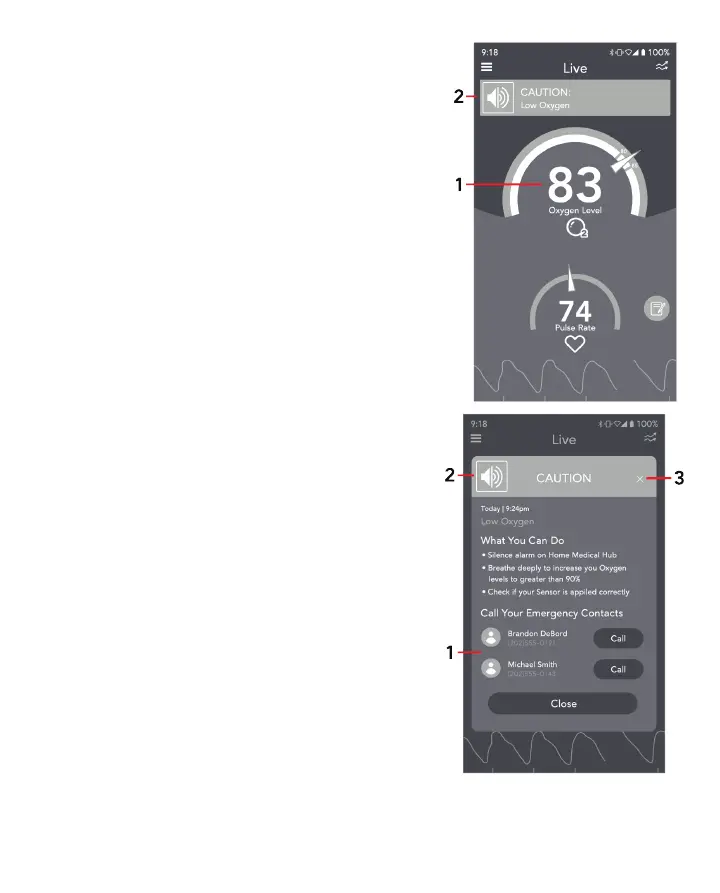
When Level 1 is triggered, an alarm sounds on your Masimo
Stork Hub and the App.
The App displays a yellow CAUTION banner at the top of
screen.
Touch the Oxygen Level (1) or the yellow banner (2) to learn
what the Level 1 notification means.
LEVEL 1 CAUTION Alert Event Information
Information about the low oxygen level event is shown along
with steps on how to help your oxygen level recovery.
You have the option to:
1. Call a designated emergency contact (1) to assist you.
2. Silence the alarm
On the App: Tap the alarm icon on the top left corner of the
pop-up (2)
Masimo Stork Hub: Press the button once.
See Silence Alarms for additional information. To exit the
screen, tap the "X" (3) or select the Close button.
Levels 2 and 3



 To Next Page