MBT1015 rev-C
User’s Manual Version 18.08
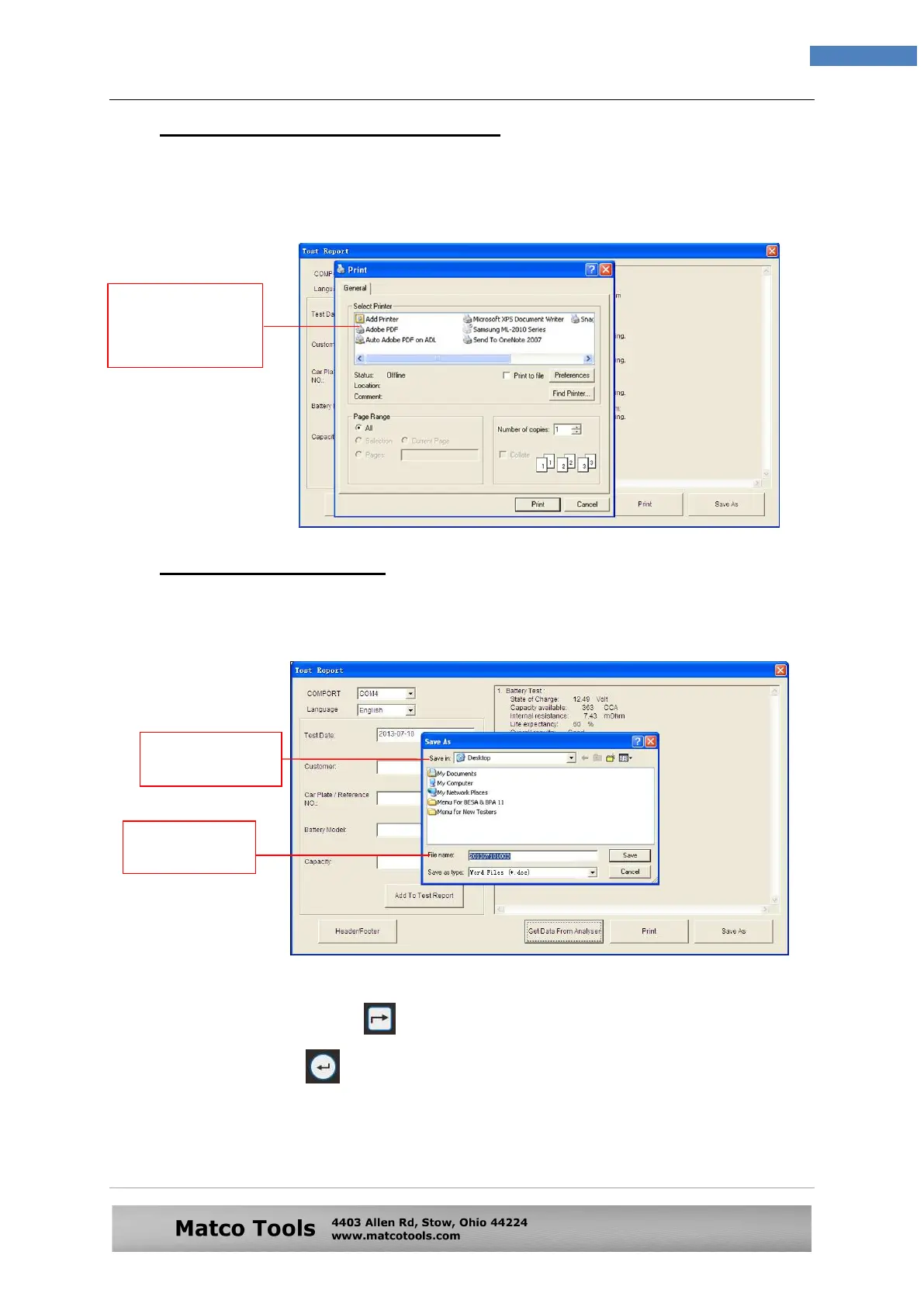
10.2 Printing Results from PC Printer:
While on this page, if you wish to print out the results, make sure that
your printer is connected to the computer. Click on [PRINT] tab and a
text box will appear. Select the right printer and click [Print] tab to print.
10.3 Saving Results to PC:
If you wish to save the results from this page, then click on [SAVE AS] tab. A
message box will appear. Type in the file name and click [Save] tab.
After you had completed saving the first result and wish to save the next
one, you should press key on the Analyser to the display as shown
in Fig.80. Select the one on the list shown on the screen that you want
and then press key to proceed to the ‘particulars’ screen (Fig.81).
Again, you have to click “Get Data from Analyser” tab on the PC to
transfer the results data to be saved.
Select the printer
which is connected
to your computer
here.
Select where you
want to save in.
Type the file
name here.


 To Next Page