Additional Tests
ADJUSTMENTS AND SETTINGS
46
Language Selection: Sets the display language for the Scan Tool
to English, French or Spanish.
Unit of Measurement: Sets the Unit of Measurement for the Scan
Tool’s display to USA or metric.
To enter the Tool Settings mode:
1. While linked to the vehicle, press and
release M.
The Main Menu displays.
2. Select Tool Settings, then press
ENTER
.
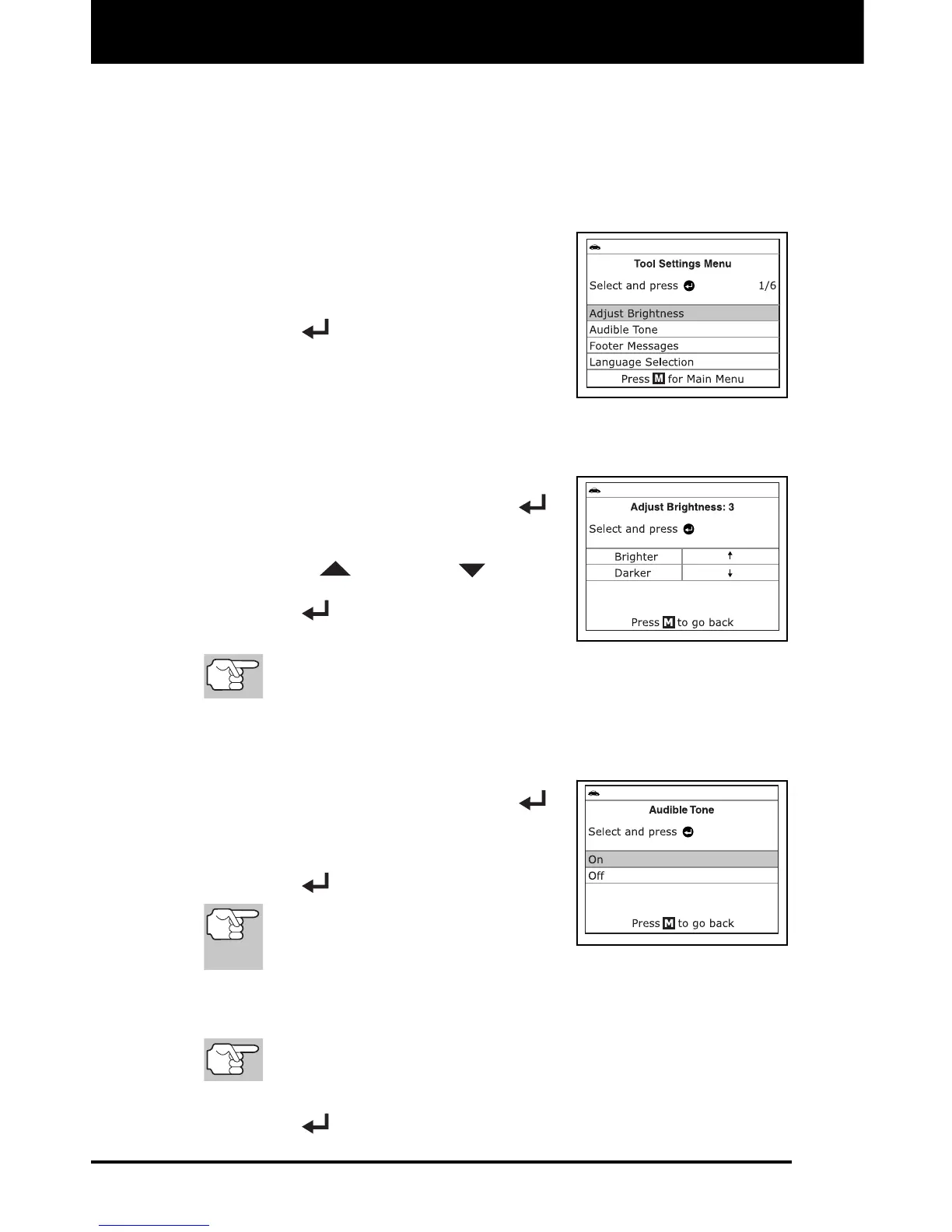
The Tool Settings menu displays.
3. Make adjustments and settings as
follows.
Adjusting Display Brightness
1. Select Adjust Brightness in the Tool
Settings menu, then press ENTER
.
The Adjust Brightness screen displays.
2. Press UP
and DOWN
to make
the display lighter or darker, then press
ENTER
to save your changes and
return to the Tool Settings menu.
To return to the Tool Settings menu without making changes,
press M.
Enabling/Disabling the Audible Tone
1. Select Audible Tone in the Tool
Settings menu, then press ENTER
.
The Audible Tone screen displays.
2. Select On or Off, as desired, then press
ENTER
to save your changes.
To return to the Tool Settings
menu without making changes,
press M.
Enabling/Disabling Navigational Footers
Navigational “footers” show which hotkey to press to return to
the topmost menu for the current function.
1. Select Footer Messages in the Tool Settings menu, then press
ENTER
.


 To Next Page